GitHub Spec Kit — The Complete Guide: From Vibe Coding to Intent-Driven Engineering
Sit with me for an hour — we're going to build a complete project with GitHub Spec Kit, step by step. You'll walk in vibe coding and walk out orchestrating AI agents with spec-driven precision. 66 commands, 9 phases, 30+ integrations, and an extension ecosystem that lets you govern AI the way you govern any team of engineers. Coffee ready? Let's go.
Section1. The Problem: Let Me Tell You About Ahmed
Pull up a chair. Before I show you a single command, I want to tell you a story — because if you don't feel the problem, no tool in the world will matter to you.
Ahmed is a solid developer. Ships fast, knows his stack, and last spring he discovered AI agents. Suddenly he was flying: "build me the auth feature" — done. "Add a dashboard" — done. Three weeks of what used to take three months. His manager loved him.
Then came demo night.
The client clicks a button. The stats screen shows numbers that make no sense. Ahmed opens the code live, sweating, and realizes: the feature the AI built two weeks ago silently changed an assumption that another feature — built one week ago — depended on. Nobody wrote either assumption down. It lived in a chat session that's long gone.
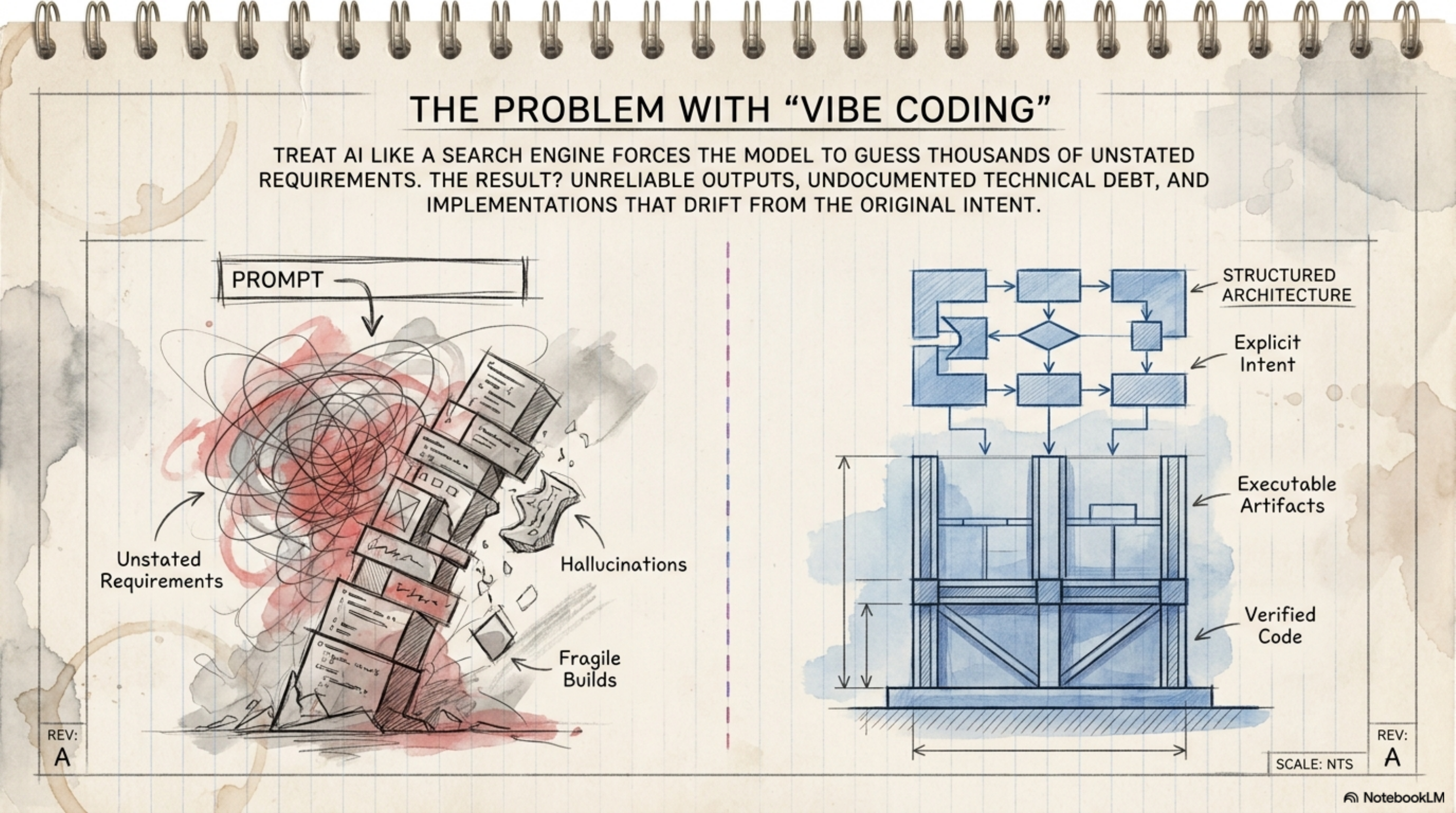
That, my friend, is vibe coding. It's not a term you'll find in engineering textbooks — it's what happens when a developer prompts an AI agent with "build me feature X" with no spec, no constraints, no acceptance criteria. The AI generates code, the developer eyeballs it, merges it. Fast? Absolutely. Correct? On paper, yes. In production? A completely different story.
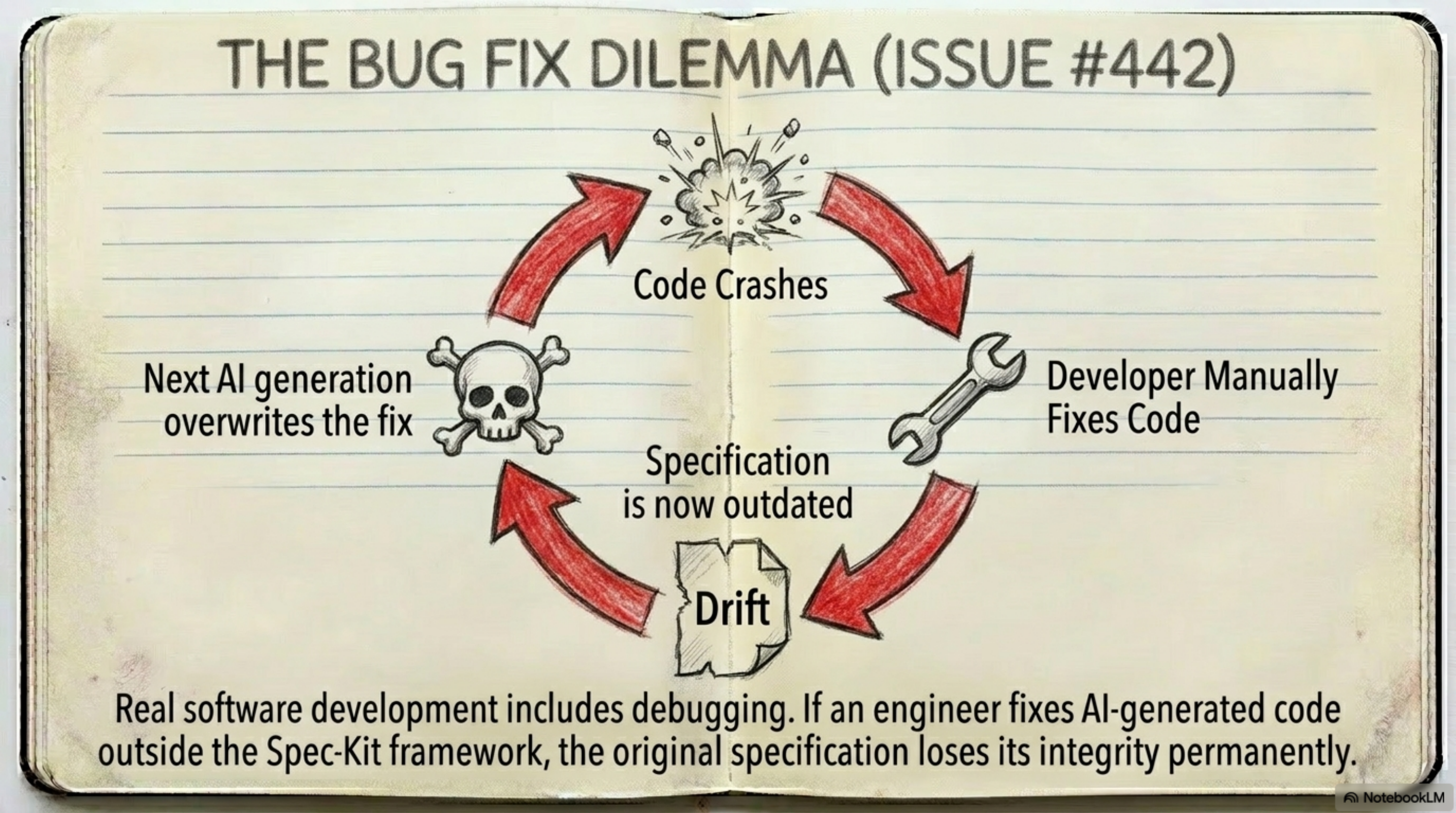
And here's the part most people get wrong: the AI was never the problem. The AI did exactly what it was told. The problem is that the intent was never defined. So you enter the vicious cycle:
Developer vague → AI hallucinates → Code drifts → Spec never written → Repeat
Every loop around that cycle, the project drifts a little further — not because the code is wrong, but because the intent was never committed anywhere. Six months later you have a repo nobody can maintain, and a team rotating through it like commuters in a metro at rush hour.
Spine (one line): GitHub Spec Kit transforms intent from something ephemeral in a chat session into an artifact committed to a repo — the spec becomes the source of truth, and code becomes the secondary artifact.
Twist (one line): The fix isn't more compute or a better model — the fix is structure. When intent is defined and committed, even a mid-tier model outperforms a frontier model in vibe coding mode.
1.1 Vibe Coding vs Spec-Driven Development — Side by Side
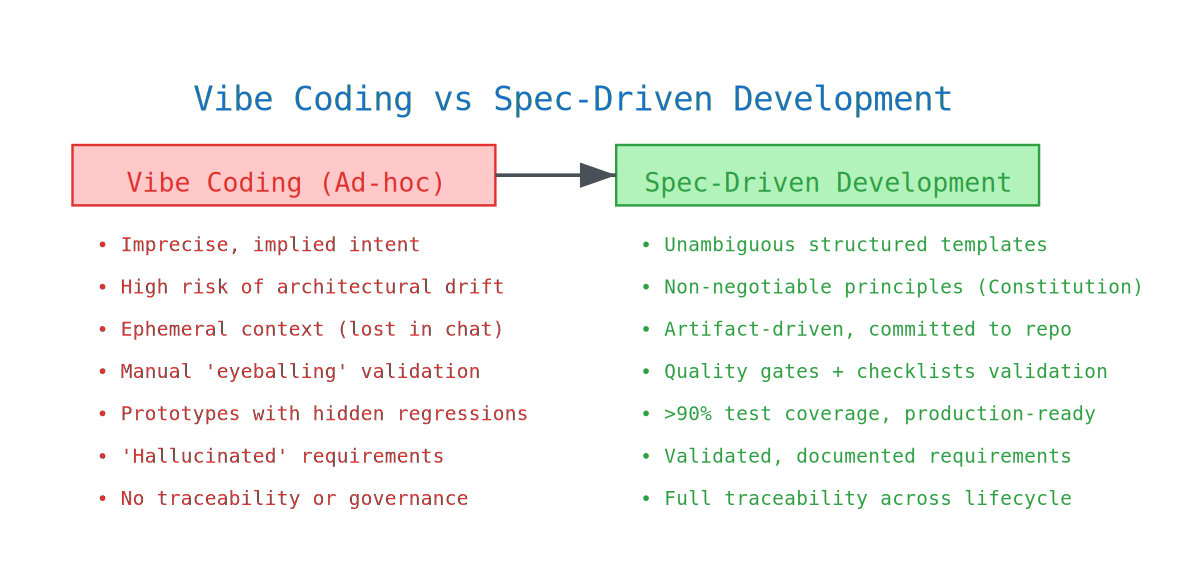
Look at this table slowly — every row is one of Ahmed's wounds:
| Dimension | Vibe Coding (Ad-hoc) | Spec-Driven Development (SDD) |
|---|---|---|
| Intent Definition | Imprecise and implied; prone to "hallucinated" requirements | Unambiguous, documented instructions via structured templates |
| Architectural Integrity | High risk of drift; consistency is sacrificed for speed | Non-negotiable principles enforced via a Project Constitution |
| Traceability | Context is ephemeral; decisions are lost across chat sessions | Artifact-driven orchestration; specs are committed to the repo |
| Validation | Manual "eyeballing" and ad-hoc debugging | Validated implementation via read-only quality gates and checklists |
| Output Quality | Loosely stitched prototypes with hidden regressions | Disciplined, production-ready engineering with >90% test coverage |
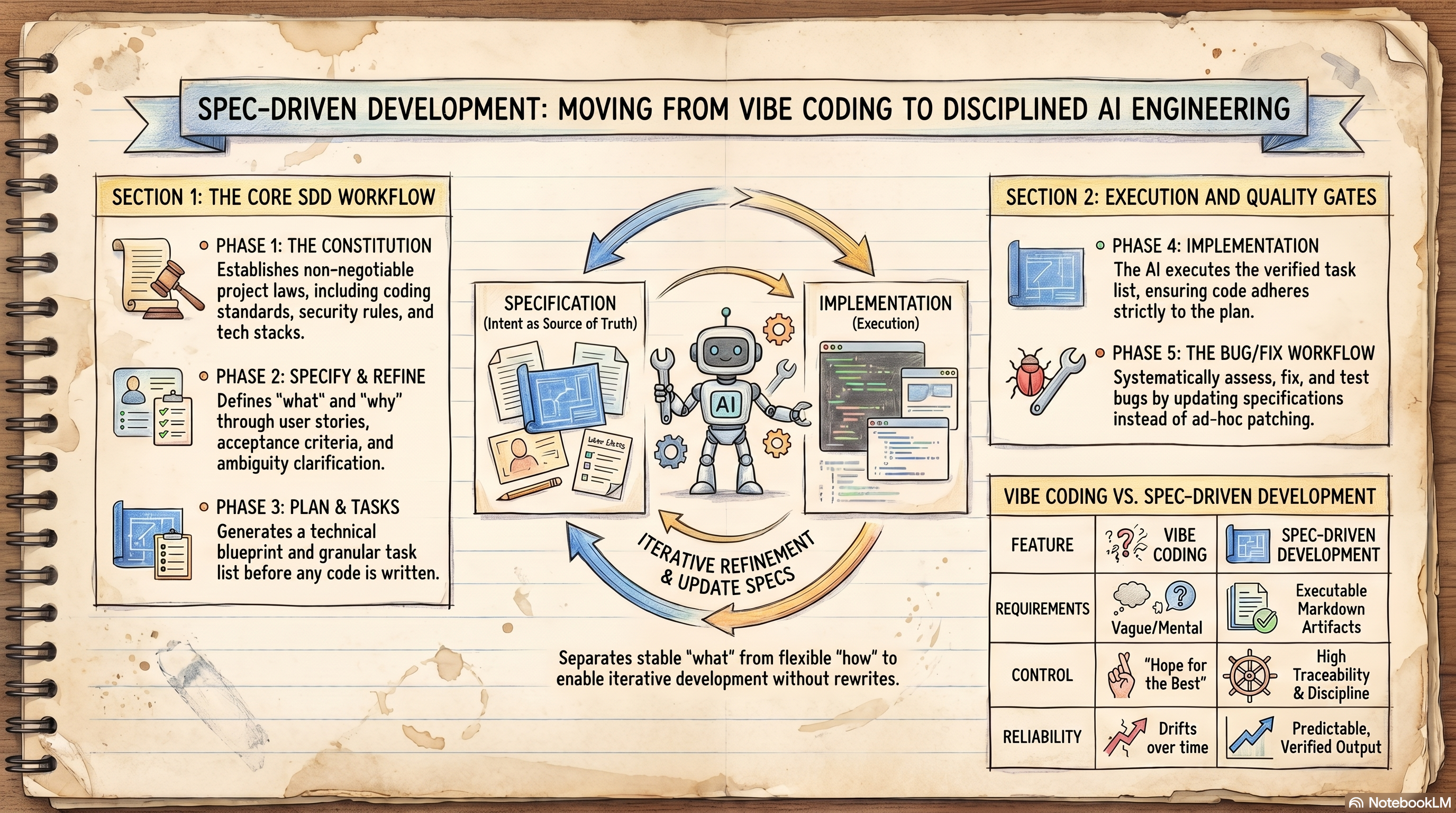
This foundational shift moves the focus from writing code to managing intent. That's the governance layer AI-native engineering organizations actually need — and it's what the rest of this article teaches you, one step at a time.
Section2. So What Exactly IS GitHub Spec Kit?
Here's the mental model I want you to keep for the whole ride: building software with an AI agent is like building a house with a contractor.
Would you tell a contractor "build me something nice" and come back in six months? Of course not. You'd give him:
- A requirements brief — what the house must do → that's the spec
- Architectural drawings — how it will be built → that's the plan
- A bill of quantities — itemized work → that's the tasks
- A building code — non-negotiable rules → that's the Constitution
- An inspection engineer — verifies the work → that's the QA gates
Spec Kit is exactly that paperwork, for AI. Not a framework, not a library, not an SDK — it's a CLI tool + workflow framework that orchestrates the interaction between you and the AI agent.
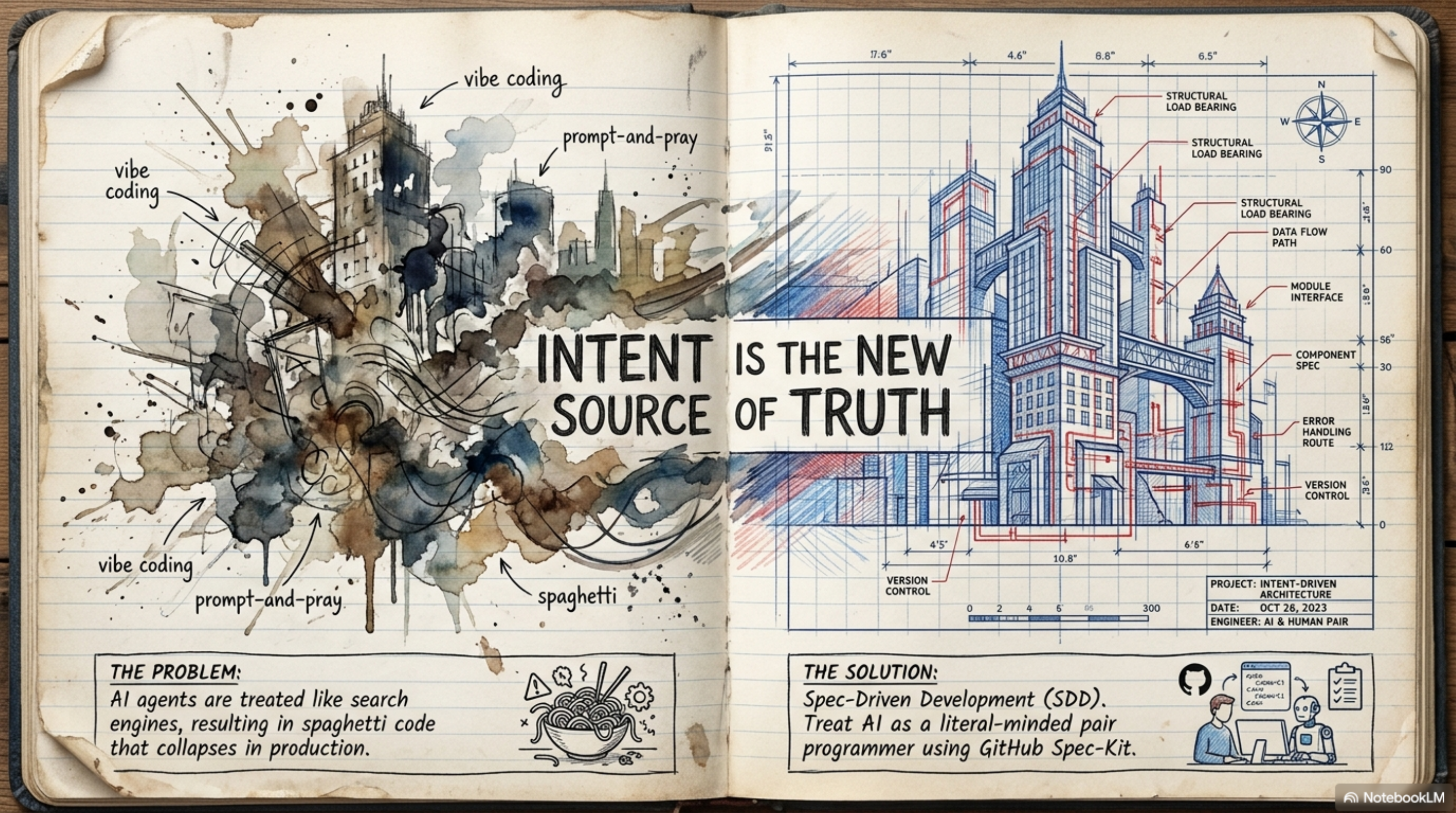
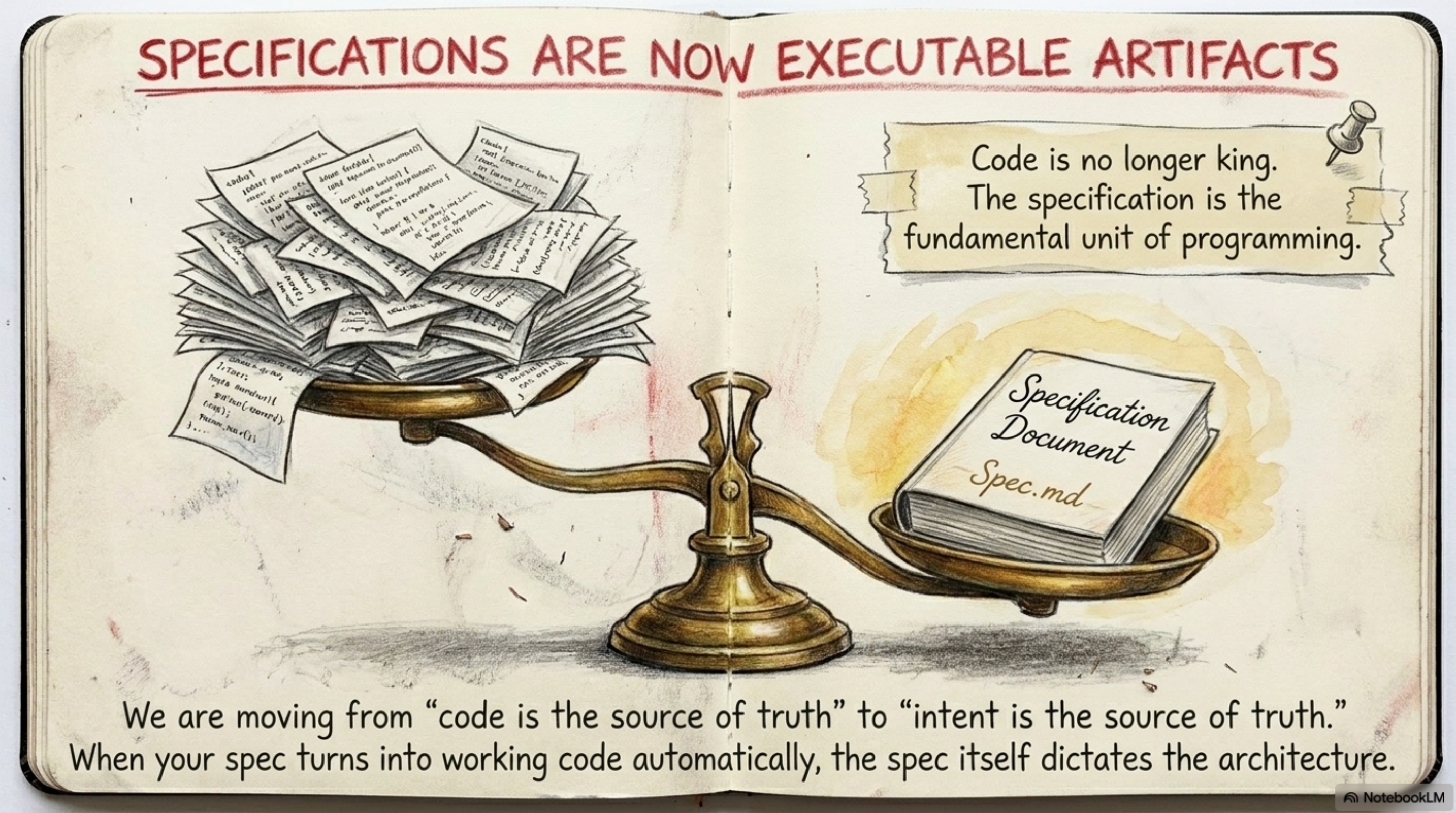
The core philosophy in one sentence: specifications become executable. The spec is not a document that goes to die in Confluence — it's a living, persistent source of truth that governs the entire lifecycle. It enforces a strict separation between the "What" and the "How", so code becomes a secondary artifact derived from validated intent.
2.1 Setting Up the Workshop — Installation
Enough theory — open a terminal. Successful SDD requires a standardized environment, and Spec Kit uses the uv package manager for isolation.
Prerequisites:
- Python 3.11+
- Git
uvorpipx
Installation:
# Recommended method (uv)
uvtoolinstallspecify-cli--fromgit+https://github.com/github/spec-kit.git

# Via pipx
pipxinstallgit+https://github.com/github/spec-kit.git

# Verify
specifycheck# audit environment
specify--version# confirm official build
And here's what initialization actually looks like on screen:
2.2 "But I Use a Different Agent" — the 30+ Integrations
I can hear you already: "I'm on Cursor" — "I'm on Copilot" — "I use some obscure agent nobody's heard of." Good news: Spec Kit is designed with a no lock-in philosophy. Any frontier model or agent works:
| Integration | Output |
|---|---|
| Claude Code | CLAUDE.md |
| GitHub Copilot | .github/copilot/ |
| Gemini CLI | GEMINI.md |
| Codex CLI | CODEX.md |
| Cursor | .cursor/rules/ |
| Windsurf | .windsurf/rules/ |
| Hermes | HERMES.md |
| Kimi Code | KIMI.md |
| Kiro CLI | KIRO.md |
| Qwen Code | QWEN.md |
| Roo Code | .roorules |
| Cline | .clinerules |
| opencode | OPENCODE.md |
| Forge | FORGE.md |
| generic | --integration-options for custom |
# List all integrations
specifyintegrationlist

# Initialize project with a specific agent
specifyinit.--integrationclaude

# If your agent isn't on the list
specifyinit.--integrationgeneric--integration-options="--commands-dir .myagent/cmds"

# Skills mode (for agents that support it)
specifyinit.--integrationcodex--integration-options="--skills"
2.3 What Just Got Created? — Project Structure After specify init
When you run specify init, it creates the .specify/ directory — think of it as the brain of your SDD workflow. Walk through this tree with me; you'll live inside it for the rest of the article:
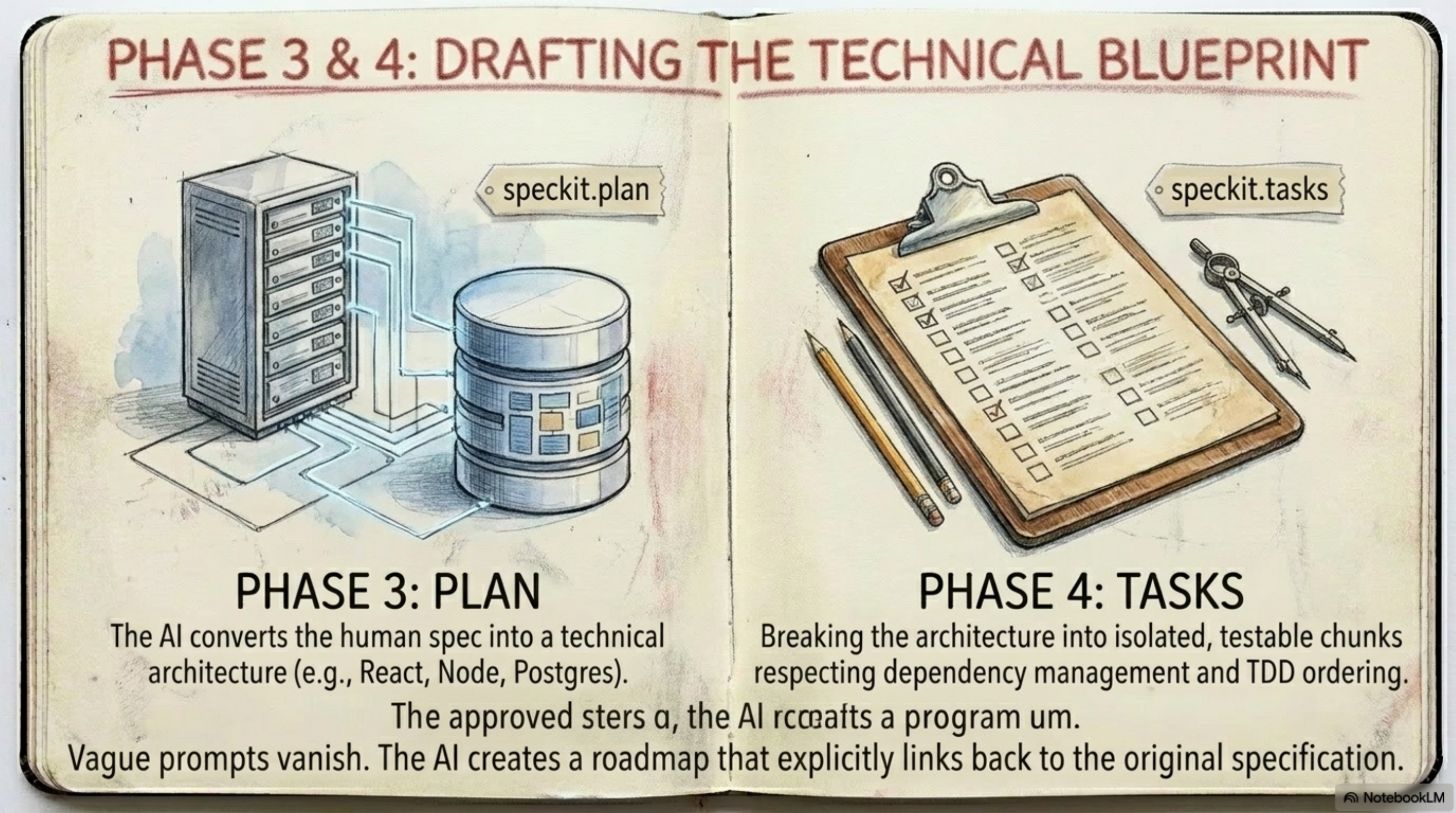
my-project/
├── .specify/
│   ├── memory/constitution.md      ← Project rules (Project Constitution)
│   ├── templates/
│   │   ├── spec-template.md
│   │   ├── plan-template.md
│   │   └── tasks-template.md
│   ├── templates/overrides/        ← Highest priority
│   ├── presets/                    ← Preset templates
│   ├── extensions/                 ← Installed extensions
│   └── features/
│       └── 001-feature-name/
│           ├── spec.md             ← From /speckit.specify
│           ├── plan.md             ← From /speckit.plan
│           ├── tasks.md            ← From /speckit.tasks
│           ├── data-model.md
│           ├── contracts/
│           │   ├── api-spec.json
│           │   └── signalr-spec.md
│           ├── research.md
│           ├── checklist.md
│           ├── blueprint.md
│           └── analysis.md
├── CLAUDE.md     ← Or KIMI.md / COPILOT.md depending on integration
├── .gitignore
└── src/          ← Code (generated from /speckit.implement)
One subtle thing worth knowing early — when two templates conflict, this is who wins:
Template Resolution Order (highest wins):
1. .specify/templates/overrides/    ← project-local (highest priority)
2. .specify/presets/templates/      ← presets
3. .specify/extensions/templates/   ← extensions
4. .specify/templates/              ← spec kit core (lowest priority)
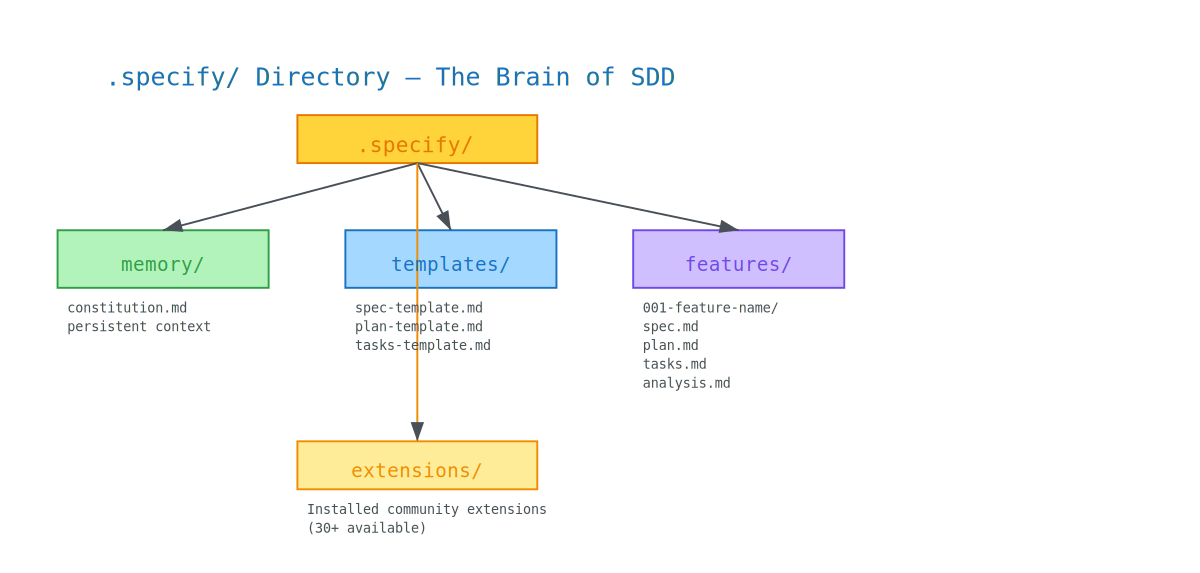
Note: you don't need to memorize this tree. You'll see each file get born, one phase at a time, in the next section. That's the whole point of the journey.
Section3. The Nine Phases — Let's Actually Build Something
Now the fun part. We're not going to list phases like a manual — we're going to build a real project together and watch every file appear.
Our running example: a task tracker — "a simple tasks app: the user adds a task, marks it done, and sees productivity stats." Small enough to follow, real enough to hurt in the right places.
Every feature in Spec Kit goes through nine phases. They're not optional — this is the canonical arc:
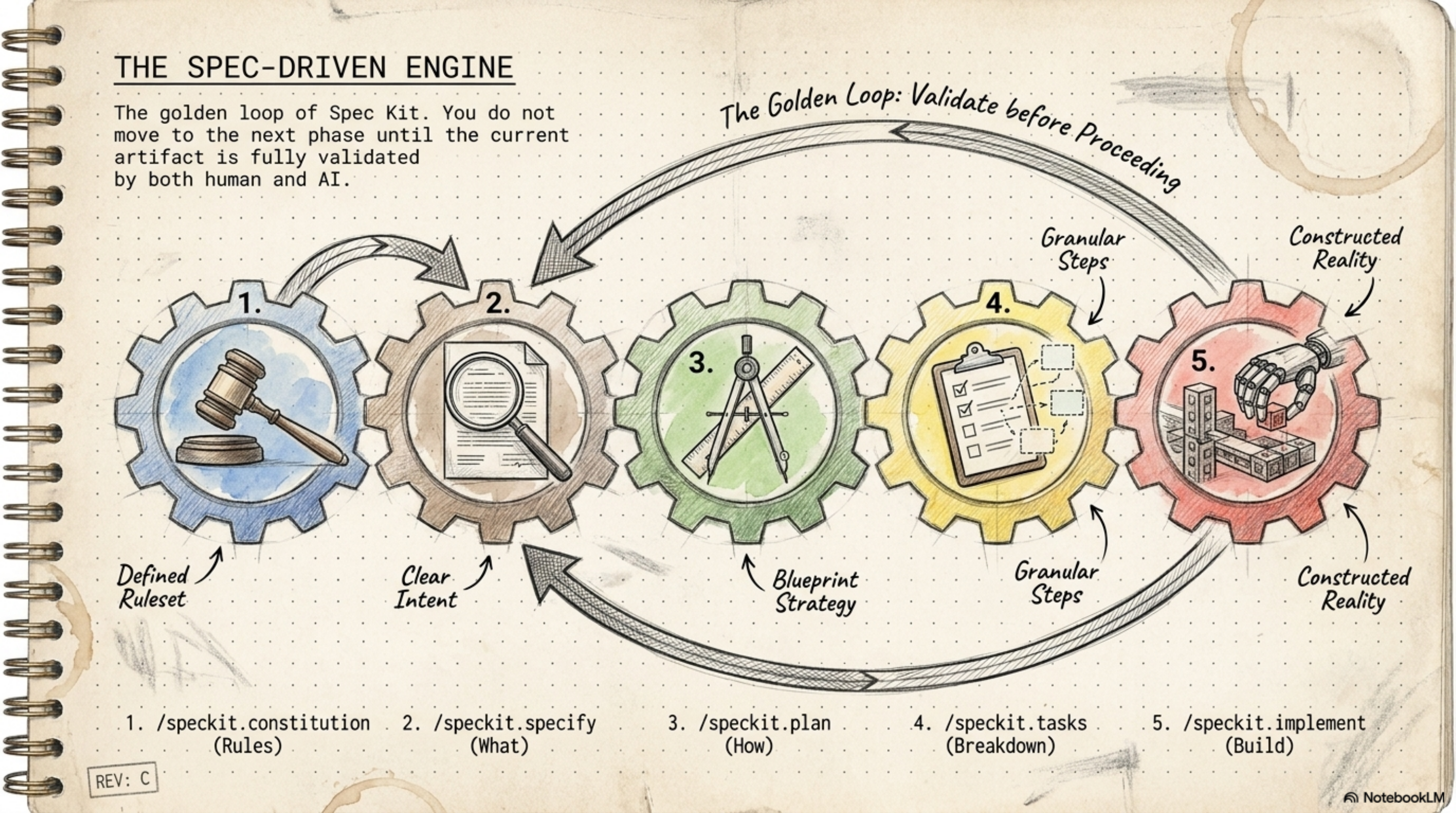
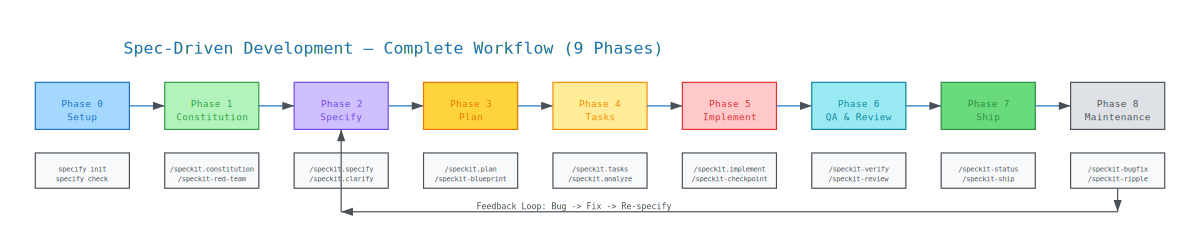
TheFullJourney:
┌──────────────────────────────────────────────────────────────────────────┐
│ 0.Setup → 1.Constitution → 2.Specify → 3.Plan → 4.Tasks                 │
│         → 5.Implement → 6.QA & Review → 7.Ship → 8.Maintenance          │
│                                                                          │
│ 🖥️ Terminal = specify CLI commands  │  🤖 Agent = /speckit.* slash cmds  │
│ ❌ Built-in = no extension needed  │  ✅ Extension = install required    │
└──────────────────────────────────────────────────────────────────────────┘
Keep those legend symbols in your head — 🖥️ terminal vs 🤖 agent, ❌ built-in vs ✅ extension. They repeat in every table below.
Phase 0 — Setup: Preparing the Workshop
Before the first brick, the contractor sets up the site. Here's your full toolbox for that:
| Command | ❌/✅ | When to Use | Output |
|---|---|---|---|
specify init <name> | ❌ | First time — new project | .specify/, CLAUDE.md, templates |
specify init . --integration <agent> | ❌ | In existing project | Same inside current directory |
specify check | ❌ | After install or anytime | Verify Python/Git/uv |
specify --version | ❌ | Anytime | CLI version + system info |
specify self | ❌ | For updates | check/upgrade the CLI |
specify extension search | ❌ | Before installing | List available extensions |
specify extension add <n> --from <url> | ❌ | After init | Install extension |
specify extension remove <n> | ❌ | To remove extension | Delete extension and its files |
specify preset search | ❌ | Before using presets | List of presets |
specify preset add <n> | ❌ | To modify spec format | Install preset |
specify integration list | ❌ | Before init | Show 30+ supported agents |
specify workflow run <name> | ❌ | To run full cycle | Execute steps in sequence |
# Install extension from community
specifyextensionadd<short-name>--fromhttps://github.com/<owner>/<repo>/archive/refs/heads/main.zip

# Search available extensions
specifyextensionsearch
⚠️ Important: The only built-in extensions that install by name without
--fromare the git extensions. All community extensions require--from <zip-url>. This trips up almost everyone once — now it won't trip you.
Phase 1 — The Constitution: Your Project's Building Code
Here's where our task tracker gets its non-negotiables. The Project Constitution is the "engineering rulebook" that prevents architectural drift — a set of non-negotiable governing principles the AI agent must adhere to in every single phase.
/speckit.constitution
For our task tracker, we'd write something like:
/speckit.constitution "Vanilla JS only. TDD mandatory. No external UI frameworks. All data local-first."
That generates constitution.md in .specify/memory/. A constitution typically encodes:
- Tech Stack Constraints: Mandatory library versions (e.g., "Must use Next.js 14 SSG")
- Testing Mandates: Minimum coverage thresholds and TDD requirements
- Compliance: Accessibility (WCAG), Security (OWASP), design system standards
Why this matters strategically: the Constitution acts as a hard gate. A "strict" constitution (enterprise performance budgets, mandatory unit tests) increases downstream complexity but guarantees production readiness. A "lean" one is better for exploratory spikes. Pick deliberately.
And here's the quiet superpower: by encoding the rules once, you eliminate context saturation — you never again type "remember, we use TDD" into every prompt. The agent reads the constitution automatically with every slash command.
| Command | ❌/✅ | Extension | When | Output |
|---|---|---|---|---|
/speckit.constitution | ❌ | — | Project start or rule changes | .specify/memory/constitution.md |
/speckit-red-team | ✅ | red-team | After constitution or plan | findings report (no auto-edit) |
/speckit-brownfield | ✅ | brownfield | Existing project start | initial specs per module |
/speckit-repoindex | ✅ | repoindex | Existing project — once | .specify/repo-index.md |
specifyextensionaddred-team--fromhttps://github.com/ashbrener/spec-kit-red-team/archive/refs/heads/main.zip
specifyextensionaddbrownfield--fromhttps://github.com/Quratulain-bilal/spec-kit-brownfield/archive/refs/heads/main.zip
specifyextensionaddrepoindex--fromhttps://github.com/liuyiyu/spec-kit-repoindex/archive/refs/heads/main.zip
Pro tip: run
/speckit-red-teamagainst your constitution before you write a single spec. Attacking the rules while they're still on paper is the cheapest security review you'll ever do.
Phase 2 — Specify: Say WHAT, Never HOW
Now we describe the task tracker — and here's where SDD enforces its most important discipline: strict separation between the "What" (Specify) and the "How" (Plan). This prevents premature technical optimization and keeps the focus on user outcomes.
/speckit.specify"Feature description"
For our project:
/speckit.specify "Users add tasks, mark them complete, and view productivity statistics over time."
Notice what's not in there: no database, no framework, no architecture. Just what and why.
The output is spec.md — pure user stories and acceptance criteria.
Golden rule in specify: Say what and why — never how. The agent will figure out the technology. If you catch yourself typing "React" in a specify prompt, stop — that word belongs in Phase 3.
Quality Gates: Clarify and Checklist
Before any technical planning, the spec must pass through quality gates — and this step is exactly what would have saved Ahmed's demo:
| Command | ❌/✅ | Extension | When | Output |
|---|---|---|---|---|
/speckit.specify | ❌ | — | Every new feature | specs/<feature>/spec.md |
/speckit.clarify | ❌ | — | After specify, before plan | Updates spec.md |
/speckit-critique | ✅ | critique | After specify — dual review | critique-report.md |
/speckit-spec-validate | ✅ | spec-validate | After clarify, before implement | comprehension quiz + gate |
/speckit.checklist | ❌ | — | After specify — quality check | checklist.md |
/speckit-whatif | ✅ | whatif | Before requirement changes | impact analysis |
/speckit-scope | ✅ | scope | After specify — effort estimation | scope-report.md |
/speckit-memory-loader | ✅ | memory-loader | Auto before every command | Loads .specify/memory/ |
- /speckit.clarify: A sequential, coverage-based questioning layer. The agent finds the ambiguities and quizzes you — "should completed tasks count in the stats?" — recording answers directly into the spec. No more guesswork.
- /speckit.checklist: Generates a validation checklist — essentially "unit tests for English" — ensuring requirements are complete, clear, and consistent.
specifyextensionaddcritique--fromhttps://github.com/arunt14/spec-kit-critique/archive/refs/heads/main.zip
specifyextensionaddspec-validate--fromhttps://github.com/aeltayeb/spec-kit-spec-validate/archive/refs/heads/main.zip
specifyextensionaddwhatif--fromhttps://github.com/DevAbdullah90/spec-kit-whatif/archive/refs/heads/main.zip
specifyextensionaddscope--fromhttps://github.com/Quratulain-bilal/spec-kit-scope-/archive/refs/heads/main.zip
specifyextensionaddmemory-loader--fromhttps://github.com/KevinBrown5280/spec-kit-memory-loader/archive/refs/heads/main.zip
Phase 3 — Plan: NOW We Talk Technology
The spec is locked. Now — and only now — you're allowed to say the forbidden words:
/speckit.plan"Vite + SQLite + vanilla JS"
/speckit.plan synthesizes the technical architecture and defines:
- Data models
- API contracts
- File structures
And — this is the elegant part — it cross-references the Constitution automatically. Remember we said "Vanilla JS only"? If the plan tried to sneak React in, that's a constitutional violation and it gets flagged.
Full output of /speckit.plan:
specs/<feature>/
├── plan.md           ← Technical plan
├── data-model.md     ← Schema
├── contracts/
│   ├── api-spec.json ← API contracts
│   └── signalr-spec.md
├── research.md
└── quickstart.md
| Command | ❌/✅ | Extension | When | Output |
|---|---|---|---|---|
/speckit.plan | ❌ | — | After spec — define tech stack | plan.md + data-model.md + contracts/ |
/speckit-blueprint | ✅ | blueprint | After plan, before implement | blueprint.md (class diagrams + file layout) |
/speckit-version-guard | ✅ | version-guard | After plan — verify deps | version-report.md |
/speckit-diagram | ✅ | diagram | After plan/tasks — visualization | Mermaid diagrams |
/speckit-red-team | ✅ | red-team | After plan — attack the plan | findings report |
specifyextensionaddblueprint--fromhttps://github.com/chordpli/spec-kit-blueprint/archive/refs/heads/main.zip
specifyextensionaddversion-guard--fromhttps://github.com/KevinBrown5280/spec-kit-version-guard/archive/refs/heads/main.zip
specifyextensionadddiagram--fromhttps://github.com/Quratulain-bilal/spec-kit-diagram-/archive/refs/heads/main.zip
Phase 4 — Tasks: Slicing the Elephant
You can't hand an AI agent a whole architecture and say "go" — context windows are finite, and big prompts drift. The plan must be atomized into actionable, reviewable chunks:
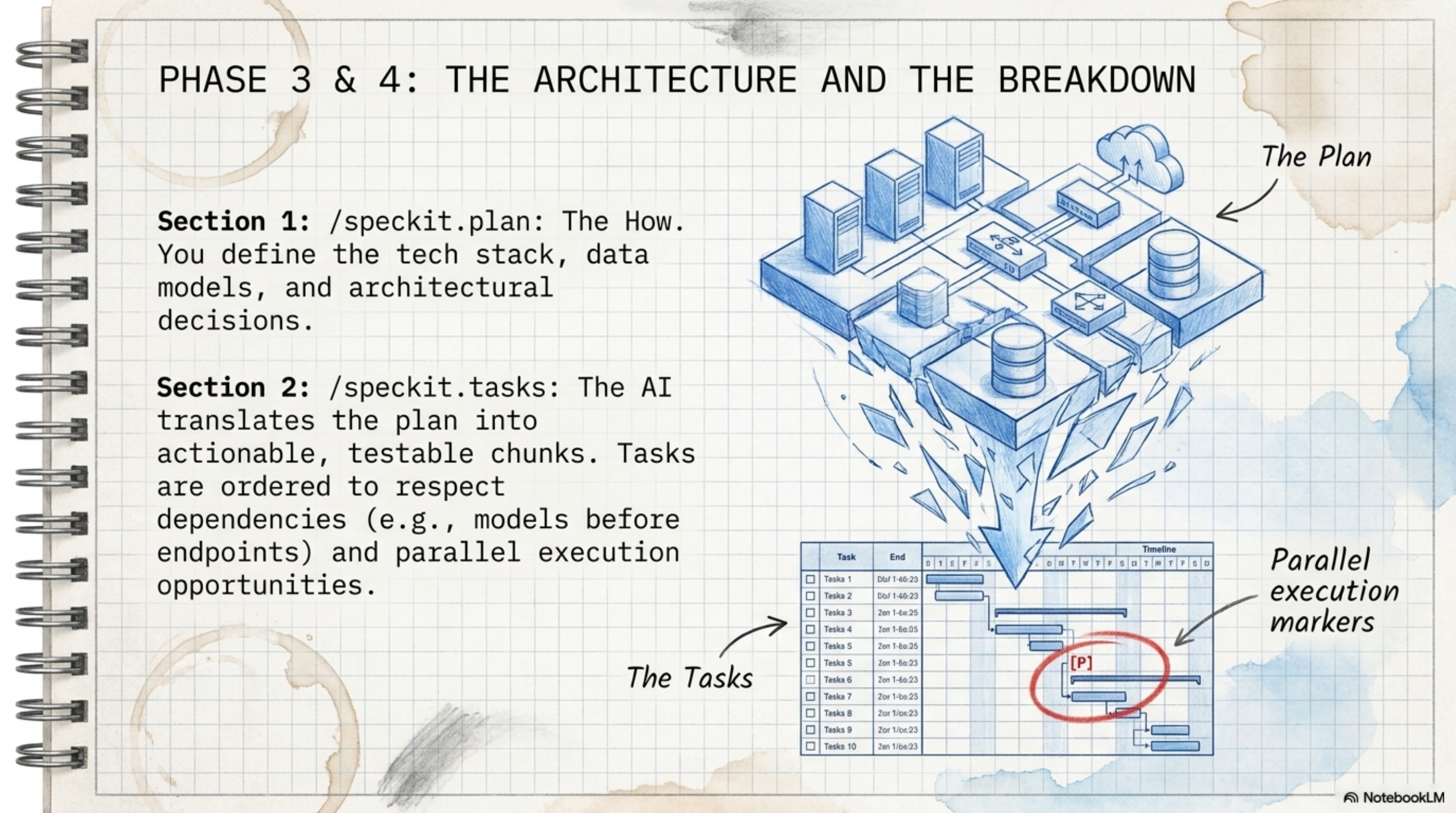
/speckit.tasks
This generates tasks.md for our task tracker, organizing implementation into a logical sequence:
- Dependency Management: the SQLite layer gets built before the stats UI that reads from it
- Parallel Execution: tasks marked
[P]can be handled simultaneously by multiple agents - TDD Enforcement: the task list requires failing tests before implementation code — our constitution said TDD, remember?
| Command | ❌/✅ | Extension | When | Output |
|---|---|---|---|---|
/speckit.tasks | ❌ | — | After plan | tasks.md with dependencies + [P] parallel markers |
/speckit.analyze | ❌ | — | After tasks, before implement — always | analysis.md — consistency check |
/speckit.taskstoissues | ❌ | — | After tasks | GitHub Issues (remote) |
/speckit-jira | ✅ | jira | After tasks | Jira Epic → Stories → Sub-tasks |
/speckit-maqa-linear | ✅ | maqa-linear | MAQA workflow | Linear issues |
/speckit-maqa-trello | ✅ | maqa-trello | MAQA workflow | Trello board |
/speckit-maqa-azure-devops | ✅ | maqa-azure-devops | MAQA workflow | Azure DevOps work items |
specifyextensionaddjira--fromhttps://github.com/mbachorik/spec-kit-jira/archive/refs/heads/main.zip
⚠️ Mandatory: Run
/speckit.analyzebefore/speckit.implement. Always. No exceptions. A consistency mistake caught here takes 2 minutes to fix — after implement it takes hours. This is the single highest-leverage habit in all of SDD.
Phase 5 — Implement: The Agent Finally Writes Code
Notice something? We're five phases in and the AI hasn't written a line of product code. That's not slowness — that's the whole point. Everything it's about to write now has a contract behind it.
First, /speckit.analyze acts as a read-only validator — it audits spec, plan, and tasks for consistency and catches Constitutional Violations (like a task that quietly imports a forbidden library).
Then:
/speckit.implement
The agent builds the code task-by-task, marks tasks complete as it goes, and proactively resolves issues discovered during build cycles.
| Command | ❌/✅ | Extension | When | Output |
|---|---|---|---|---|
/speckit.implement | ❌ | — | After tasks + analyze | source code + tasks.md updated with ✅ |
/speckit-checkpoint | ✅ | checkpoint | Auto during implement | organized git commits (not one giant commit) |
/speckit-worktree | ✅ | worktree | Parallel feature development | isolated git worktrees |
/speckit-worktrees | ✅ | worktrees | Multiple parallel agents | sibling/nested worktrees |
/speckit-conduct | ✅ | conduct | Large context window | delegates phases to sub-agents |
specifyextensionaddcheckpoint--fromhttps://github.com/aaronrsun/spec-kit-checkpoint/archive/refs/heads/main.zip
specifyextensionaddworktree--fromhttps://github.com/Quratulain-bilal/spec-kit-worktree/archive/refs/heads/main.zip
specifyextensionaddworktrees--fromhttps://github.com/dango85/spec-kit-worktree-parallel/archive/refs/heads/main.zip
specifyextensionaddconduct--fromhttps://github.com/twbrandon7/spec-kit-conduct-ext/archive/refs/heads/main.zip
Phase 6 — QA & Review: "Done" Is a Claim, Not a Fact
The agent says our task tracker is finished. Do we believe it? No. We verify.
Here's a real moment from projects like ours: the agent reports all tasks ✅, but /speckit-verify catches that deleted tasks still count in the productivity stats — exactly the kind of ambiguity /speckit.clarify asked about back in Phase 2. The spec said one thing; the code did another. Without this gate, that's a production bug. With it, it's a two-minute fix.
Two commands are required, the rest are optional:
| Command | ❌/✅ | Extension | Priority | What it does |
|---|---|---|---|---|
/speckit-verify | ✅ | verify | ✅ Required | Does the code match every spec requirement? |
/speckit-verify-tasks | ✅ | verify-tasks | ✅ Required | Detects "phantom completions" — agent said done but didn't do it |
/speckit-review | ✅ | review | 🔶 Important | 6 specialized agents: code quality, comments, tests, errors, types, simplification |
/speckit-staff-review | ✅ | staff-review | 🔶 Important | Senior engineer level review |
/speckit-security-review | ✅ | security-review | 🔶 Important | OWASP top 10, injection, auth, data exposure |
/speckit-qa | ✅ | qa | 🔶 Optional | browser/CLI acceptance testing against spec criteria |
/speckit-spectest | ✅ | spectest | 🔶 Optional | Maps tests to requirements — detects untested areas |
/speckit-ripple | ✅ | ripple | 🔶 Important after any change | Side effects analysis across 9 domains |
/speckit-cleanup | ✅ | cleanup | 🔶 Optional | Scout rule: fix small, track big issues |
/speckit-fix-findings | ✅ | fix-findings | 🔶 Optional | Auto-fix review findings |
/speckit-reconcile | ✅ | reconcile | 🔶 Optional | If code drifted from spec, updates the spec |
specifyextensionaddverify--fromhttps://github.com/ismaelJimenez/spec-kit-verify/archive/refs/heads/main.zip
specifyextensionaddverify-tasks--fromhttps://github.com/datastone-inc/spec-kit-verify-tasks/archive/refs/heads/main.zip
specifyextensionaddreview--fromhttps://github.com/ismaelJimenez/spec-kit-review/archive/refs/heads/main.zip
specifyextensionaddstaff-review--fromhttps://github.com/arunt14/spec-kit-staff-review/archive/refs/heads/main.zip
specifyextensionaddsecurity-review--fromhttps://github.com/DyanGalih/spec-kit-security-review/archive/refs/heads/main.zip
specifyextensionaddqa--fromhttps://github.com/ismaelJimenez/spec-kit-qa/archive/refs/heads/main.zip
specifyextensionaddspectest--fromhttps://github.com/Quratulain-bilal/spec-kit-spectest/archive/refs/heads/main.zip
specifyextensionaddripple--fromhttps://github.com/chordpli/spec-kit-ripple/archive/refs/heads/main.zip
specifyextensionaddcleanup--fromhttps://github.com/dsrednicki/spec-kit-cleanup/archive/refs/heads/main.zip
specifyextensionaddreconcile--fromhttps://github.com/stn1slv/spec-kit-reconcile/archive/refs/heads/main.zip
Phase 7 — Ship: Handing Over the Keys
Everything's green. Time to hand the building over:
| Command | ❌/✅ | Extension | When | Output |
|---|---|---|---|---|
/speckit-status | ✅ | status | Before ship — verify everything is green | console dashboard |
/speckit-ci-guard | ✅ | ci-guard | In CI pipeline automatically | blocks merge if specs are missing |
/speckit-pr-bridge | ✅ | pr-bridge | After implement, when creating PR | automatic PR description |
/speckit-confluence | ✅ | confluence | After finalize specs | Confluence page |
/speckit-ship | ✅ | ship | When everything is ready | CHANGELOG + release PR + git tags |
/speckit-retrospective | ✅ | retrospective | After each feature | retrospective.md + adherence score |
/speckit-memory-hub | ✅ | memory-md | After ship — save lessons | .specify/memory/ |
specifyextensionaddstatus--fromhttps://github.com/KhawarHabibKhan/spec-kit-status/archive/refs/heads/main.zip
specifyextensionaddci-guard--fromhttps://github.com/Quratulain-bilal/spec-kit-ci-guard/archive/refs/heads/main.zip
specifyextensionaddpr-bridge--fromhttps://github.com/Quratulain-bilal/spec-kit-pr-bridge-/archive/refs/heads/main.zip
specifyextensionaddship--fromhttps://github.com/arunt14/spec-kit-ship/archive/refs/heads/main.zip
specifyextensionaddretrospective--fromhttps://github.com/emi-dm/spec-kit-retrospective/archive/refs/heads/main.zip
specifyextensionaddmemory-md--fromhttps://github.com/DyanGalih/spec-kit-memory-hub/archive/refs/heads/main.zip
Note: don't skip
/speckit-retrospective— it gives you an "adherence score": how faithfully did you follow the workflow this feature? Lessons get saved via/speckit-memory-hubinto.specify/memory/— meaning your next feature starts smarter than this one ended.
Phase 8 — Maintenance: The Work Doesn't End at Ship
The building is delivered — but buildings need maintenance. A living codebase moves: bugs appear, requirements shift, and specs can drift away from code over time:
| Command | ❌/✅ | Extension | When |
|---|---|---|---|
/speckit-doctor | ✅ | doctor | Periodic health check |
/speckit-status | ✅ | status | Daily check |
/speckit-sync | ✅ | sync | Detect spec-code drift |
/speckit-bugfix | ✅ | bugfix | Any new bug |
/speckit-fixit | ✅ | fixit | Quick targeted fix |
/speckit-iterate | ✅ | iterate | Mid-implementation spec update |
/speckit-refine | ✅ | refine | Requirements change + cascade |
/speckit-memory-hub audit | ✅ | memory-md | Clean old memory |
specifyextensionadddoctor--fromhttps://github.com/KhawarHabibKhan/spec-kit-doctor/archive/refs/heads/main.zip
specifyextensionaddsync--fromhttps://github.com/bgervin/spec-kit-sync/archive/refs/heads/main.zip
specifyextensionaddbugfix--fromhttps://github.com/Quratulain-bilal/spec-kit-bugfix/archive/refs/heads/main.zip
specifyextensionadditerate--fromhttps://github.com/imviancagrace/spec-kit-iterate/archive/refs/heads/main.zip
specifyextensionaddrefine--fromhttps://github.com/Quratulain-bilal/spec-kit-refine/archive/refs/heads/main.zip
And that's the full journey: from an empty workshop to a production feature with living, maintained specs. Take a breath — next up is the extra gear.
Section4. The Extension Catalog — The Extra Toolbox
Remember when I told you at the start that Spec Kit ships with a "core toolbox" and an "extra toolbox"? We've arrived at the extra toolbox.
The concept is simple: Spec Kit's core has just 19 commands — those are the essentials. Everything else comes as an extension you install when you need it. Exactly like your phone: it ships with the basic apps, and you download the rest from the store.
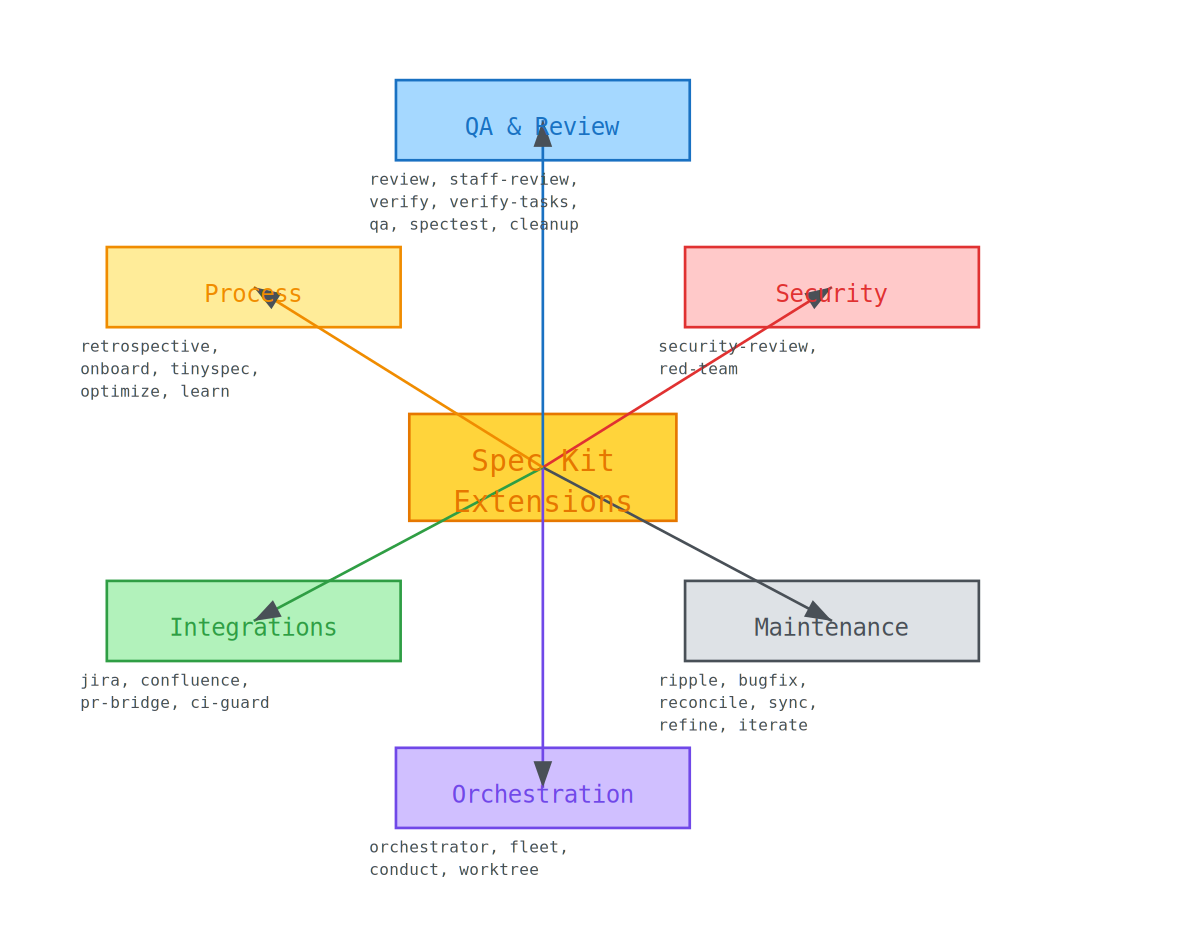
Take a good look at that map. You're thinking "that's way too much"? Exactly — and that's the point. The beauty is that you don't have to install them all. Pick what you need for your workflow. But keep one important thing in mind: these extensions aren't optional nice-to-haves — each one solves a real pain point somewhere in the SDD lifecycle.
Let me tell you why you need each one — not just "what it does":
- Verify Tasks → You know that moment when the AI says "all tasks complete ✅" and you open the code to find half of it missing? Those are called phantom completions — and this extension catches them one by one.
- Review → Not just linting. This is 6 agents reviewing your code from 6 different angles: quality, types, logic, and more.
- Ripple → Any change — no matter how small — has side effects across 9 domains. Without this extension you discover the breakage too late, usually in production.
- Red Team → This one attacks the spec itself before it gets implemented. Why? Because a problem solved while it's still on paper is 100x cheaper than one solved in code.
Master Extension Table
These are the 10 most important extensions — pay special attention to the Value Proposition column:
| Short Name | Command | Category | Value Proposition |
|---|---|---|---|
| Review | /speckit-review | QA | 6-agent audit of quality, types, and logic to prevent code rot |
| Staff Review | /speckit-staff-review | QA | Senior-level architecture validation for high-stakes implementations |
| Verify Tasks | /speckit-verify-tasks | QA | Eliminates "phantom completions" by verifying code exists for all [x] marks |
| Security | /speckit-security-review | Security | Automates OWASP-aligned vulnerability scanning within the dev cycle |
| Red Team | /speckit-red-team | Security | Adversarial review to find integrity gaps in specifications early |
| Ripple | /speckit-ripple | Maintenance | Detects side effects across 9 domains before a change is merged |
| Bug Fix | /speckit-bugfix | Maintenance | Standardized, spec-aware remediation workflow |
| Reconcile | /speckit-reconcile | Maintenance | Manages drift by updating specs to match implementation realities |
| Orchestrator | /speckit-orchestrator | Orchestration | Tracks state and resolves conflicts across multiple parallel features |
| Worktree | /speckit-worktree | Git | Spawns isolated Git worktrees for parallel feature development |
And installation always looks the same:
specifyextensionadd<name>--from<zip-url>
Note: See that
--fromflag? We'll come back to it in the Important Rules section — it trips up a lot of people.
Section5. Greenfield vs Brownfield — Let's Walk the Road Twice
Enough theory — let's walk the full journey twice: once with a brand-new project built from scratch (Greenfield — an empty green field), and once with an old project that other people worked on before you (Brownfield — land someone else built on and left you the inheritance).
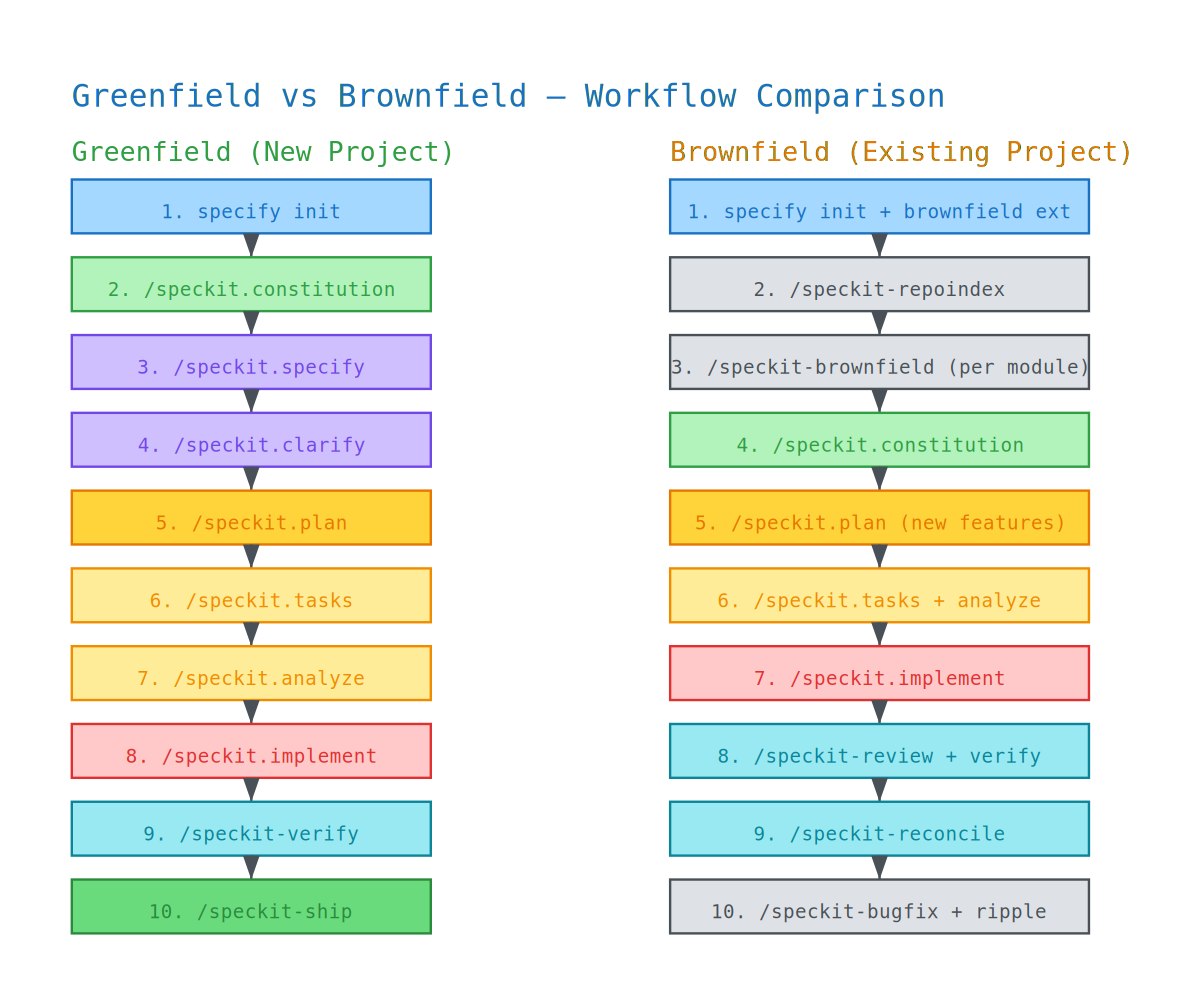
5.1 Greenfield (New Project)
This is the easy scenario — the workshop is empty and you're laying the first brick yourself. Look at the whole sequence in one shot, and note the (✅ required) vs (optional) markers:
[Phase 0] specify init . --integration claude
specifycheck
specifyextensionaddreview,security-review,qa,ship,...
[Phase 1] /speckit.constitution "Security-first. TDD. TTFB < 200ms."
/speckit-red-team(optional—attacktheconstitution)
[Phase 2] /speckit.specify "Feature description"
/speckit.clarify(removeambiguity)
/speckit-critique(optional—dual-lensreview)
/speckit.checklist(optional—qualityvalidation)
[Phase 3] /speckit.plan "Vite + SQLite + vanilla JS"
/speckit-blueprint(optional—codemapbeforeimplementation)
/speckit-version-guard(optional—verifydependencies)
[Phase 4] /speckit.tasks
/speckit.analyze(✅requiredbeforeimplementalways)
/speckit.taskstoissues(optional—linktoGitHubIssues)
[Phase 5] /speckit.implement
/speckit-checkpoint(optional—organizedcommits)
[Phase 6] /speckit-verify            (✅ required)
/speckit-verify-tasks(✅required)
/speckit-review(optional—codereview)
/speckit-security-review(optional—securityaudit)
/speckit-qa(optional—acceptancetesting)
[Phase 7] /speckit-status
/speckit-ship(optional—releasepipeline)
See it? The spine of the journey is the same six we memorized: constitution → specify → plan → tasks → implement → verify. Everything else is reinforcement for the spots that matter to you.
5.2 Brownfield (Existing Project)
Here the story is different. You're standing in front of a 3-year-old codebase, the people who wrote it have left the company, and the documentation's last update says "coming soon". The first mistake you could make? Start writing specs for new things before understanding what already exists.
That's why the Brownfield workflow starts with a reverse step: instead of writing a spec and producing code from it, you take the existing code and produce specs from it — that's the reverse-engineering that /speckit-brownfield does:
[Phase 0] specify init . --integration copilot
specifyextensionaddbrownfield,repoindex,verify,reconcile,...
[Phase 1] /speckit-repoindex          (understand existing code)
/speckit-brownfield(reverse-engineermodules)
/speckit.constitution(defineprojectrules)
[Phase 2] /speckit-brownfield "Reverse-engineer the auth module"
/speckit-brownfield"Reverse-engineer the API layer"
...(repeatforeachmajormodule)
[Phase 3] /speckit.plan               (if adding a new feature)
[Phase 4] /speckit.tasks + /speckit.analyze
[Phase 5] /speckit.implement
[Phase 6] /speckit-review
/speckit-security-review
/speckit-spectest(generatetestsfromspecs)
/speckit-verify
/speckit-reconcile(verifyconsistency)
[Phase 7] /speckit-checkpoint
/speckit-ship
[Phase 8] /speckit-bugfix             (for any new bug)
/speckit-ripple(afteranychange)
/speckit-verify(verifythechangedidn't break anything)
5.3 Brownfield Golden Rule
Memorize this one like your own name. Any change to existing code — any change — goes through these seven steps:
Beforemodifyinganyexistingcode:
  1. /speckit-status          ← Know where things stand
  2. Read the module spec.md  ← Understand the contract
  3. Make your change
  4. /speckit-verify          ← Did you break the contract?
  5. /speckit-ripple          ← Any side effects?
  6. /speckit-spectest        ← Are tests still aligned?
  7. /speckit-reconcile       ← Final consistency check
Tip: If you take just one thing from this section, take this rule. Most disasters in legacy projects come from step 2 being skipped — people modify code without ever understanding its contract.
Section6. But Why Spec Kit Specifically? — Comparison with the Market
There's a fair question you're going to ask: "Is Spec Kit the only game in town?" Of course not — and choosing between the alternatives comes down to something called the Maturity Level.
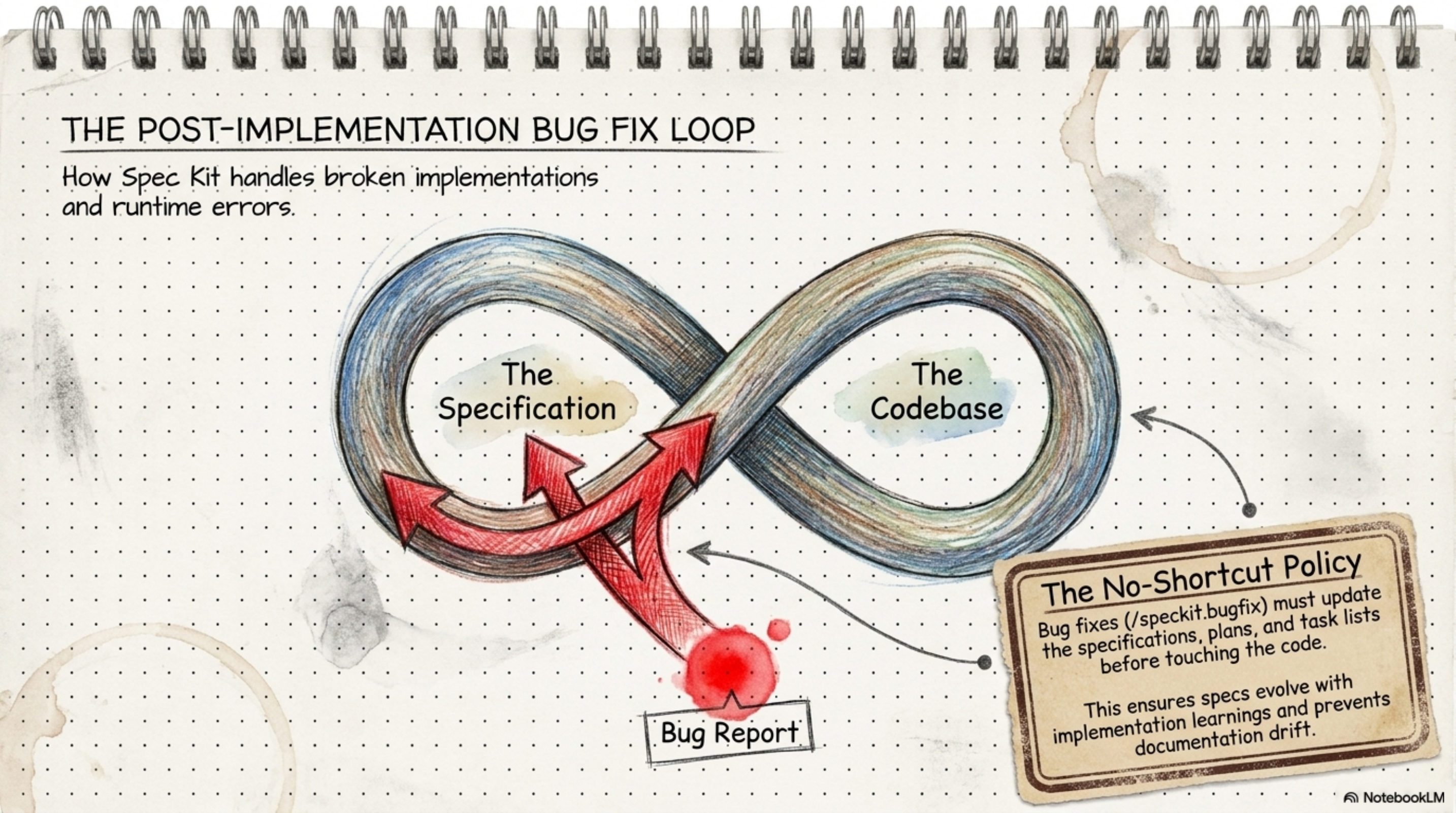
You might say "all these tools do the same thing" — and I'd say no. Each one stands on a different rung of the ladder:
SDD Maturity Hierarchy
| Level | Name | Description | Tools |
|---|---|---|---|
| 1 | Spec-First | Specs precede coding but are often discarded | Spec Kit, Kiro |
| 2 | Spec-Anchored | Specs persist and evolve alongside code as a durable contract | Spec Kit + extensions, OpenSpec, Spec Kitty |
| 3 | Spec-as-Source | Specs are the primary unit of programming; code is a secondary, auto-generated artifact | Tessl |
The difference between these levels isn't theoretical — it's a practical difference you'll feel:
- At Level 1, the spec gets written first and then... forgotten. Like the requirements binder that gets tossed in a drawer once the building is finished.
- At Level 2, the spec stays a living document — it updates alongside the code and remains a binding contract. This is where Spec Kit with its extensions (sync, reconcile, verify) plays.
- At Level 3, the story flips: the spec is the source and the code is just a derived artifact generated from it. That future is still taking shape — and Tessl is the one experimenting with it right now.
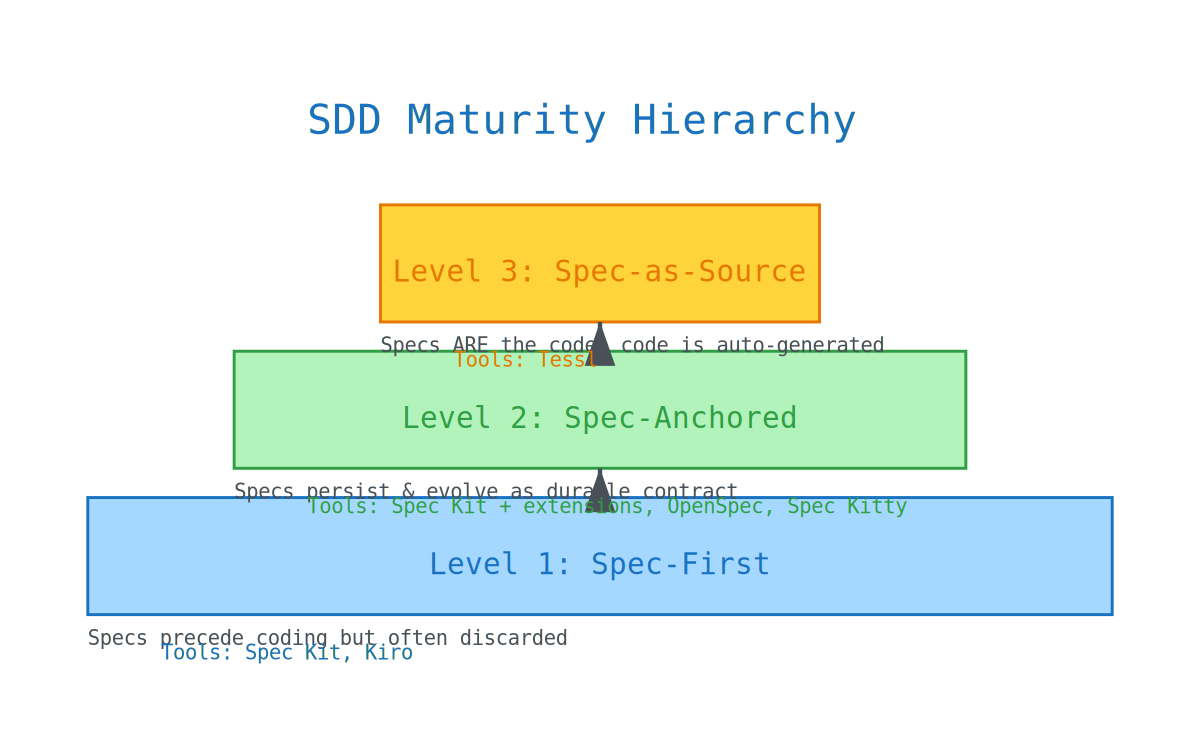
SDD Tool Comparison
| Tool | License | Git Worktrees | Best For |
|---|---|---|---|
| Spec Kit | Open Source | via Extension | Greenfield projects & battlefield-tested SDD |
| Spec Kitty | Open Source | Built-in | Orchestrating parallel features with Git Worktree |
| BMad | Open Source | No | Enterprise workflows using 21 specialized agents |
| OpenSpec | MIT | No | Lightweight change management for brownfield projects |
| Tessl | Proprietary | No | Spec-as-source; high-abstraction generation |
The bottom line? If you want an open-source tool that's been tested in battle and grows with you from Level 1 to Level 2 — Spec Kit is the most widely adopted choice with the most mature ecosystem.
Section7. The Bug Workflow — The "No-Shortcut" Policy
Now for the hardest exam any methodology can face: what happens when a bug shows up in production and everything is on fire?
This is where most teams throw the methodology out the window: "No time for specs, quick hotfix and done." And that is exactly the first thread of the drift we talked about at the beginning — the first "small exception" brings ten more behind it.
Spec Kit takes a hard stance on this called the No-Shortcut Policy, with a dedicated track for bugs:
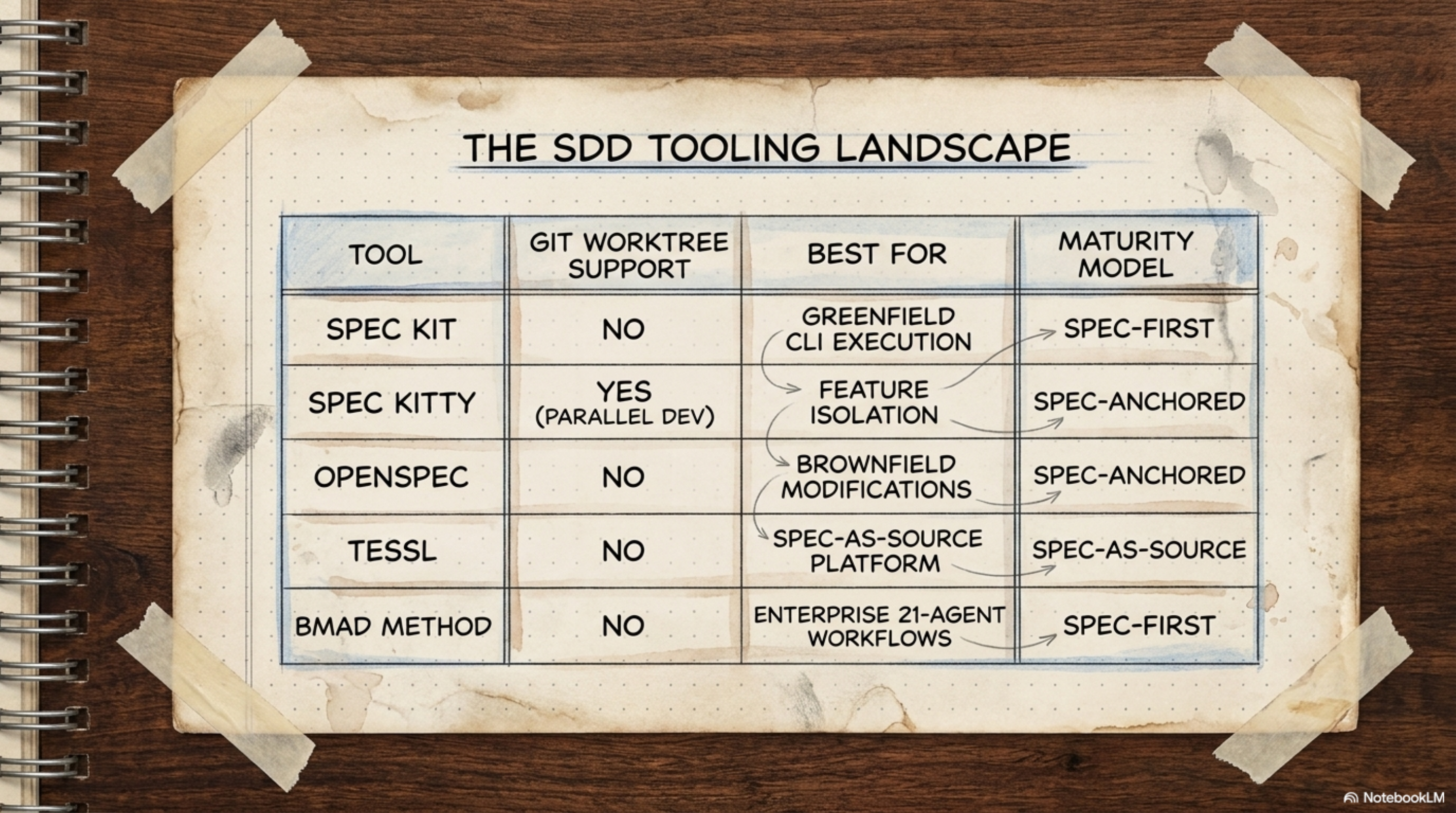
The Bug Extension (namespaced under speckit.bug.*) records everything in a structured audit trail inside .specify/bugs/<slug>/ — meaning six months later you can look back and see what the bug was, how it was fixed, and why:
| Command | What It Does | When to Use It | Why It Matters |
|---|---|---|---|
speckit.bug.assess | Analyzes the codebase against the original spec | Any new bug | Understand the divergence before you fix |
speckit.bug.fix | Generates targeted fixes that maintain spec compliance | After assess | The fix is spec-compliant, not ad-hoc |
speckit.bug.test | Verifies the fix against the identified failure scenarios | After fix | Confirm the bug is actually gone |
So the sequence is always: assess (understand the divergence from the spec) → fix (repair without breaking compliance) → test (make sure the failing scenario can't happen again).
And the fundamental rule: bug fixes must not bypass the spec workflow. Even a single-line fix requires a retroactive specification pass.
And here's where you'll tell me: "Come on — it's a one-line bug, why does it need a spec?!"
Let me tell you why. Because that one-line bug is a symptom, not the disease — it may be pointing at a bigger problem in the spec itself. If the spec were sound, why was that line wrong in the first place? The bug workflow doesn't slow you down — it protects you from the regressions you never see coming until production goes down at 3 AM. The "simple change" without a spec is exactly what causes the "ripples" nobody accounted for.
Section8. The Complete Table — All 66 Commands at Once
Take a breath. We've made the whole journey, and now it's time for the master map — every command in Spec Kit in one table you can come back to anytime.
How to read the table:
- ❌/✅ → ❌ means built-in, ships with Spec Kit itself; ✅ means an extension you must install first
- 🖥️/🤖 → 🖥️ means a terminal (CLI) command; 🤖 means a slash command inside the AI agent
- Project → 🟢 New for new projects, 🟤 Existing for old ones, and Both for both
| # | Command | ❌/✅ | Extension | 🖥️/🤖 | Project | Category |
|---|---|---|---|---|---|---|
| 1 | specify init | ❌ | — | 🖥️ | Both | Setup |
| 2 | specify check | ❌ | — | 🖥️ | Both | Setup |
| 3 | specify --version | ❌ | — | 🖥️ | Both | Setup |
| 4 | specify self | ❌ | — | 🖥️ | Both | Setup |
| 5 | specify extension add | ❌ | — | 🖥️ | Both | Setup |
| 6 | specify extension search | ❌ | — | 🖥️ | Both | Setup |
| 7 | specify preset add | ❌ | — | 🖥️ | Both | Setup |
| 8 | specify preset search | ❌ | — | 🖥️ | Both | Setup |
| 9 | specify integration list | ❌ | — | 🖥️ | Both | Setup |
| 10 | specify workflow | ❌ | — | 🖥️ | Both | Setup |
| 11 | /speckit.constitution | ❌ | — | 🤖 | Both | Core SDD |
| 12 | /speckit.specify | ❌ | — | 🤖 | Both | Core SDD |
| 13 | /speckit.plan | ❌ | — | 🤖 | Both | Core SDD |
| 14 | /speckit.tasks | ❌ | — | 🤖 | Both | Core SDD |
| 15 | /speckit.taskstoissues | ❌ | — | 🤖 | Both | Core SDD |
| 16 | /speckit.implement | ❌ | — | 🤖 | Both | Core SDD |
| 17 | /speckit.clarify | ❌ | — | 🤖 | Both | Quality |
| 18 | /speckit.analyze | ❌ | — | 🤖 | Both | Quality |
| 19 | /speckit.checklist | ❌ | — | 🤖 | Both | Quality |
| 20 | /speckit-brownfield | ✅ | brownfield | 🤖 | 🟤 Existing | Code Discovery |
| 21 | /speckit-repoindex | ✅ | repoindex | 🤖 | 🟤 Existing | Code Discovery |
| 22 | /speckit-review | ✅ | review | 🤖 | Both | QA & Review |
| 23 | /speckit-staff-review | ✅ | staff-review | 🤖 | Both | QA & Review |
| 24 | /speckit-security-review | ✅ | security-review | 🤖 | Both | Security |
| 25 | /speckit-qa | ✅ | qa | 🤖 | Both | QA & Testing |
| 26 | /speckit-spectest | ✅ | spectest | 🤖 | Both | QA & Testing |
| 27 | /speckit-verify | ✅ | verify | 🤖 | Both | QA & Testing |
| 28 | /speckit-verify-tasks | ✅ | verify-tasks | 🤖 | Both | QA & Testing |
| 29 | /speckit-cleanup | ✅ | cleanup | 🤖 | Both | QA & Review |
| 30 | /speckit-ripple | ✅ | ripple | 🤖 | Both | QA & Testing |
| 31 | /speckit-critique | ✅ | critique | 🤖 | Both | Quality |
| 32 | /speckit-red-team | ✅ | red-team | 🤖 | Both | Security |
| 33 | /speckit-spec-validate | ✅ | spec-validate | 🤖 | Both | Quality |
| 34 | /speckit-blueprint | ✅ | blueprint | 🤖 | 🟢 New | Planning |
| 35 | /speckit-bugfix | ✅ | bugfix | 🤖 | Both | Bug Fixing |
| 36 | /speckit-fixit | ✅ | fixit | 🤖 | Both | Bug Fixing |
| 37 | /speckit-iterate | ✅ | iterate | 🤖 | Both | Spec Management |
| 38 | /speckit-reconcile | ✅ | reconcile | 🤖 | Both | Spec Management |
| 39 | /speckit-sync | ✅ | sync | 🤖 | Both | Spec Management |
| 40 | /speckit-refine | ✅ | refine | 🤖 | Both | Spec Management |
| 41 | /speckit-jira | ✅ | jira | 🤖 | Both | Integrations |
| 42 | /speckit-github-issues | ✅ | github-issues | 🤖 | Both | Integrations |
| 43 | /speckit-confluence | ✅ | confluence | 🤖 | Both | Integrations |
| 44 | /speckit-pr-bridge | ✅ | pr-bridge | 🤖 | Both | GitHub & CI/CD |
| 45 | /speckit-ci-guard | ✅ | ci-guard | CI | Both | GitHub & CI/CD |
| 46 | /speckit-checkpoint | ✅ | checkpoint | 🤖 | Both | GitHub & CI/CD |
| 47 | /speckit-ship | ✅ | ship | 🤖 | Both | GitHub & CI/CD |
| 48 | /speckit-doctor | ✅ | doctor | 🤖 | Both | Health |
| 49 | /speckit-status | ✅ | status | 🤖 | Both | Health |
| 50 | /speckit-diagram | ✅ | diagram | 🤖 | Both | Health |
| 51 | /speckit-scope | ✅ | scope | 🤖 | Both | Health |
| 52 | /speckit-whatif | ✅ | whatif | 🤖 | Both | Health |
| 53 | /speckit-orchestrator | ✅ | orchestrator | 🤖 | Both | Orchestration |
| 54 | /speckit-fleet | ✅ | fleet | 🤖 | 🟢 New | Orchestration |
| 55 | /speckit-conduct | ✅ | conduct | 🤖 | Both | Orchestration |
| 56 | /speckit-retrospective | ✅ | retrospective | 🤖 | Both | Process |
| 57 | /speckit-retro | ✅ | retro | 🤖 | Both | Process |
| 58 | /speckit-onboard | ✅ | onboard | 🤖 | Both | Process |
| 59 | /speckit-memory-hub | ✅ | memory-md | 🤖 | Both | Memory |
| 60 | /speckit-memory-loader | ✅ | memory-loader | 🤖 | Both | Memory |
| 61 | /speckit-version-guard | ✅ | version-guard | 🤖 | 🟢 New | Dependency |
| 62 | /speckit-worktree | ✅ | worktree | 🤖 | Both | Git & Parallel |
| 63 | /speckit-worktrees | ✅ | worktrees | 🤖 | Both | Git & Parallel |
| 64 | /speckit-tinyspec | ✅ | tinyspec | 🤖 | Both | Process |
| 65 | /speckit-optimize | ✅ | optimize | 🤖 | Both | Process |
| 66 | /speckit-learn | ✅ | learn | 🤖 | Both | Process |
Note: Notice something important in the table: only the first 19 commands are built-in (❌). The remaining 47 are all community extensions — and that's what keeps this ecosystem alive and growing every day.
Section9. Quick Decision Guide — "Where Am I and What Do I Do?"
Lost your way in the middle of the work? It happens. This table answers exactly one question: "I'm standing here... where do I start?"
| Scenario | Start Here |
|---|---|
| Brand new project from scratch | Phase 0 → Phase 1 → Phase 2 → ... |
| Existing project, adopting SDD | Phase 0 (with brownfield + repoindex) → Phase 1 |
| Constitution ready, starting a new feature | Phase 2 (specify) |
| Spec written, ready for plan | Phase 3 |
| Plan ready, need to organize work | Phase 4 (tasks) |
| Tasks ready, time to code | Phase 5 (implement) |
| Code done, need quality check | Phase 6 (QA) |
| All tests pass | Phase 7 (ship) |
| Bug reported | Phase 8 → bugfix → verify → ripple |
| Requirements changed mid-work | iterate → refine → tasks → implement |
| Don't know where things stand | /speckit-status → read the dashboard |
Section10. Important Rules — What Separates a Beginner from a Pro
Before we wrap up, here are a few rules that will save you weeks of flailing. Each rule comes with its why — because I don't want you memorizing, I want you understanding:
| Rule | Details | Why |
|---|---|---|
Don't mention tech stack in /speckit.specify | Only say what and why — the plan is where tech goes | The spec must stay technology-agnostic |
/speckit.analyze before implement — always | The consistency check saves hours of debugging | A mistake caught here takes 2 minutes to fix; after implement it takes an hour |
| The constitution is not optional | It follows every command and you never have to remember to include it | It's read automatically with every slash command |
[P] markers in tasks.md | Flags tasks safe to run in parallel | Speeds up the implementation |
Community extensions need --from | You can't just say specify extension add review | The only built-in one is the git extension |
/speckit-verify-tasks is required | AI says "done" without doing it — catch it here | You won't catch phantom completions without it |
| Each feature = new branch | Optional but best practice | Isolates the changes |
Warning: That first rule is the most common mistake newcomers make. The moment they get their hands on
/speckit.specifythey write "React app with Express backend..." — no. Specify is for the what and why; plan is for the how. Mix them up, and you're back to the same vibe-coding habits, just with more steps.
Section11. Conclusion: The Future of Intent-Based Development
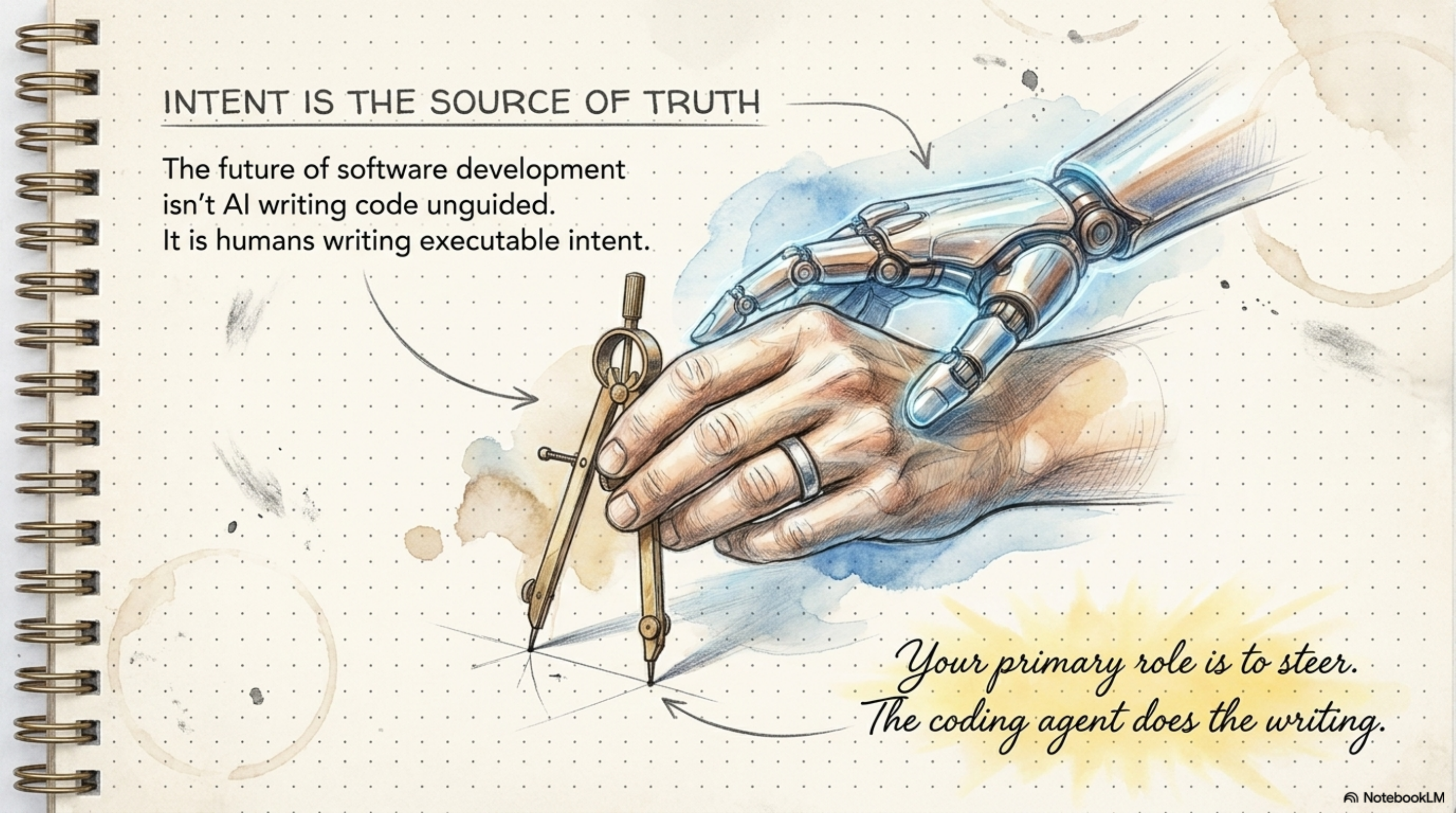
We've reached the end of the road. Remember Ahmed from the start of this article — the one whose demo fell apart in front of the client? Let's sum up what would have gone differently if he'd been working with SDD from day one — and that's really the summary of everything we've learned:
First: the specification is the fundamental unit of programming — not the code. Code is a secondary artifact derived from validated intent. Ahmed was stacking prompts on top of each other with no memory — the spec is that memory.
Second: structure isn't a luxury — it's the difference between a team that drifts and a team that stays on course. Vibe coding is fast but not sustainable. And SDD isn't slow — it's disciplined. The difference between the two shows up not on day one... but in month three.
Third: the AI agent isn't the problem — vague intent is the problem. When intent is precise and enforced, even a mid-tier model outperforms a frontier model running in vibe-coding mode. So before you pay more for a stronger model, try paying more time for a clearer spec.
As AI continues to evolve, the specification will become the fundamental unit of programming. Spec Kit hands you the toolkit to manage that transition — not tomorrow, but today.
Let's Go — Your First SDD Project
Open your terminal right now — not tomorrow — and walk these six steps:
- Init:
specify init . - Constitution:
/speckit.constitution - Specify:
/speckit.specify - Plan:
/speckit.plan - Tasks:
/speckit.tasks - Implement:
/speckit.implement
And before you go, let me leave you with the question this whole article was building toward: vibe coding is fast and easy — but is speed without structure worth the drift that follows? Or is it time to move the source of truth from the code to the spec?
The answer is yours. And the toolkit is right in front of you. 🚀
Section📎 References & Sources
- GitHub Spec Kit Repository
- Spec Kit Documentation
- Integrations Reference
- Spec Kit Cheatsheet — The reference you pin next to your monitor
This article is part of the Agentic AI series on Learn-in-Depth Journal.
Comments