Claude Code — Cheat Sheet 📋
"The page you print and pin next to your screen"
SectionInstall & Setup
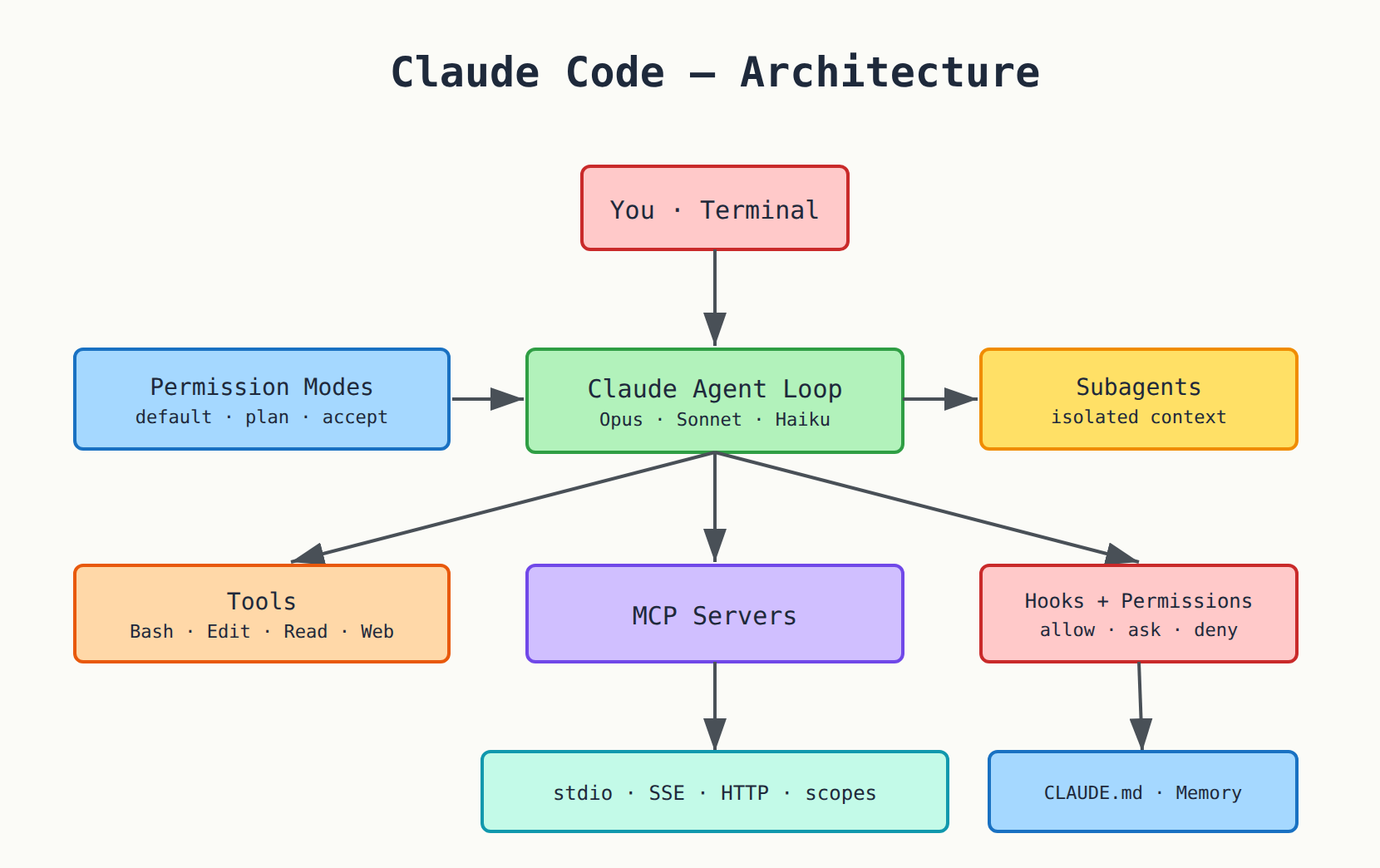
Claude Code is Anthropic's official terminal coding agent — it reads/edits files, runs shell commands, uses MCP servers, delegates to subagents, and can run headless.
# macOS / Linux / WSL — native install (recommended)
curl-fsSLhttps://claude.ai/install.sh|bash

# Windows PowerShell
irmhttps://claude.ai/install.ps1|iex

# Windows CMD
curl-fsSLhttps://claude.ai/install.cmd-oinstall.cmd&&install.cmd&&delinstall.cmd

# Stable channel instead of latest
curl-fsSLhttps://claude.ai/install.sh|bash-sstable

# A specific version
curl-fsSLhttps://claude.ai/install.sh|bash-s2.1.89

# Homebrew (no auto-update)
brewinstall--caskclaude-code

# WinGet
wingetinstallAnthropic.ClaudeCode

# npm (needs Node.js 22+ — installs the SAME native binary; claude does NOT use your Node at runtime)
npminstall-g@anthropic-ai/claude-code
# ⚠️ NEVER: sudo npm install -g
| Command | What it does | When to use | Why it matters |
|---|---|---|---|
claude --version | Prints the version number | Confirm your build | Verifies the install |
claude doctor | Read-only install + settings check (no session) | Something's off | Diagnoses without changing anything |
claude update | Update to the latest version | Manual update | Homebrew & pkg managers don't auto-update |
claude (first run) | Opens a session and prompts browser login | First run | Needs a Pro / Max / Team / Enterprise / Console account |
claude setup-token | Generates a long-lived OAuth token | For CI & scripts | Auth without a browser |
Auth: If the ANTHROPIC_API_KEY env var is set, Claude prompts once to approve the key instead of opening a browser. Enterprise providers: Amazon Bedrock, Google Cloud Vertex AI, Microsoft Foundry.
System requirements: macOS 13+ / Windows 10 1809+ / Ubuntu 20.04+ / Debian 10+ / Alpine 3.19+, 4GB+ RAM, x64/ARM64, ripgrep bundled. On native Windows, Git for Windows is optional (enables the Bash tool via Git Bash; otherwise it uses the PowerShell tool).
SectionCore CLI Commands
| Command | What it does | When to use | Why it matters |
|---|---|---|---|
claude | Start an interactive session | Daily use | The main entry point |
claude "query" | Start with an initial prompt | Jump in with a question | Saves a step |
claude -p "query" | Print mode: run via SDK, print, exit | headless / scripts | Key to automation |
cat file | claude -p "query" | Process piped content | Analyze a log or file | Combine with terminal tools |
claude -c | Continue the most recent conversation in this dir | Resume your work | No need to recall the ID |
claude -c -p "query" | Continue via SDK (headless) | Chained automation | Keeps context |
claude -r "<session>" "query" | Resume a session by ID/name (or picker) | Return to a specific chat | Precise session control |
claude update | Update to the latest version | Manual update | For Homebrew & pkg managers |
claude install [version] | Install / reinstall the native binary | Fix an install | Pins a specific version |
claude doctor | Read-only install + settings diagnostics | Troubleshoot | No session needed |
claude mcp | Configure MCP servers (subcommands below) | Add external tools | Wire up data/tools |
claude agents | Open agent view: monitor/dispatch parallel background sessions | Multi-task in parallel | Monitoring for background agents |
claude auth login / logout / status | Sign in / out / show status | Account management | Switch accounts |
claude setup-token | Long-lived OAuth token for CI | Auth in pipelines | Automated auth |
claude plugin | Manage plugins | Add/remove plugins | Extend the tool |
claude project purge [path] | Delete local Claude state for a project | Clean up | Start fresh |
SectionKey Flags
| Flag | What it does | When to use |
|---|---|---|
-p, --print | Print response, no REPL (headless/SDK) | Automation & scripts |
-c, --continue | Load the most recent conversation in the cwd | Resume your work |
-r, --resume | Resume a specific session by ID/name (or picker) | Return to a chat |
--fork-session | On resume, make a new session id instead of reusing | Safe forking |
--model | Set the model by alias or full name | Pick Opus/Sonnet/Haiku |
--fallback-model | Auto-fallback model(s) when the primary is overloaded | Reliability |
--permission-mode | Start in a permission mode (default/acceptEdits/plan/bypassPermissions) | Control safety |
--dangerously-skip-permissions | Skip all permission prompts (== bypassPermissions) | Sandboxed envs only ⚠️ |
--allowedTools / --allowed-tools | Tools that run without prompting | Trusted automation |
--disallowedTools / --disallowed-tools | Deny rules for tools | Block certain tools |
--tools | Restrict which built-in tools Claude may use | Narrow permissions |
--add-dir | Add extra working directories to read/edit | Multi-directory work |
--output-format | Print-mode output: text | json | stream-json | Programmatic parsing |
--input-format | Print-mode input: text | stream-json | Streaming input |
--json-schema | Force validated JSON output matching a schema | Guaranteed shape |
--mcp-config | Load MCP servers from JSON file(s)/string | Ad-hoc MCP setup |
--strict-mcp-config | Use only the servers from --mcp-config | Isolate MCP |
--append-system-prompt | Append text to the default system prompt | Extra instructions |
--system-prompt | Replace the whole system prompt | Full control |
--agents | Define subagents inline via JSON | Ad-hoc agents |
--agent | Use a specific agent for the session | Custom behavior |
--max-turns | Cap the number of agentic turns | Automation guardrail |
--max-budget-usd | Stop after spending this many dollars on the API | Cost control |
--session-id | Use a specific UUID for the session | Programmatic linking |
--settings | Path to settings JSON or inline JSON | Custom config |
--setting-sources | Which sources to load: user,project,local | Control config |
--verbose | Full turn-by-turn output | Debugging |
--worktree, -w | Start in an isolated git worktree | Work on a separate feature |
--permission-prompt-tool | MCP tool to handle permission prompts non-interactively | Full automation |
--version, -v | Print the version | Confirm your build |
SectionHeadless & Programmatic
# One-shot: print and exit
claude-p"explain the root cause"

# Structured JSON output (result, cost, session_id...)
claude-p"summarize this diff"--output-formatjson

# Streaming NDJSON events — with streaming input
claude-p"refactor auth"--output-formatstream-json--input-formatstream-json

# Pipe content from another tool
caterror.log|claude-p"explain the root cause"

# Automation guardrails
claude-p"fix failing tests"\
--max-turns8\
--max-budget-usd2.00\
--allowedTools"Read,Edit,Bash(npm test:*)"\
--permission-modeacceptEdits\
--session-id123e4567-e89b-12d3-a456-426614174000

# Long-lived auth for CI
claudesetup-token
The Claude Agent SDK (TypeScript / Python) wraps all of this so you can build custom agents.
SectionPermission Modes
| Mode | What it does | When to use |
|---|---|---|
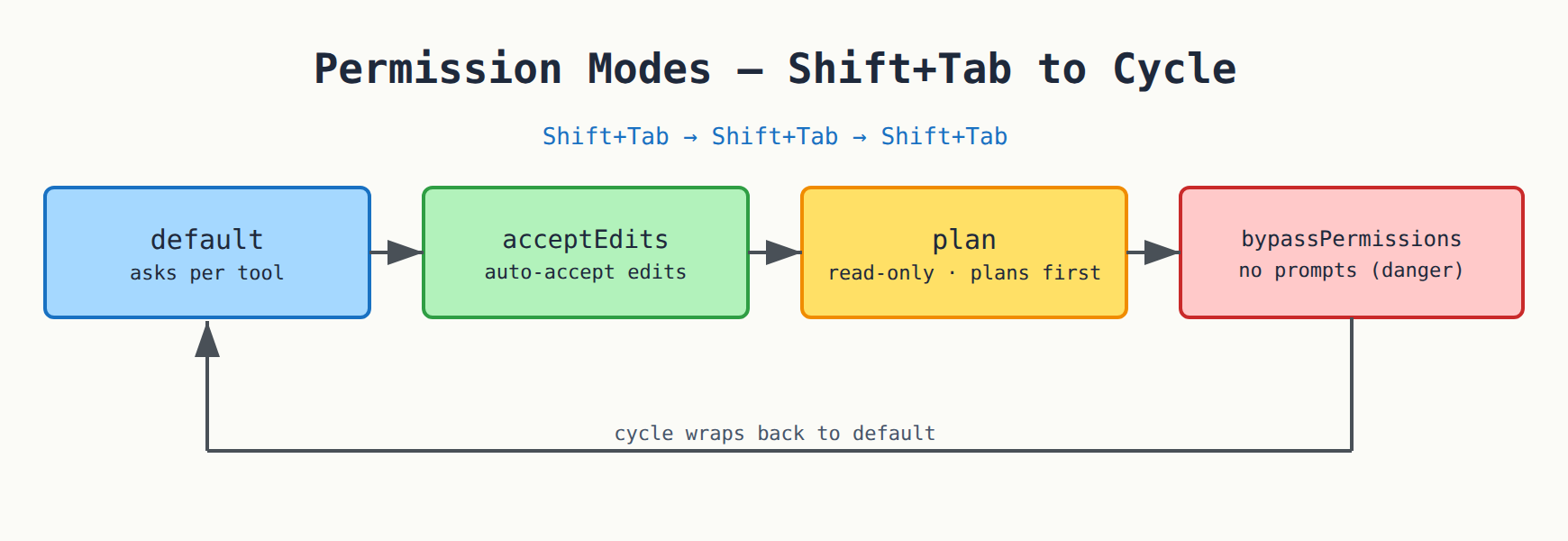
| default | Asks the first time it uses each kind of tool | Normal use — safest |
| acceptEdits | Auto-accepts file edits (still asks for risky bash) | Many trusted edits |
| plan | Read-only: plans and proposes, does not modify until you approve | A big task that needs thought |
| bypassPermissions | No prompts at all (dangerous — --dangerously-skip-permissions) | Sandboxed envs only ⚠️ |
Switching: Shift+Tab cycles the modes (default → acceptEdits → plan → …). Or start directly in a mode with --permission-mode.
SectionSession & Conversation
| Command | What it does | When to use | Why it matters |
|---|---|---|---|
/clear (aliases: /reset, /new) | Start a new conversation, empty context (keeps project memory) | Start a new topic | Clean context = better results |
/resume | Return to an earlier conversation | Get back to old work | Saves time |
/rewind | Roll code and conversation back to a checkpoint | The agent did something wrong | Undoes edits and context together |
/compact [instructions] | Summarize the conversation to free context | You're near the context limit | Keeps the important bits, saves tokens |
/branch [name] | Branch the conversation at this point | Try a different path | Experiment without losing the original |
/background [prompt] (alias /bg) | Detach the session to run as a background agent | Work in the background | Lets you keep going |
/fork <directive> | Spawn a forked subagent that inherits the conversation | Independent side work | Inherits the context |
/export [filename] | Export the conversation as plain text | Share or save | Archiving |
/context [all] | Visualize context usage as a colored grid | Understand your context | Know when to compact |
/status | Current session status | Quick glance | Diagnostics |
/cost (= /usage) | Token usage + costs | Watch spend | Cost control |
/copy [N] | Copy the last (or Nth-latest) response to clipboard | Grab a reply fast | Paste elsewhere |
/btw <question> | Quick side question, not added to the conversation | A simple question | Doesn't pollute context |
SectionAll Slash Commands
Built-in
| Command | What it does | When to use |
|---|---|---|
/add-dir <path> | Add a working dir for this session | Work in another dir |
/agents | Manage subagent configurations | Create/edit agents |
/cd <path> | Move the session to a new working dir | Change work location |
/chrome | Configure Claude in Chrome | Browser integration |
/color [color|default] | Set the prompt bar color | Customize the look |
/config [key=value] (alias /settings) | Open Settings or set a setting directly | Change configuration |
/desktop (alias /app) | Continue this session in the Desktop app | Move to the GUI |
/diff | Interactive diff viewer of uncommitted changes | See what changed |
/exit (alias /quit) | Exit the CLI | Close |
/fast [on|off] | Toggle fast mode | Faster replies |
/focus | Toggle focus view | Focused display |
/help | Show help + available commands | Learn the commands |
/hooks | View hook configurations for tool events | Review hooks |
/ide | Manage IDE integrations + show status | Connect the editor |
/init | Initialize the project with a CLAUDE.md guide | New project |
/keybindings | Open your keyboard shortcuts file | Customize keys |
/login / /logout | Sign in / out | Account management |
/mcp [reconnect|enable|disable] | Manage MCP connections + OAuth | Manage MCP |
/memory | Edit CLAUDE.md memory files + manage auto-memory | Update memory |
/mobile (aliases /ios, /android) | QR to download the mobile app | Move to mobile |
/model [model] | Switch model, save as default | Change the model |
/permissions (alias /allowed-tools) | Manage allow/ask/deny tool rules | Control permissions |
/rewind | Roll code and conversation back to a checkpoint | Undo |
/status | Current session status | Quick glance |
/tasks | List this session's background work | Monitor background work |
/teleport | Pull a web session into this terminal | Move from the web |
/remote-control | Continue a local session from another device | Remote control |
/usage (alias /cost) | Token usage + costs | Watch spend |
Bundled skills (ship with Claude Code)
| Command | What it does | When to use |
|---|---|---|
/code-review [level] [--fix] [--comment] [target] | Review the diff for bugs + cleanups — ultra = deep cloud multi-agent review | Before a merge |
/security-review | Check the diff for security vulnerabilities | Confirm no vulnerabilities |
/simplify | Cleanup-only review that applies fixes (no bug hunting) | Tidy up the code |
/plan | Switch into plan mode before a large change | Plan first |
/debug [description] | Enable debug logging + troubleshoot | Fix problems |
/deep-research <question> | Fan out web searches + synthesize a cited report | Deep research |
/fork <directive> | Spawn a forked subagent that inherits the conversation | Side work |
/goal [condition|clear] | Keep working until a condition is met | A task with a clear goal |
/loop [interval] [prompt] (alias /proactive) | Run a prompt repeatedly while the session stays open | Monitoring |
/batch <instruction> | Orchestrate large-scale parallel changes across a codebase | Bulk edits |
/dataviz [request] | Design guidance for charts/dashboards | Data design |
/claude-api | Load Claude API reference material | Work on the API |
/fewer-permission-prompts | Scan transcripts + add an allowlist | Fewer prompts |
/install-github-app | Install the Claude GitHub App for a repo | GitHub integration |
/doctor (alias /checkup) | Setup checkup that diagnoses/fixes issues | Diagnostics |
Aliases: /settings=/config · /reset,/new=/clear · /cost=/usage · /bug,/share=/feedback · /quit=/exit · /checkup=/doctor · /allowed-tools=/permissions · /bg=/background · /app=/desktop · /proactive=/loop.
SectionDelegation & Subagents
Subagents are specialized AI assistants that handle a specific kind of task in their own context window, with their own system prompt, tool access, and permissions — and they return only a summary to the main chat.
Why they matter: (1) preserve the main context, (2) enforce tool constraints, (3) reuse config across projects, (4) specialize behavior, (5) control cost by routing tasks to cheap/fast models like Haiku.
How delegation happens: Claude reads each subagent's description and delegates automatically when a task matches. You can also force it:
>Usethecode-reviewersubagenttocheckmychanges
Managing them & file locations:
| Location | Purpose |
|---|---|
/agents | Create/edit/view, set tools and model |
.claude/agents/<name>.md | Project-level agent (shared via git) |
~/.claude/agents/<name>.md | Personal agent (all your projects) |
claude agents / --bg | Run many independent parallel sessions and monitor them |
--agents (flag) | Define subagents inline via JSON |
Frontmatter fields: name · description (when to use it — write it well!) · tools (optional; omit = inherit all) · model (optional: sonnet/opus/haiku or 'inherit').
---
name: code-reviewer
description: Expert code review specialist. Use PROACTIVELY after writing or changing code.
tools: Read, Grep, Glob, Bash
model: sonnet
---
You are a senior code reviewer. When invoked: run git diff, focus on changed files, review for
readability, bugs, security. Give feedback grouped by priority.
Mental model: the main agent = orchestrator; subagents = focused workers with clean context; only the summary comes back.
SectionCustom Commands (Skills)
Custom commands are merged into skills. .claude/commands/deploy.md and .claude/skills/deploy/SKILL.md both make /deploy.
| Location | Scope |
|---|---|
.claude/commands/ or .claude/skills/ | Project (shared via git) |
~/.claude/commands/ or ~/.claude/skills/ | Personal |
Frontmatter fields: description · argument-hint · allowed-tools · model · (skills add) invocation control + run-in: subagent.
Body specials:
$ARGUMENTS= everything typed after the command ·$1,$2, … = positional args.!at the start of a line = run a bash command and embed its output (needs allowed-tools Bash).@path/to/file= embed a file's contents.
Namespacing: subdirectories → /frontend:lint, /backend:deploy. Skills load their body only when used (cheap until needed). Claude can auto-invoke a skill when relevant, or you invoke /name.
---
description: Create a git commit
argument-hint: [message]
allowed-tools: Bash(git add:*), Bash(git commit:*)
model: claude-haiku-4-5
---
## Context
- Current status: !`git status`
- Current diff: !`git diff HEAD`
## Task
Create a single commit with message: $ARGUMENTS
SectionMemory & Config
CLAUDE.md = persistent instructions, auto-loaded. Hierarchy (all concatenate, later can add to earlier):
| Priority | File | Scope |
|---|---|---|
| 1 | Enterprise/managed policy (system dir) | Org policy |
| 2 | ~/.claude/CLAUDE.md | All your projects |
| 3 | ./CLAUDE.md | The project (shared via git) |
| 4 | ./CLAUDE.local.md | Personal (gitignored) — being deprecated for imports |
- Nested
CLAUDE.mdin subdirs load on demand when Claude touches files there. /init= scaffold a CLAUDE.md for the project./memory= open + edit memory files.#at the start of input = "remember this" → appends a line to a memory file.@path/import.mdinside CLAUDE.md = import another file (max 5 hops).- Auto-memory: Claude writes notes to
~/.claude/projects/<project>/memory/(MEMORY.md index). Survives/compact. Gitignored. - Path-scoped rules:
.claude/rules/*.mdwithpaths:frontmatter globs load only when Claude reads matching files.
settings.json hierarchy (precedence high → low)
Managed(org)→command-lineflags→.claude/settings.local.json(personal,gitignored)
  → .claude/settings.json (project, shared) → ~/.claude/settings.json (user)
Key fields: model · permissions {allow, ask, deny, defaultMode} · env · hooks · autoUpdatesChannel · minimumVersion · editorMode ("vim"/"normal") · autoMemoryEnabled · outputStyle.
SectionHooks
Deterministic handlers (shell/HTTP/…) fired at lifecycle events (settings.json → hooks).
| Event | When it fires |
|---|---|
SessionStart | Session begins/resumes (matchers: startup, resume, clear, compact) |
UserPromptSubmit | You submit a prompt, before Claude sees it |
PreToolUse | Before a tool call runs (can allow/deny/ask) |
PostToolUse | After a tool call succeeds |
PostToolUseFailure | After a tool call fails |
Notification | Claude sends a notification (e.g. needs input) |
Stop | Claude finishes responding |
SubagentStart / SubagentStop | A subagent spawns / finishes |
PreCompact / PostCompact | Around context compaction |
SessionEnd | The session terminates |
There are more:
PermissionRequest,PermissionDenied,TaskCreated/Completed,FileChanged,WorktreeCreate/Remove, etc.
{
  "hooks": {
    "PreToolUse": [
      {
        "matcher": "Bash",
        "hooks": [
          {
            "type": "command",
            "if": "Bash(rm *)",
            "command": "${CLAUDE_PROJECT_DIR}/.claude/hooks/block-rm.sh",
            "args": []
          }
        ]
      }
    ]
  }
}
- Matcher:
""/"*"/omitted = all · plain string = exact (e.g."Edit|Write") · other chars = regex. - Hook types:
command,http,mcp_tool,prompt,agent. Common fields:if,timeout(default 600s),statusMessage. - Exit codes:
0= ok (stdout may carry JSON) ·2= BLOCK (stderr → Claude) · other = non-blocking error. - JSON control (PreToolUse):
{"hookSpecificOutput":{"hookEventName":"PreToolUse","permissionDecision":"deny","permissionDecisionReason":"..."}}— values allow/deny/ask/defer. - Universal JSON:
continue(false stops Claude) ·stopReason·suppressOutput·systemMessage·additionalContext. - Path vars:
${CLAUDE_PROJECT_DIR}·${CLAUDE_PLUGIN_ROOT}.
SectionMCP
Connect external tools/data.
# stdio
claudemcpadd<name>--<command>[args]

# SSE / HTTP
claudemcpadd--transportsse<name><url>
claudemcpadd--transporthttp<name><url>

# From JSON
claudemcpadd-json<name>'<json>'

# Import from Claude Desktop
claudemcpadd-from-claude-desktop

# List / details / remove
claudemcplist
claudemcpget<name>
claudemcpremove<name>
| Scope | Meaning |
|---|---|
local (default) | This project only |
project | Shared via .mcp.json in the repo |
user | All your projects |
- In the REPL:
/mcpshows servers + status, does OAuth login (/mcp→ authenticate), reconnect/enable/disable. - Use resources in prompts:
@server:protocol://resource. - MCP servers can expose prompts as slash commands:
/mcp__server__promptname.
{
  "mcpServers": {
    "github": {
      "command": "npx",
      "args": ["-y", "@modelcontextprotocol/server-github"],
      "env": { "GITHUB_TOKEN": "..." }
    }
  }
}
SectionPermission Rules
allow/ask/deny rules in settings.json (permissions.allow/ask/deny):
| Rule | Meaning |
|---|---|
Read, Edit, Write, Bash, WebFetch, WebSearch, Grep | A whole tool |
Bash(npm run test:*) | Prefix match |
Bash(git *) | All git commands |
Bash(git status) | Exact command |
Read(./src/**) | Read a specific path |
Read(//etc/**) | Absolute path |
deny Read(./.env) | Block reading a sensitive file |
deny Read(./secrets/**) | Block a whole folder |
mcp__server__tool | A specific MCP tool |
/permissionsopens the rules UI.defaultModein settings sets the starting mode.
SectionShortcuts & Input
Prefixes at the start of a line:
| Symbol | What it does |
|---|---|
/ | slash command / skill |
! | bash mode (run shell directly) |
@ | file-path mention/autocomplete |
# | add to memory |
| Shortcut | Function |
|---|---|
Shift+Tab | Cycle permission modes (default → acceptEdits → plan → …) |
Esc | Interrupt Claude / close a dialog |
Esc Esc (double, empty input) | Open the rewind/checkpoint menu |
Ctrl+C | Cancel current input/operation |
Ctrl+D | Exit |
Ctrl+L | Clear screen (keeps session) |
Ctrl+R | Reverse-search history / toggle verbose |
Ctrl+O | Toggle transcript / expand |
Ctrl+V (Cmd+V on some terms) | Paste an image |
Up/Down | Command history |
| Multiline | \ + Enter, or Option/Alt+Enter, or Ctrl+J |
| Vim mode | Enable via /config (editorMode: vim): Esc→NORMAL, i/a→INSERT, hjkl, dd, yy, p, u, . |
Image input: drag/paste screenshots for Claude to analyze.
SectionEnv Vars & Config Paths
| Env var | What it does |
|---|---|
ANTHROPIC_API_KEY | API key; Claude prompts once to approve instead of a browser |
DISABLE_AUTOUPDATER=1 | Disable the background update check |
DISABLE_UPDATES=1 | Block all updates |
CLAUDE_CODE_GIT_BASH_PATH | Path to Git Bash on Windows (enables the Bash tool) |
USE_BUILTIN_RIPGREP | Controls use of the bundled ripgrep |
| Path | Purpose |
|---|---|
~/.claude/settings.json | User settings |
.claude/settings.json | Project settings (shared) |
.claude/settings.local.json | Personal settings (gitignored) |
~/.claude/CLAUDE.md | User memory |
./CLAUDE.md | Project memory |
.mcp.json | Project-level MCP |
.claude/agents/ | Subagent definitions |
.claude/commands/ | Custom commands |
SectionQuick Comparison
| Dimension | Claude Code | GitHub Copilot CLI | OpenCode |
|---|---|---|---|
| Maker | Anthropic | GitHub | Community (open source) |
| Default model | Claude (Opus/Sonnet/Haiku) | Claude Sonnet 4.5 | Configurable |
| Model choice | Claude family (+ Bedrock/Vertex/Foundry) | Multi (Claude, GPT-5) | Any provider (Ollama, OpenAI, Anthropic…) |
| Subagents/Delegation | ✅ .claude/agents/, /agents | ✅ subagents + rubber-duck | ✅ primary + sub |
| Custom commands | ✅ skills / .claude/commands/ | ✅ skills | ✅ |
| Hooks | ✅ rich lifecycle | ✅ 9 types | ✅ |
| MCP | ✅ stdio/SSE/HTTP + scopes | ✅ (+ built-in GitHub MCP) | ✅ |
| Permission modes | ✅ default/acceptEdits/plan/bypass | ✅ Allow/Ask/Deny | ✅ |
| Plan mode | ✅ | ✅ | ✅ |
| Checkpoints/rewind | ✅ /rewind, Esc Esc | ✅ /rewind | partial |
| Headless / SDK | ✅ -p, Agent SDK | ✅ -p | ✅ |
| Background agents | ✅ claude agents, --bg | ✅ /delegate cloud | ❌ |
| IDE ext | ✅ VS Code + JetBrains | ✅ | ✅ |
| Cost | Pro $20 / Max / API / Console | Copilot sub $10–39/mo | Free + your API keys |
| Source | Proprietary binary | Proprietary (MIT-licensed CLI) | Open source |
Comments