GitHub Copilot CLI — The AI Agent That Works in Your Terminal 🤖
"The terminal in front of you — that's not just a place to type commands. That's where an AI builds real code, opens PRs, manages issues, and comes back to tell you it's done."
Section1. This Isn't About Autocomplete
Picture this: it's 3 AM, you've got a bug in the authentication module, CI is red, and a PR is waiting for review. You open your IDE and Copilot suggests a line — but you need more than a line. You need something that reads the issue, understands the context, modifies the code, runs the tests, and opens the PR. Not autocomplete — an agent.
That's exactly where GitHub Copilot CLI comes in. This isn't the IDE plugin that completes your sentences. This is a real agent that lives in your terminal — reads entire files, runs shell commands, deals with GitHub issues and PRs, builds plans and executes them step by step, and even works on autopilot without you intervening.
You might say: "But I can do all of that myself in the terminal." True. The difference is that this agent understands context — it knows your repo, sees your issues, reads your codebase, and then acts rather than just completing. You'd think this is just hype and marketing? Let me show you what's actually inside.
Grab your coffee and focus with me, because there's more here than meets the surface.
Section2. What It Actually Is — And What Makes It Different
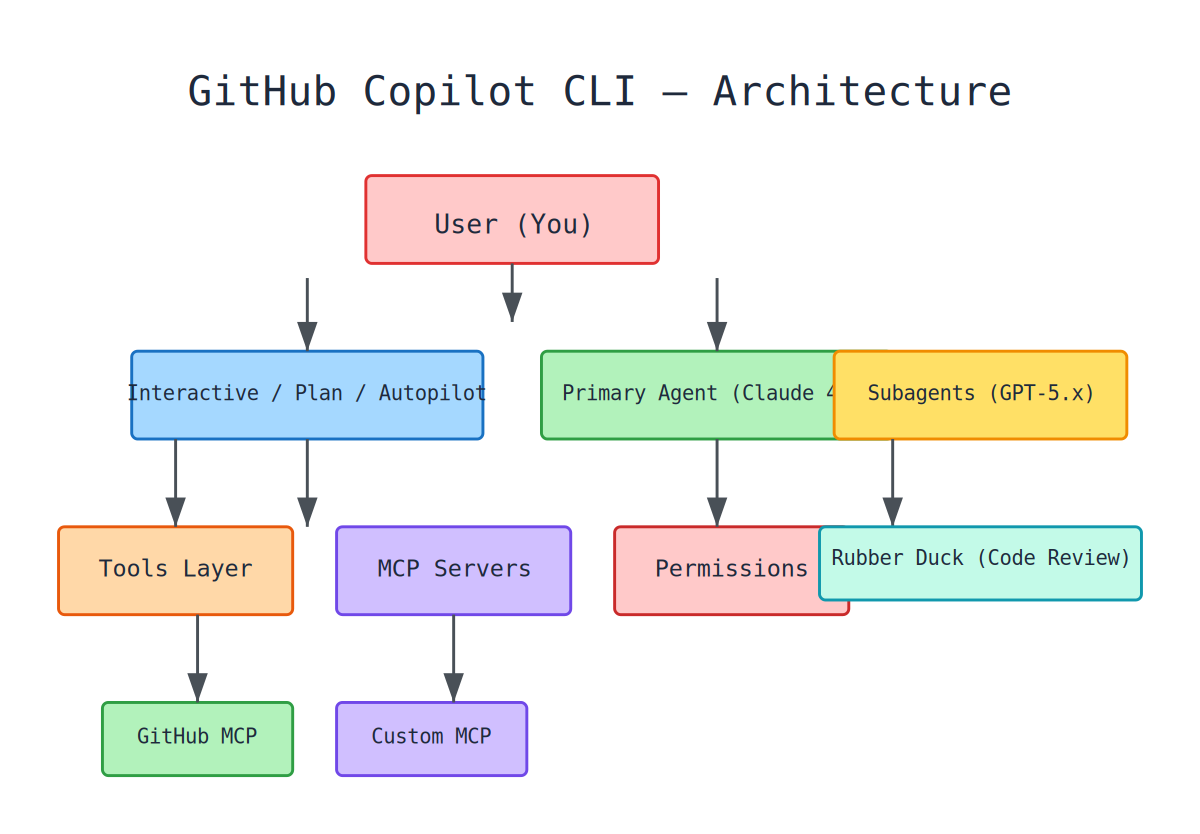
In plain terms: GitHub Copilot CLI is the same agentic harness that powers the Copilot coding agent on the cloud (the one that works on PRs in GitHub.com), but it runs locally in your terminal.
The Quick Facts
- Default model: Claude Sonnet 4.5 — with access to GPT-5 family, Claude Opus 4.7/4.8, Fable 5, and more
- GitHub MCP Server built-in: From day one you can work with issues, PRs, repos, and workflows — no setup required
- Custom Agents: Define specialized agents in
.github/agents/*.md— each with its own model and tools - Skills system: Reusable instruction sets you write once and invoke anytime
- Hooks system: 9 hook types that let you intercept and modify agent behavior
- Permission triad: Allow / Ask / Deny — full control over what the agent can do
Imagine sitting in your terminal. You type:
copilot
and start typing: "Fix the login bug and create a PR." The agent understands context, reads the code, modifies files, runs tests, opens the PR — and comes back to tell you it's done. This isn't imagination — this is real.
Installation
# macOS / Linux
curl-fsSLhttps://gh.io/copilot-install|bash

# Homebrew
brewinstallcopilot-cli

# Windows
wingetinstallGitHub.Copilot

# npm (cross-platform)
npminstall-g@github/copilot
First run asks you to /login and authenticate with GitHub. After that — you're ready.
Section3. The 3 Modes — From Ask to Autopilot
Now you might say: "I don't want the agent modifying anything without me seeing it." And you'd be right. That's why there are 3 modes:
| Mode | How to Enter | What It Does | When to Use |
|---|---|---|---|
| Interactive (default) | copilot | Proposes and executes, asking before each tool | When you want control over every step |
| Plan | Shift+Tab or --mode plan | Builds an execution plan without writing code | When you want to understand scope first |
| Autopilot | Shift+Tab twice or --autopilot | Continues working until task is complete | When you trust the objective and want it done |
Plan Mode — Understand Before You Build
In Plan Mode, Copilot doesn't modify anything. It analyzes your request, asks clarifying questions, and builds a structured plan — then waits for your approval. Excellent for complex tasks where you need to understand the scope before any code gets written.
Autopilot Mode — Trust and Let Go
copilot--autopilot
/autopilotFixallfailingtests
/goalRefactortheauthenticationmodule
You might think "that's dangerous!" — and yes, if you're not sure, don't use it. But there are guardrails: a 5-continuation-message limit (configurable with --max-autopilot-continues), and permissions you approve carry over. Plus /rewind is there to undo anything.
Section4. Slash Commands — Over 60 Commands at Your Fingertips
The CLI isn't just a conversation — it's a full control panel. Over 60 slash commands covering everything you need. I won't list every single one (that's what the cheatsheet is for), but here's the flavor:
Session Management — The Daily Drivers
Everything starts with /. Let's see the essentials:
/loginand/logout— Authentication/model— Switch AI models (Claude, GPT-5, Opus...)/clearor/new— Start a fresh conversation/resume— Continue a previous session/fork— Create an independent copy of the session for safe experimentation/compact— Compress context when it's getting full
Execution Commands — Where the Real Work Happens
/agent— Pick or create a custom agent (this is a topic on its own)/delegate— Delegate a task to the cloud coding agent — it creates a branch, opens a PR, and works in the background/autopilot— Toggle autopilot mode/rubber-duck— Request independent critique from another agent. Yes, AI reviewing AI.
File & Review Commands
/diff— Show changes with vim-style navigation (j/k, w/W, g/G)/review— Security review of code changes/rewind— Undo to a previous git checkpoint
Context & Configuration
/context— Show token usage and loaded context/env— Show loaded environment (instructions, MCP, skills, hooks)/memory on/off/show— Manage persistent memory across sessions/init— Generate copilot instructions for the current project
MCP & Extensions
/mcpand/mcp search— Manage and discover MCP servers/plugin— Install and manage community plugins
Scheduling — The Secret Feature Most People Don't Know About
/every1hRunfrontendtestsandreportanyfailures
/after30mCheckifthebuildpassed
Think this is simple? It's not. This means you can set up automated monitoring without leaving the terminal. The CLI itself runs commands periodically and reports back.
Direct Shell Commands
Prefix any command with ! to run it directly:
!git status
!npm test
It uses your $SHELL and respects aliases and rc files. No need to leave the CLI to run something.
Section5. The Agents System — Not Just One Agent
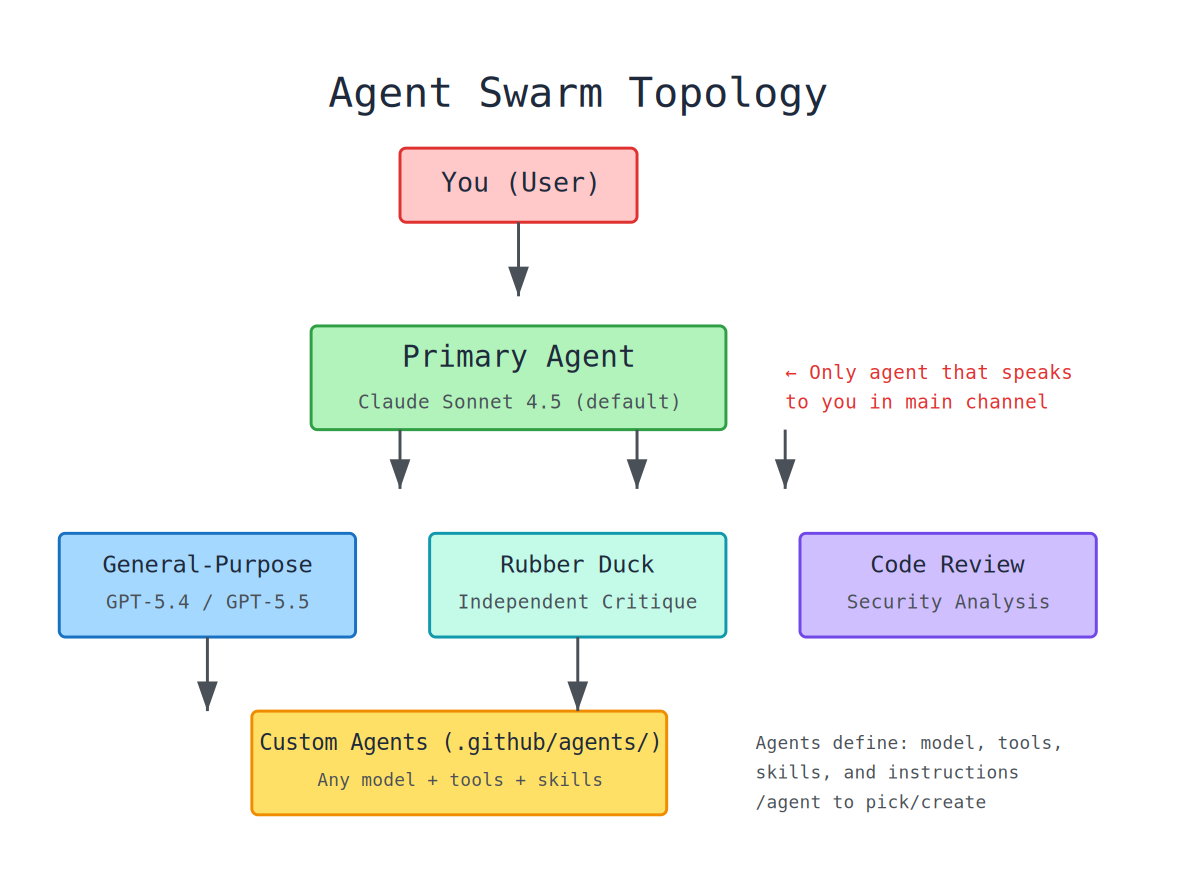
You'd think one agent is enough? Here's where it gets interesting.
The Primary Agent
This is the one that talks to you directly — Claude Sonnet 4.5 by default. It works in the main channel and executes tasks.
Subagents
When a task needs more depth, the Primary calls subagents:
- General-purpose subagent — Uses GPT-5.4 or 5.5, specialized for tasks that need a different model
- Rubber Duck agent — An independent agent (Claude-powered) that reviews the primary's work and returns constructive criticism. Yes, AI reviewing AI. Activate with
/rubber-duck - Code Review agent — Reviews code changes for security vulnerabilities
Custom Agents — Here's Where It Gets Powerful
You can define specialized agents in .github/agents/*.md:
---
name: Security Auditor
description: Reviews code for security vulnerabilities
model: claude-opus-4.7
tools: [view, grep, glob]
skills: [security-review]
deferred-tool-loading: true
---
You are a security auditor. Review all code changes for...
Locations:
.github/agents/*.md— project-level~/.copilot/agents/*.md— personal- Organization's
.githubrepo — organization-level
Each agent can specify its own model, skills that load automatically, and tools it has access to. You can create an agent specifically for security that uses Opus 4.7 and carries security review skills — something you can't do in Claude Code.
The key point: Subagents cannot speak in the main channel. Only the Primary Agent can deliver aggregated results to you. This is by design — to prevent chaos.
Section6. The Skills System — Write Once, Use Forever
You might say: "I don't need skills, I'll write the prompt every time." That's exactly what wastes your time. Skills are reusable instruction sets that load into the agent's context when needed.
Each skill has a SKILL.md with YAML frontmatter:
---
name: deploy-to-staging
description: Deploy the current branch to staging environment
trigger: /deploy-staging
---

You are a deployment specialist. When the user asks to deploy to staging:
1. Run the test suite first
2. Build the project
3. Deploy using the staging script
4. Report the deployment URL
Then type /deploy-staging in a session and the agent follows those exact instructions. No need to rewrite the prompt every time.
| Location | Priority |
|---|---|
.github/skills/ | High (project-level) |
.agents/skills/ | High (project-level) |
--plugin-dir skills | Highest (plugin-specific) |
~/.copilot/skills/ | Medium (personal) |
Section7. MCP — Connect to Any Service Without Setup
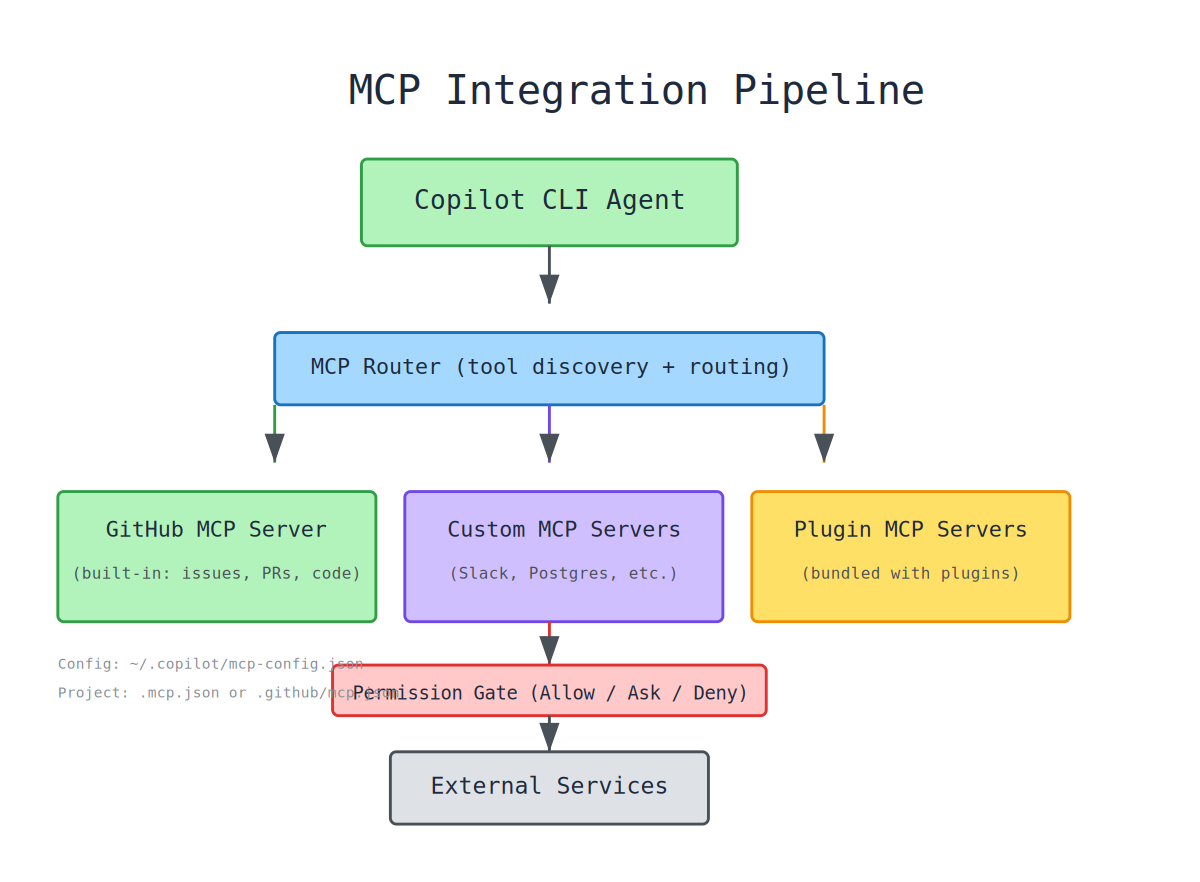
Model Context Protocol (MCP) is what lets Copilot CLI talk to external services. The beautiful part is that GitHub MCP Server is built in — no setup required.
Built-in GitHub MCP Server
Provides ready-made tools for: reading files and searching code (get_file_contents, search_code), managing issues (get_issue, list_issues, search_issues), managing PRs (pull_request_read, list_pull_requests), monitoring CI/CD (list_workflows, list_workflow_runs), and more. Use --enable-all-github-mcp-tools to enable all GitHub tools including read-write.
Custom MCP Servers
Add any service:
{
  "mcpServers": {
    "slack": {
      "command": "npx",
      "args": ["-y", "@modelcontextprotocol/server-slack"],
      "env": {"SLACK_BOT_TOKEN": "${SLACK_BOT_TOKEN}"}
    },
    "postgres": {
      "command": "npx",
      "args": ["-y", "@modelcontextprotocol/server-postgres", "postgresql://localhost/mydb"]
    }
  }
}
Config locations: ~/.copilot/mcp-config.json (user-level), .mcp.json (project-level), .github/mcp.json (shared project-level).
Section8. The Hooks System — Intercept Everything
Hooks let you intercept and modify agent behavior at key points. 9 types:
| Hook | When It Fires | Use Case |
|---|---|---|
preToolUse | Before a tool executes | Deny tool, modify args, inject context |
postToolUse | After a tool completes | Inject additional context into results |
sessionStart | When session starts | Setup, environment checks |
sessionEnd | When session ends | Cleanup, reporting |
subagentStart | Before subagent runs | Control subagent behavior |
subagentStop | When subagent stops | Process subagent results |
permissionRequest | When permission is requested | Auto-approve patterns |
agentStop | When agent stops (task_complete) | Final actions |
preMcpToolCall | Before MCP call | Control outgoing MCP metadata |
Example: auto-approve all read operations but ask for writes:
hooks:
  preToolUse:
    - matchers: ["View|Grep|Glob"]
      command: "approve-reads"
Section9. Permissions — The Allow/Ask/Deny Triad
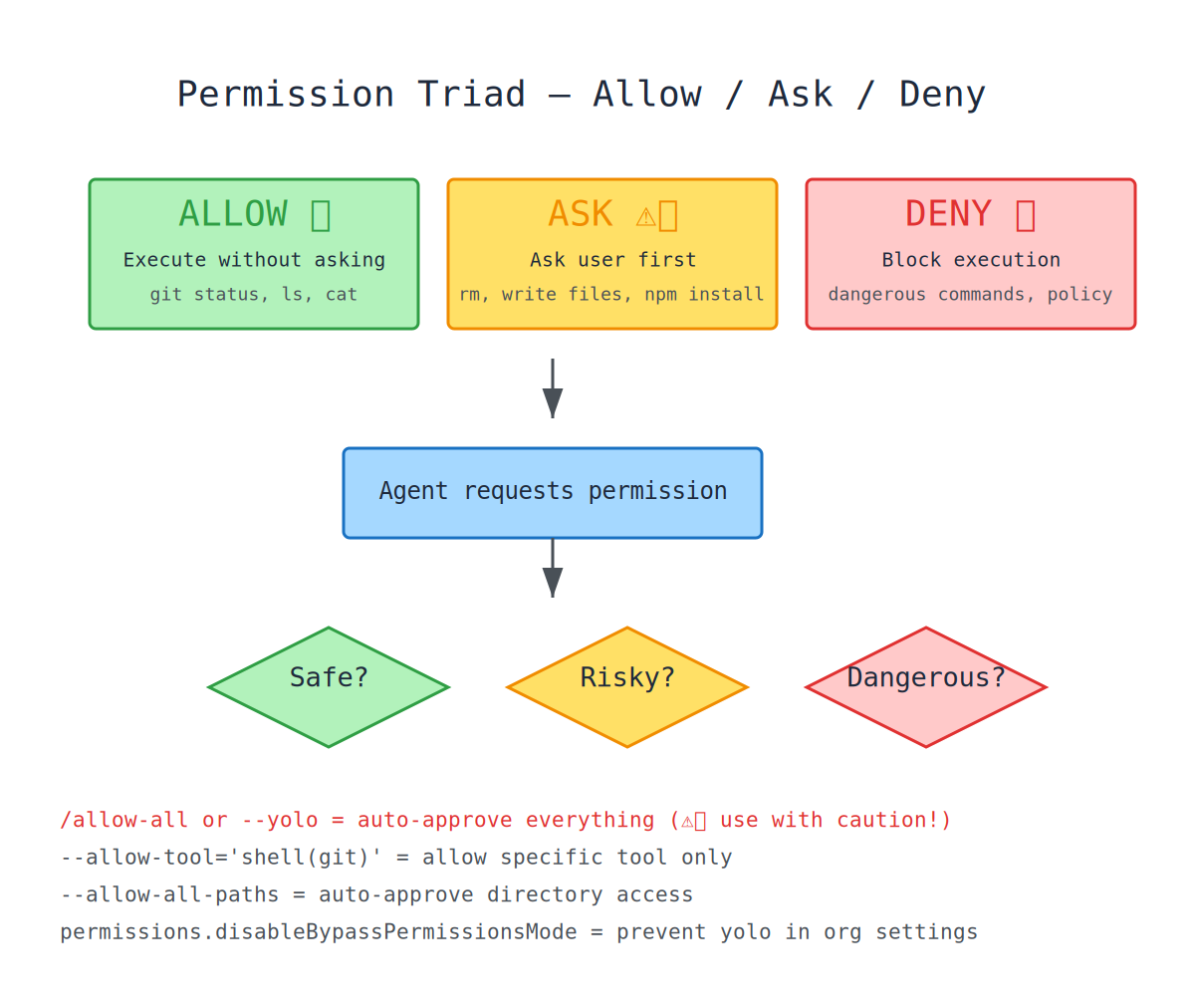
You might say: "But what can this agent actually do without me watching?" Great question. Copilot CLI has a three-tier permission system:
| State | Meaning | Example |
|---|---|---|
| ALLOW | Execute without asking | git status — always safe |
| ASK | Ask the user first | rm -rf node_modules — potentially dangerous |
| DENY | Refuse execution | Harmful or prohibited commands |
Quick permission commands:
/allow-all# Approve everything (dangerous!)
/yolo# Same as /allow-all
--allow-tool='shell(git)'# Allow specific tool
--allow-all-paths# Auto-approve directory access
--allow-all-urls# Auto-approve URL access
Security features: dangerous kill command patterns are filtered, LD_PRELOAD and GIT_EXTERNAL_DIFF trigger permission prompts, read-only gh commands are auto-approved.
Section10. Memory — Persistence Across Sessions
/memoryon# Enable memory
/memoryoff# Disable memory
/memoryshow# Display stored memories
Memory stores facts across sessions — project conventions, personal preferences, recurring patterns. It has user scope (personal) and repository scope (shared with collaborators).
Section11. Comparison: Copilot CLI vs Claude Code vs OpenCode
| Feature | GitHub Copilot CLI | Claude Code | OpenCode |
|---|---|---|---|
| Developer | GitHub | Anthropic | Community (Charmbracelet fork) |
| License | MIT | Proprietary | Apache 2.0 |
| Default Model | Claude Sonnet 4.5 | Claude Sonnet 4 | Configurable |
| Model Support | Multi (Claude, GPT-5 family) | Claude only | Multi (Ollama, OpenAI, etc.) |
| GitHub Integration | Native (built-in MCP server) | Via MCP | Via MCP |
| Custom MCP | ✅ Full support | ✅ Full support | ✅ Full support |
| Custom Agents | ✅ .github/agents/*.md | ❌ (single agent) | ✅ .opencode/agents/*.md |
| Skills System | ✅ Full skills system | ❌ (uses /commands) | ✅ Skills system |
| Hooks | ✅ 9 hook types | ✅ (limited) | ✅ Hooks system |
| Permissions | Allow/Ask/Deny | Allow/Deny | Allow/Ask/Deny |
| LSP Support | ✅ (TypeScript, Python, etc.) | ❌ | ❌ |
| Plan Mode | ✅ (Shift+Tab) | ✅ (Shift+Tab) | ✅ |
| Autopilot Mode | ✅ (experimental) | ❌ | ✅ |
| Session Resume | ✅ /resume | ✅ /resume | ✅ |
| Memory | ✅ /memory | ✅ (CLAUDE.md) | ✅ (AGENTS.md) |
| Subagents | ✅ (general-purpose, rubber duck) | ✅ (subagent) | ✅ (primary + sub) |
| Plugin System | ✅ Marketplace | ❌ | ✅ Extensions |
| Remote Control | ✅ --remote | ❌ | ❌ |
| Cloud Agent | ✅ /delegate | ❌ | ❌ |
| Shell Integration | ✅ ! prefix | ✅ ! prefix | ✅ ! prefix |
| Diff Viewer | ✅ /diff (vim-style) | ✅ Basic | ✅ |
| Scheduling | ✅ /every, /after | ❌ | ❌ |
| Voice Input | ✅ | ❌ | ❌ |
| Themes | ✅ GitHub Dark/Light | ❌ | ✅ |
| BYOK | ✅ (OpenAI, Anthropic, Azure) | ✅ (Anthropic only) | ✅ (any) |
| Cost | Copilot subscription ($10-39/mo) | $20/mo (Claude Pro) or API | Free (bring own keys) |
What truly sets Copilot CLI apart?
- Built-in GitHub MCP Server — No setup needed for issues, PRs, repos
- Extensible Agents system — Define specialized agents per domain
- Rubber Duck agent — AI reviewing AI, unique feature
- LSP Integration — Understands your code better than any competitor
- Plugin Marketplace — Install community plugins with one command
- Scheduling —
/everyand/afterfor automated monitoring - Cloud Delegation —
/delegatesends tasks to the cloud coding agent
Section12. Programmatic Mode — For CI/CD and Automation
You don't have to sit in an interactive session. Copilot CLI works as a programmatic tool:
copilot-p"What does this function do?"# Quick question
copilot-p"Run tests"--allow-tool='shell(npm test)'# Specify tools
copilot--modeautopilot-p"Refactor auth"# Autopilot
echo"Explain this error"|copilot# Pipe input
copilot-p"Analyze this image"--attachmentscreenshot.png# Attach file
copilot--continue# Continue last session
This opens the door to: CI/CD pipelines (automated test fixing), Git hooks (code review before commit), Scripts (repetitive task automation), Cron jobs (/every and /after for monitoring).
Section13. Keyboard Shortcuts
| Shortcut | Action |
|---|---|
Shift+Tab | Cycle modes (Interactive → Plan → Autopilot) |
Ctrl+C | Cancel current operation |
Esc Esc | Undo file changes to previous snapshot |
Ctrl+L | Clear terminal (keep session) |
Ctrl+O | Expand recent timeline entries |
Ctrl+E | Expand all timeline entries |
Ctrl+S | Stash/pop current prompt |
Ctrl+T | Toggle reasoning summaries |
Ctrl+Y | Accept highlighted completion |
Ctrl+X → B | Move task/shell to background |
Ctrl+X → / | Run slash command without losing input |
Ctrl+D | Queue slash command alongside message |
Tab | Accept completion / navigate picker |
@ | File/issue mention completion |
# | Issue reference |
/ | Slash command picker |
! | Shell command prefix |
& | Background delegate prefix |
j/k | Vim-style navigation |
w | Hide whitespace in diff |
Section14. Configuration Files
| File | Purpose |
|---|---|
~/.copilot/settings.json | User settings |
~/.copilot/config.json | Internal state (auto-managed) |
~/.copilot/mcp-config.json | MCP server configuration |
~/.copilot/lsp-config.json | LSP server configuration |
~/.copilot/instructions/**/*.md | User-level instructions |
.github/copilot/settings.json | Project-level settings |
.github/instructions/*.md | Project instructions (with applyTo patterns) |
.github/agents/*.md | Custom agent definitions |
.mcp.json | Project MCP config |
Section15. The Verdict
So what does all of this mean? First, if you work in the GitHub ecosystem, this is the strongest choice without competition. The built-in MCP server gives you access to everything GitHub without setup. Second, if you need multi-model support, you can switch between Claude and GPT depending on the task. Third, if you want custom agents, the agent system is more powerful than any competitor. Fourth, if you're building CI/CD, the programmatic mode and scheduling open the door to full automation. Fifth, if you need LSP, this is the only CLI that supports Language Server Protocol.
But you should know: you need a Copilot subscription ($10-39/mo), the binary isn't open source (though the license is MIT), it won't work without a GitHub account, and experimental features like autopilot aren't 100% stable yet.
The question I'll leave you with: when an AI agent can handle everything in your terminal — from git commands to PRs to issue management to code review — what's stopping you from trying it? 🚀
Comments