OpenCode — Complete Cheat Sheet
"The reference sheet you print and keep next to your monitor."
SectionInstallation & Setup
Install
| Method | Command |
|---|---|
| Install script | curl -fsSL https://raw.githubusercontent.com/opencode-ai/opencode/main/install | bash |
| Homebrew (macOS/Linux) | brew install opencode-ai/tap/opencode |
| AUR (Arch) | yay -S opencode-bin |
| Nix | nix run nixpkgs#opencode |
| Go | go install github.com/opencode-ai/opencode@latest |
| Debian/Ubuntu | dpkg -i opencode_*.deb |
| Fedora/RHEL | rpm -i opencode_*.rpm |
| Windows | scoop install opencode or winget install OpenCode.OpenCode |
First Run
| Command | What it does | When to use it | Why it matters |
|---|---|---|---|
opencode | Opens the interactive TUI | First time in a project | Main interface |
opencode -p "fix the bug" | Runs one prompt and exits | CI/CD or scripting | No interactive input |
opencode -p "explain" -f json | Emits JSON for piping | Automation and pipelines | Structured output |
opencode -p "explain" -q | Quiet output without spinner | CI/CD environments | Clean logs |
opencode --yolo | Runs tool calls without permission prompts | Only when you trust the agent | Dangerous if you are not sure |
➜ ~ opencode
opens the interactive TUI
➜ ~ opencode -p "fix the null pointer"
⠋ Running agent...
✓ Fixed auth/auth.go line 42
➜ ~ opencode -p "explain" -f json | jq .summary
"This function handles OAuth token refresh."
➜ ~⏎ run · ⌫ clear
SectionCLI Commands
| Command | What it does exactly | When to use it | Why it matters |
|---|---|---|---|
opencode | Opens the interactive TUI, the main interface | Daily work | Used most of the time |
opencode -p "prompt" | Runs one prompt in non-interactive mode and exits | CI/CD, scripts, automation | Produces a result without opening the TUI |
opencode -f json | Outputs structured JSON | Pipelines and parsing | Everything is structured and explicit |
opencode -q | Quiet mode without spinner or decorations | CI/CD environments | Clean log output |
opencode -c /path | Sets the working directory | Running from another location | Keeps the agent on the right project |
opencode serve | Starts a shared workspace server | Multi-client collaboration | Multiple TUIs can work together |
opencode login | Logs into subscription providers | Gemini Code Assist, Copilot | Required by authenticated providers |
opencode models | Lists available models | Choosing a model | Shows what is available |
opencode stats | Shows usage statistics | Cost monitoring | Shows spend and usage |
opencode sessions | Lists saved sessions | Session management | Shows active and previous work |
opencode update-providers | Updates the model database from Catwalk | New model availability | Keeps provider data current |
opencode logs | Opens internal logs | Debugging | Shows what happened inside |
SectionAgent System — Types and Roles
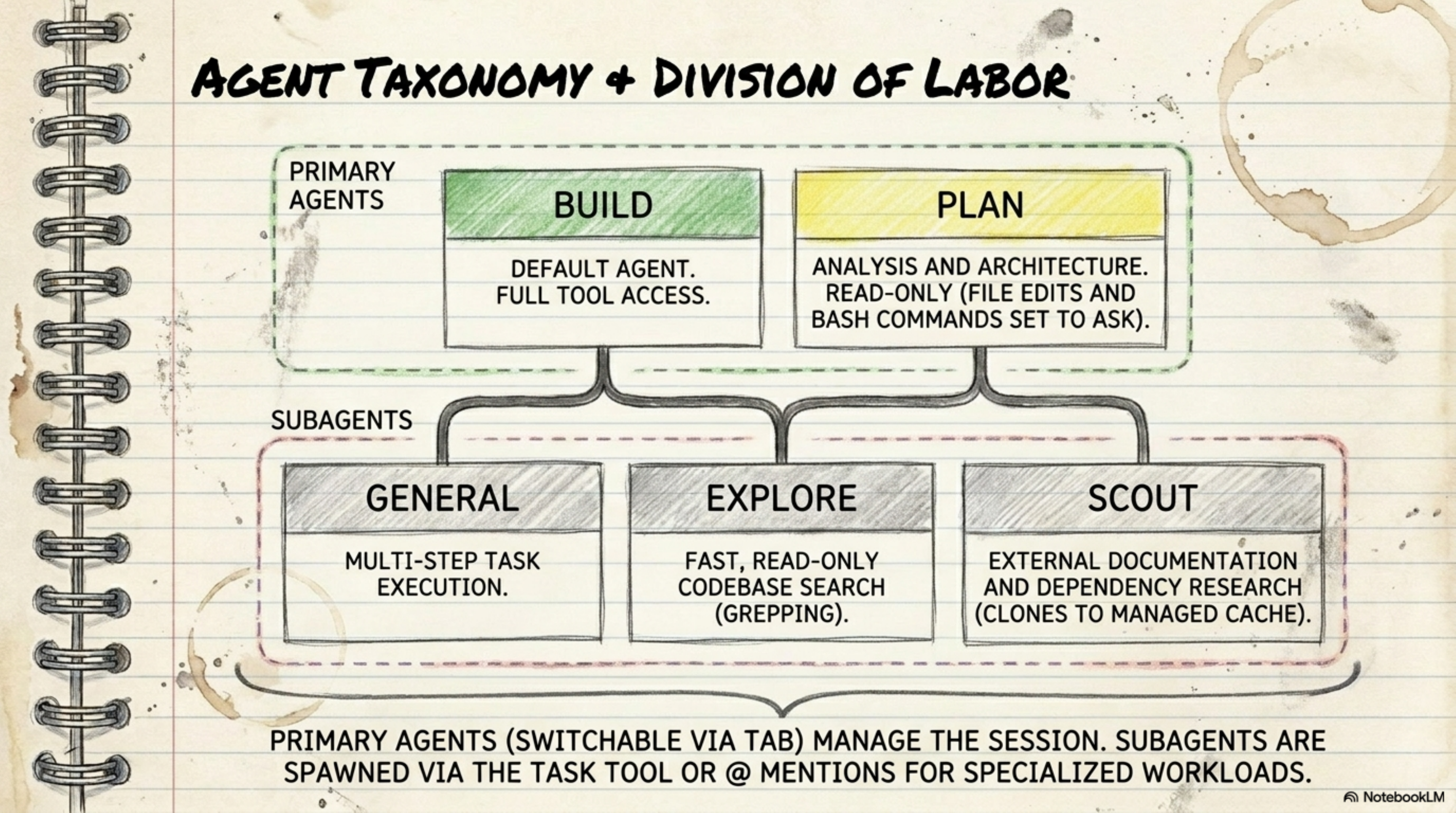
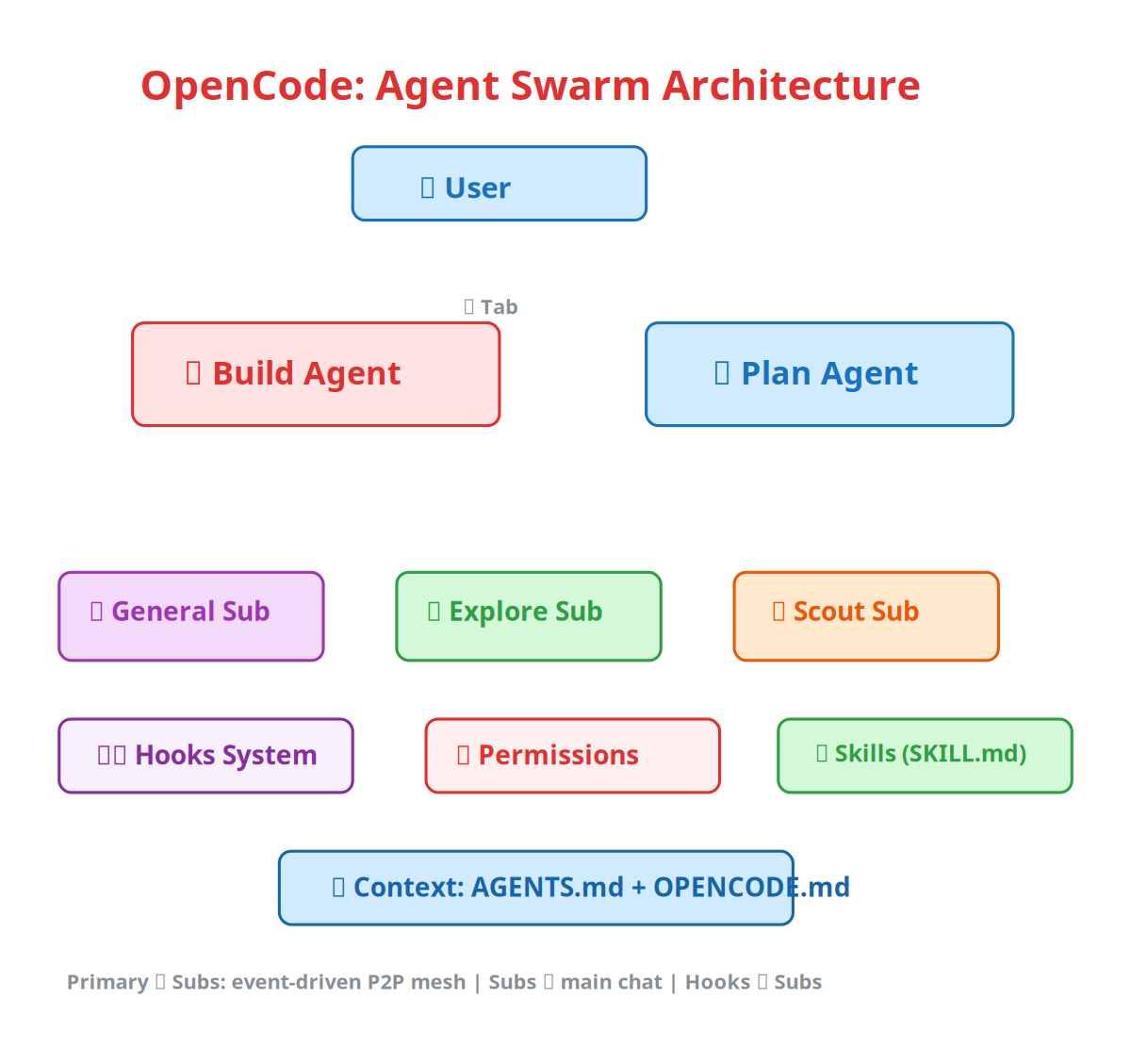
Primary Agents
| Agent | Role | Temperature | Permissions | When to use it |
|---|---|---|---|---|
| Build | Default driver that does everything | 0.3-0.5 | Full file ops + system commands | Daily coding, edits, execution |
| Plan | Analyst that reads and reasons | 0.0-0.2 | Ask-first for file edits + bash | Analysis or architecture review |
| Title | Generates session titles | - | Read-only | Automatic, not usually invoked manually |
Tab key — switch between Build and Plan at any time.
Subagents
| Subagent | Access | Role | When to call it |
|---|---|---|---|
| General | Full tools except todo | Multi-step task execution | Tasks with many steps |
| Explore | Read-only: glob, grep, ls, view | Local codebase search | Finding something in code |
| Scout | External researcher | External docs and dependency research | Looking up docs or upstream code |
SectionConfiguration — .opencode.json
Full Config
json
{
  "agents": {
    "coder": { "model": "claude-sonnet-4", "maxTokens": 5000 },
    "task": { "model": "claude-sonnet-4", "maxTokens": 5000 },
    "title": { "model": "claude-sonnet-4", "maxTokens": 80 }
  },
  "providers": {
    "anthropic": { "apiKey": "$ANTHROPIC_API_KEY" },
    "openai": { "apiKey": "$OPENAI_API_KEY" },
    "openrouter": { "apiKey": "$OPENROUTER_API_KEY" }
  },
  "permissions": {
    "allowed_tools": ["view", "ls", "grep", "glob", "edit"]
  },
  "mcp": {
    "github": {
      "type": "http",
      "url": "https://api.githubcopilot.com/mcp/",
      "headers": { "Authorization": "Bearer $GH_PAT" }
    }
  },
  "lsp": {
    "go": { "command": "gopls" }
  },
  "hooks": {
    "PreToolUse": [
      { "matcher": "^(view|ls|grep|glob)$", "command": "echo '{\"decision\":\"allow\"}'" }
    ]
  },
  "options": {
    "context_paths": ["AGENTS.md", ".cursorrules"],
    "global_context_paths": ["~/.config/opencode/OPENCODE.md"],
    "tui": { "theme": "catppuccin", "compact_mode": false },
    "initialize_as": "AGENTS.md",
    "data_directory": ".opencode"
  }
}
Config Paths (in order)
| Path | Priority |
|---|---|
./.opencode.json (local) | Highest, project-specific |
$XDG_CONFIG_HOME/opencode/.opencode.json | User-level |
$HOME/.opencode.json | User-level fallback |
Provider Environment Variables
| Provider | Variable | Notes |
|---|---|---|
| Anthropic | ANTHROPIC_API_KEY | Claude models |
| OpenAI | OPENAI_API_KEY | GPT models |
| Google Gemini | GEMINI_API_KEY | Gemini models |
| AWS Bedrock | AWS_ACCESS_KEY_ID + AWS_SECRET_ACCESS_KEY + AWS_REGION | Claude via AWS |
| Azure OpenAI | AZURE_OPENAI_ENDPOINT + AZURE_OPENAI_API_KEY | GPT via Azure |
| OpenRouter | OPENROUTER_API_KEY | Multi-model access |
| GitHub Copilot | GITHUB_TOKEN | Free tier available |
| Groq | GROQ_API_KEY | Fast inference |
| Ollama | Local endpoint | Self-hosted |
| LM Studio | Local endpoint | Self-hosted |
| LiteLLM | Local endpoint | Proxy for any model |
Self-Hosted Models
json
{
  "providers": {
    "ollama": {
      "type": "openai-compat",
      "base_url": "http://localhost:11434/v1",
      "api_key": "ollama",
      "models": [
        { "id": "llama3.1:8b", "name": "Llama 3.1 8B" },
        { "id": "codellama:7b", "name": "CodeLlama 7B" }
      ]
    }
  }
}
SectionPermissions System — Allow/Ask/Deny
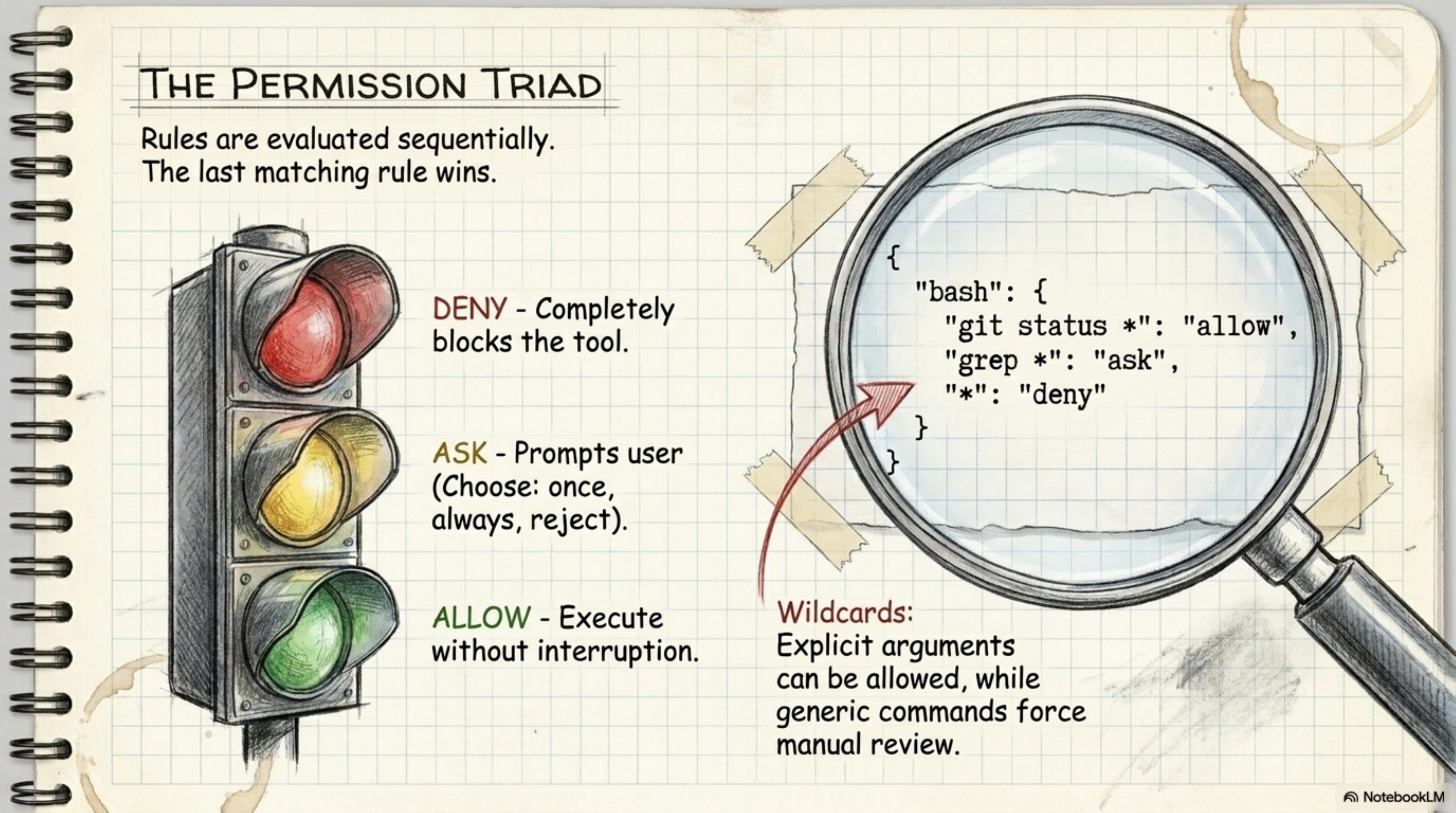
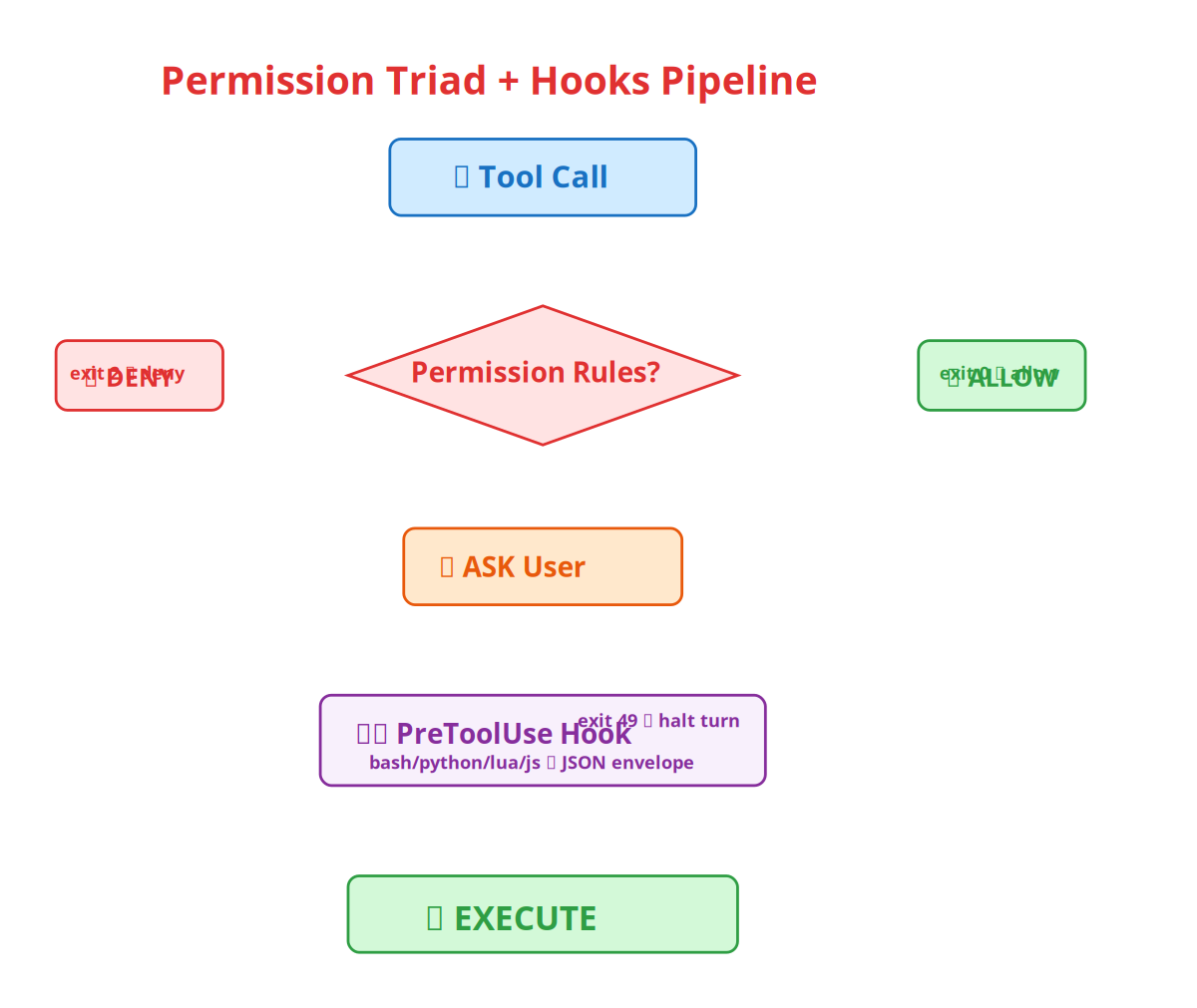
| State | Meaning | Practical example |
|---|---|---|
| ALLOW | Execute without asking | git status * — safe |
| ASK | Ask the user first | grep * — could be risky |
| DENY | Completely blocked | rm -rf / — dangerous |
Permission Rules (last rule wins)
json
{
  "permissions": {
    "bash": {
      "rules": [
        { "pattern": "git status *", "decision": "allow" },
        { "pattern": "git diff *", "decision": "allow" },
        { "pattern": "grep *", "decision": "ask" },
        { "pattern": "*", "decision": "deny" }
      ]
    }
  }
}
YOLO Mode
bash
opencode--yolo# everything runs without permission prompts
                # dangerous — use only when fully confident
SectionHooks System — PreToolUse
Hook Config
json
{
  "hooks": {
    "PreToolUse": [
      {
        "name": "no-rm-rf",
        "matcher": "^bash$",
        "command": "./hooks/no-rm-rf.sh",
        "timeout": 10
      }
    ]
  }
}
| Field | Description | When to use it |
|---|---|---|
name | Descriptive name, optional | To identify the hook |
matcher | Regex against tool name, optional | ^bash$ means bash only; omit for all tools |
command | Shell command, required | Path to the script |
timeout | Seconds, default 30 | If the hook may take time |
➜ ~ cat .opencode/pre-tool-use.sh
#!/bin/bash
block rm -rf
echo "$OPENCODE_TOOL_INPUT" | grep -q "rm -rf" && exit 1
exit 0
➜ ~ opencode -p "remove all temp files with rm -rf /"
✗ Hook blocked: dangerous rm command detected
➜ ~⏎ run · ⌫ clear
Exit Codes
| Code | Meaning | What happens |
|---|---|---|
0 | Success; stdout is parsed as JSON envelope | Can allow, deny, or halt |
2 | Block tool; stderr becomes the deny reason | Tool call is blocked |
49 | Halt turn | The agent turn stops completely |
JSON Envelope
json
{
  "version": 1,
  "decision": "allow",
  "halt": false,
  "reason": "LGTM",
  "context": "Scrubbed secrets",
  "updated_input": { "command": "…" }
}
Practical Examples
1. Block rm -rf on root:
bash
#!/usr/bin/env bash
ifecho"$OPENCODE_TOOL_INPUT_COMMAND"|grep-qE'rm\s+-(rf|fr)\s+/';then
echo"Refusing to run rm -rf against root">&2
exit2
fi
2. Auto-approve read-only tools:
json
{ "matcher": "^(view|ls|grep|glob)$", "command": "echo '{\"decision\":\"allow\"}'" }
3. Inject context for Go files:
bash
#!/usr/bin/env bash
if[["$OPENCODE_TOOL_INPUT_FILE_PATH"==*.go]];then
echo'{"context": "Run gofumpt after editing."}'
else
echo'{}'
fi
4. Halt on drop database:
bash
#!/usr/bin/env bash
ifecho"$OPENCODE_TOOL_INPUT_COMMAND"|grep-qE'drop\s+database';then
echo"Database drop detected — halting turn">&2
exit49
fi
SectionSkills System — SKILL.md
yaml
name: my-skill
description: What this skill does — critical for LLM tool selection.
user-invocable: true
disable-model-invocation: true
# Skill Instructions
Detailed instructions for the skill...
| Field | Rule | Why |
|---|---|---|
name | 1-64 chars, lowercase only | Precise matching |
description | 1-1024 chars | The LLM uses it to decide whether to invoke the skill |
user-invocable | true means visible in Ctrl+P | User can call it directly |
disable-model-invocation | true means user-only invocation | Prevents autonomous execution |
Discovery Paths
| Type | Path |
|---|---|
| Global | ~/.config/opencode/skills/ |
| Global | ~/.agents/skills/ |
| Global | ~/.claude/skills/ |
| Project | .agents/skills/ |
| Project | .opencode/skills/ |
| Custom | options.skills_paths in config |
SectionContext Files — What the Agent Reads
| File | Type | Notes |
|---|---|---|
AGENTS.md | Universal standard | Understood by many agents |
OPENCODE.md | OpenCode-specific | Read by OpenCode |
CLAUDE.md | Claude Code-specific | Read by Claude Code |
GEMINI.md | Gemini-specific | Read by Gemini |
.cursorrules | Cursor-specific | Read by Cursor |
.github/copilot-instructions.md | Copilot-specific | Read by GitHub Copilot |
Rule: AGENTS.md is the universal standard — write it once and all compatible agents understand it.
SectionBuilt-in Tools — Full Reference
File & Code Tools
| Tool | What it does | When to use it | Why it matters |
|---|---|---|---|
glob | Finds files by pattern | Looking for files of a type | Faster than find |
grep | Searches file contents | Looking for a string in code | Regex search |
ls | Shows directory tree | Inspecting structure | Depth control |
view | Reads a file with line numbers | Reading a file | Supports offset and limit |
write | Creates or replaces a file | Writing a new file | Overwrites the full file |
edit | Find-and-replace in a file | Editing a section | Requires exact match |
multiedit | Multiple edits in one file | Editing many places | Sequential edits |
diagnostics | Shows LSP errors/warnings | Finding bugs | Uses language server |
references | Finds symbol references | Understanding usage | Go-to-reference |
Execution & Search Tools
| Tool | What it does | When to use it | Why it matters |
|---|---|---|---|
bash | Runs shell commands | Tests and commands | Supports timeout and background jobs |
fetch | Fetches URL content | Online docs lookup | text/markdown/html formats |
download | Downloads a URL to a file | Binary downloads | Binary-safe streaming |
web_search | Web search | Finding internet info | Uses max_results |
web_fetch | Fetches URL as markdown | Sub-agents | Not for direct use |
sourcegraph | Searches repos for code | Cross-repo implementation lookup | Count and context window |
agent | Runs a sub-agent | Deep search by main agent | Limited to glob/grep/ls/view |
agentic_fetch | Web research sub-agent | Complex research | Follows links iteratively |
Session & Info Tools
| Tool | What it does |
|---|---|
opencode_info | Shows runtime state: model, provider, LSP, MCP, skills, hooks |
opencode_logs | Reads internal logs |
lsp_restart | Restarts the LSP client |
job_output | Gets background shell output |
job_kill | Kills a background process |
todos | Manages structured task lists |
SectionKeyboard Shortcuts — Must Know
| Shortcut | Action | When to use it |
|---|---|---|
Ctrl+X (Leader) | Starts all leader shortcuts | Leader key |
Leader n | New session | Starting fresh |
Leader l | List sessions | Returning to older work |
Ctrl+P | Command palette | Invoke a skill or quick action |
Tab | Cycle Primary Agents | Switch Build and Plan |
Leader ↓/↑ | Navigate sessions | Parent/child sessions |
Ctrl+G | Scroll to top | Move up in chat |
Ctrl+Alt+G | Scroll to bottom | Move to latest output |
a | Allow one tool call | Permission dialog |
A | Allow for the session | Permission dialog |
d | Deny | Permission dialog |
SectionMCP (Model Context Protocol)
| Type | What it does | Example |
|---|---|---|
stdio | Runs as a local process | filesystem, databases |
http | Connects to an HTTP endpoint | GitHub, external APIs |
sse | Server-Sent Events | streaming connections |
json
{
  "mcp": {
    "github": {
      "type": "http",
      "url": "https://api.githubcopilot.com/mcp/",
      "headers": { "Authorization": "Bearer $GH_PAT" },
      "disabled_tools": ["create_issue"]
    },
    "filesystem": {
      "type": "stdio",
      "command": "npx",
      "args": ["-y", "@modelcontextprotocol/server-filesystem", "/path"],
      "timeout": 30
    }
  }
}
SectionCrash Recovery — Core Rules
- When the server crashes, agents become "ready" but do not restart.
- You must restart manually so API credits are not burned overnight.
- The compaction agent auto-summarizes at 95% of the context window.
- The title agent creates automatic session names.
- The summary agent keeps background overviews.
SectionTUI Themes
| Theme | Look |
|---|---|
opencode | Default dark |
catppuccin | Warm pastel |
dracula | Purple-dark |
flexoki | Ink-inspired |
gruvbox | Retro warm |
monokai | Classic code editor |
onedark | Atom-inspired |
tokyonight | Blue-dark |
tron | Neon cyan on black |
SectionQuick Decision Guide
| Scenario | Start here |
|---|---|
| First time using OpenCode | opencode → TUI opens |
| Automating something | opencode -p "..." -f json |
| Blocking dangerous commands | Add a hook in .opencode.json |
| Auto-approving read-only tools | permissions.allowed_tools or a hook |
| Giving the agent new capabilities | Write SKILL.md in .agents/skills/ |
| Helping the agent understand your project | Write AGENTS.md in the root |
| Connecting an MCP tool | Add it under mcp in .opencode.json |
| Adding LSP | Add it under lsp in .opencode.json |
| Working on another project | opencode -c /path/to/project |
| Multi-client work | opencode serve |
| Testing a hook | opencode_logs or check the exit code |
Comments