GitHub Spec Kit — Complete Cheat Sheet 📋
Pull up a chair. No theory here — this is the sheet you pin next to your monitor, glance at mid-task, and get back to work. If you want the full story from the beginning, that's in the In-Depth Article — here we're in quick-reference territory.
This is the sheet you print and pin next to your monitor. You won't need to go back to the docs again.
Before anything else, look at this map. It's the whole journey in one glance — memorize the legend at the bottom, because you'll see those symbols in every table below:
TheFullJourney:
 ┌──────────────────────────────────────────────────────────────────────────┐
 │ 0.Setup → 1.Constitution → 2.Specify → 3.Plan → 4.Tasks                 │
 │         → 5.Implement → 6.QA & Review → 7.Ship → 8.Maintenance          │
 │                                                                          │
 │ 🖥️ Terminal = specify CLI commands  │  🤖 Agent = /speckit.* slash cmds  │
 │ ❌ Built-in = no extension needed  │  ✅ Extension = install required    │
 └──────────────────────────────────────────────────────────────────────────┘
Section📦 Installation & Setup
First things first: install the tool. This block has everything from installation to adding extensions — copy, paste, done:
# Install (one time — recommended method)
uvtoolinstallspecify-cli--fromgit+https://github.com/github/spec-kit.git

# Verify installation
specify--version
specifycheck

# Initialize new project
specifyinitmy-project--integrationclaude

# Initialize in existing project
specifyinit.--integrationcopilot

# Install any community extension
specifyextensionadd<short-name>--fromhttps://github.com/<owner>/<repo>/archive/refs/heads/main.zip

# Search available extensions
specifyextensionsearch
⚠️ Important: The only built-in extensions that install by name without
--fromare the git extensions. All community extensions require--from <zip-url>.
This one trips people up all the time — they type specify extension add review and wonder why it fails. Remember: community means --from.
Section🔄 Recommended Sequence — Greenfield (New Project)
Installed? Good. Now the natural question: where do I start and in what order? If your project is brand new, this is the exact path — ✅ means "do not skip", (optional) means it depends on your project:
[Phase 0] specify init . --integration claude
specifycheck
specifyextensionaddreview,security-review,qa,ship,...
[Phase 1] /speckit.constitution "Security-first. TDD. TTFB < 200ms."
/speckit-red-team(optional—attacktheconstitution)
[Phase 2] /speckit.specify "Feature description"
/speckit.clarify(removeambiguity)
/speckit-critique(optional—dual-lensreview)
/speckit.checklist(optional—qualityvalidation)
[Phase 3] /speckit.plan "Vite + SQLite + vanilla JS"
/speckit-blueprint(optional—codemapbeforeimplementation)
/speckit-version-guard(optional—verifydependencies)
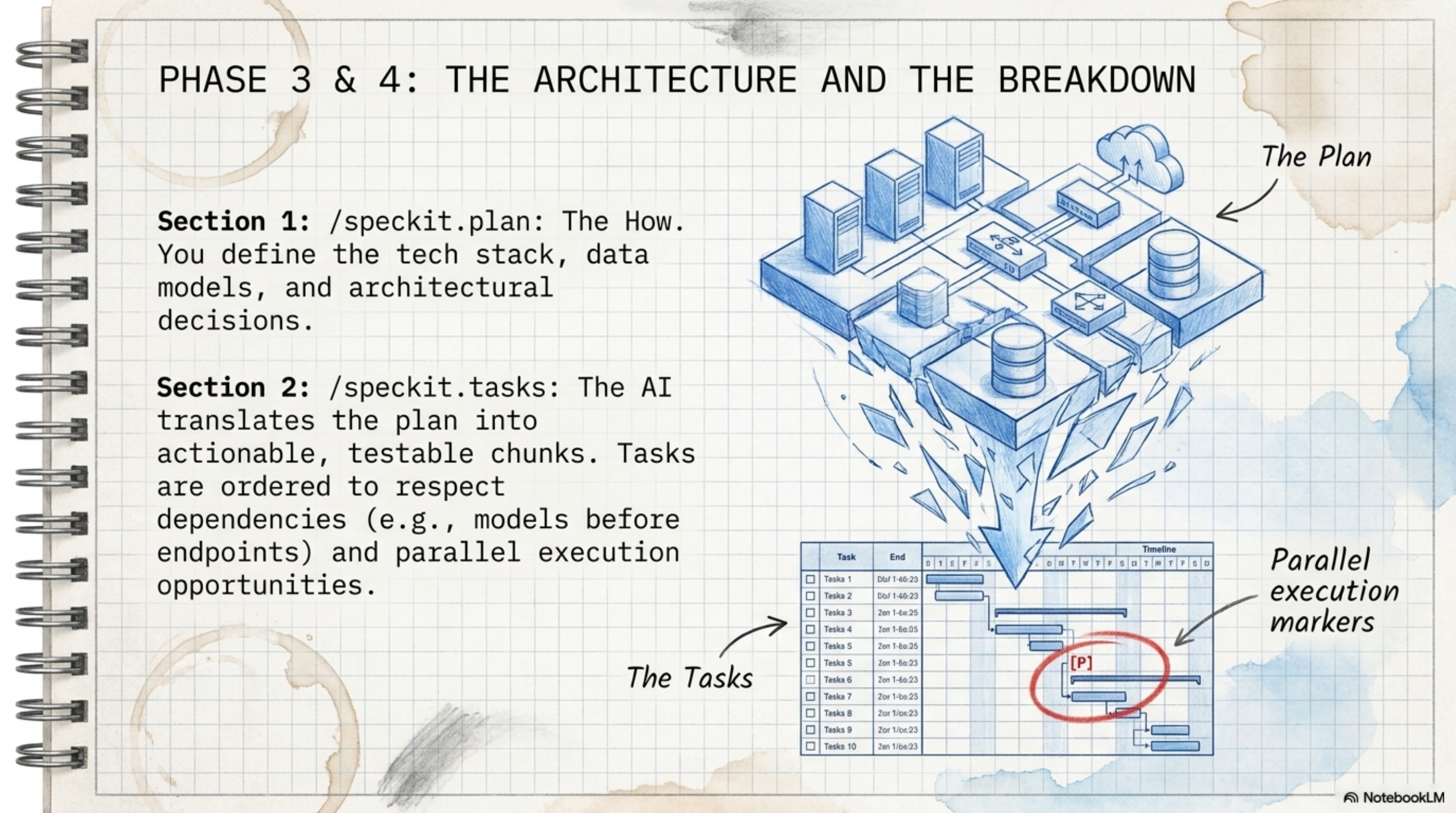
[Phase 4] /speckit.tasks
/speckit.analyze(✅requiredbeforeimplementalways)
/speckit.taskstoissues(optional—linktoGitHubIssues)
[Phase 5] /speckit.implement
/speckit-checkpoint(optional—organizedcommits)
[Phase 6] /speckit-verify            (✅ required)
/speckit-verify-tasks(✅required)
/speckit-review(optional—codereview)
/speckit-security-review(optional—securityaudit)
/speckit-qa(optional—acceptancetesting)
[Phase 7] /speckit-status
/speckit-ship(optional—releasepipeline)
Section🔄 Recommended Sequence — Brownfield (Existing Project)
"But I have a big existing codebase"? There's a dedicated path for you. The key difference: before writing any new spec, first understand what's there (repoindex + brownfield), and after every change, confirm you didn't break anything:
[Phase 0] specify init . --integration copilot
specifyextensionaddbrownfield,repoindex,verify,reconcile,...
[Phase 1] /speckit-repoindex          (understand existing code)
/speckit-brownfield(reverse-engineermodules)
/speckit.constitution(defineprojectrules)
[Phase 2] /speckit-brownfield "Reverse-engineer the auth module"
/speckit-brownfield"Reverse-engineer the API layer"
...(repeatforeachmajormodule)
[Phase 3] /speckit.plan               (if adding a new feature)
[Phase 4] /speckit.tasks + /speckit.analyze
[Phase 5] /speckit.implement
[Phase 6] /speckit-review
/speckit-security-review
/speckit-spectest(generatetestsfromspecs)
/speckit-verify
/speckit-reconcile(verifyconsistency)
[Phase 7] /speckit-checkpoint
/speckit-ship
[Phase 8] /speckit-bugfix             (for any new bug)
/speckit-ripple(afteranychange)
/speckit-verify(verifychangedidn't break anything)
SectionPhase 0 — Setup 🖥️ Terminal
Take a breath. From here on we go phase by phase, and every table is your quick lookup. This phase is all terminal commands — specify, not /speckit — the ones that prepare the ground before your agent touches anything:
| Command | ❌/✅ | When to Use | Output |
|---|---|---|---|
specify init <name> | ❌ | First time — new project | .specify/, CLAUDE.md, templates |
specify init . --integration <agent> | ❌ | In existing project | Same inside current directory |
specify check | ❌ | After install or anytime | Verify Python/Git/uv |
specify --version | ❌ | Anytime | CLI version + system info |
specify self | ❌ | For updates | check/upgrade the CLI |
specify extension search | ❌ | Before installing | List available extensions |
specify extension add <n> --from <url> | ❌ | After init | Install extension |
specify extension remove <n> | ❌ | To remove extension | Delete extension and files |
specify preset search | ❌ | Before using presets | List of presets |
specify preset add <n> | ❌ | To modify spec format | Install preset |
specify integration list | ❌ | Before init | Show 30+ supported agents |
specify workflow run <name> | ❌ | To run full cycle | Execute steps in sequence |
Why this table matters: 90% of "the tool isn't working" problems are solved by specify check before you look anywhere else.
SectionPhase 1 — Constitution 🏛️
Memorize this one like your own name: the constitution is the first thing you write and the last thing you break. It's not just another docs file — it's the law every command after this reads automatically before making a move:
| Command | ❌/✅ | Extension | When | Output | Example |
|---|---|---|---|---|---|
/speckit.constitution | ❌ | — | Project start or rule changes | .specify/memory/constitution.md | /speckit.constitution Security-first. TDD mandatory. TTFB < 200ms. |
/speckit-red-team | ✅ | red-team | After constitution or plan | findings report (no auto-edit) | /speckit-red-team Review constitution for risks |
/speckit-brownfield | ✅ | brownfield | Existing project start | initial specs per module | /speckit-brownfield Bootstrap this project |
/speckit-repoindex | ✅ | repoindex | Existing project — once | .specify/repo-index.md | /speckit-repoindex |
And the extensions you'll need for this phase:
specifyextensionaddred-team--fromhttps://github.com/ashbrener/spec-kit-red-team/archive/refs/heads/main.zip
specifyextensionaddbrownfield--fromhttps://github.com/Quratulain-bilal/spec-kit-brownfield/archive/refs/heads/main.zip
specifyextensionaddrepoindex--fromhttps://github.com/liuyiyu/spec-kit-repoindex/archive/refs/heads/main.zip
SectionPhase 2 — Specify 📝
Remember when I told you the spec is the foundation? This is where it gets written. The mistake everyone makes here is rushing — scan the commands first, then I'll give you the golden rule:
| Command | ❌/✅ | Extension | When | Output |
|---|---|---|---|---|
/speckit.specify | ❌ | — | Every new feature | specs/<feature>/spec.md |
/speckit.clarify | ❌ | — | After specify, before plan | Updates spec.md |
/speckit-critique | ✅ | critique | After specify — dual review | critique-report.md |
/speckit-spec-validate | ✅ | spec-validate | After clarify, before implement | comprehension quiz + gate |
/speckit.checklist | ❌ | — | After specify — quality check | checklist.md |
/speckit-whatif | ✅ | whatif | Before requirement changes | impact analysis |
/speckit-scope | ✅ | scope | After specify — effort estimation | scope-report.md |
/speckit-memory-loader | ✅ | memory-loader | Auto before every command | Loads .specify/memory/ |
Golden rule in specify: Say what and why — never how. The agent will figure out the technology.
specifyextensionaddcritique--fromhttps://github.com/arunt14/spec-kit-critique/archive/refs/heads/main.zip
specifyextensionaddspec-validate--fromhttps://github.com/aeltayeb/spec-kit-spec-validate/archive/refs/heads/main.zip
specifyextensionaddwhatif--fromhttps://github.com/DevAbdullah90/spec-kit-whatif/archive/refs/heads/main.zip
specifyextensionaddscope--fromhttps://github.com/Quratulain-bilal/spec-kit-scope-/archive/refs/heads/main.zip
specifyextensionaddmemory-loader--fromhttps://github.com/KevinBrown5280/spec-kit-memory-loader/archive/refs/heads/main.zip
SectionPhase 3 — Plan 🗺️
Here — and only here — do we start talking tech. The spec said "what", the plan says "how": the stack, the data models, the contracts, all decided at this moment:
| Command | ❌/✅ | Extension | When | Output |
|---|---|---|---|---|
/speckit.plan | ❌ | — | After spec — define tech stack | plan.md + data-model.md + contracts/ |
/speckit-blueprint | ✅ | blueprint | After plan, before implement | blueprint.md (class diagrams + file layout) |
/speckit-version-guard | ✅ | version-guard | After plan — verify deps | version-report.md |
/speckit-diagram | ✅ | diagram | After plan/tasks — visualization | Mermaid diagrams |
/speckit-red-team | ✅ | red-team | After plan — attack the plan | findings report |
specifyextensionaddblueprint--fromhttps://github.com/chordpli/spec-kit-blueprint/archive/refs/heads/main.zip
specifyextensionaddversion-guard--fromhttps://github.com/KevinBrown5280/spec-kit-version-guard/archive/refs/heads/main.zip
specifyextensionadddiagram--fromhttps://github.com/Quratulain-bilal/spec-kit-diagram-/archive/refs/heads/main.zip
So you know exactly what lands on disk, here's the full output:
Full output of /speckit.plan:
specs/<feature>/
├── plan.md           ← Technical plan
├── data-model.md     ← Schema
├── contracts/
│   ├── api-spec.json ← API contracts
│   └── signalr-spec.md
├── research.md
└── quickstart.md
SectionPhase 4 — Tasks 🧩
Plan ready? Great. Now we cut it into pieces the agent can execute one by one. And keep your eye on /speckit.analyze — it's the most important command in this whole table:
| Command | ❌/✅ | Extension | When | Output |
|---|---|---|---|---|
/speckit.tasks | ❌ | — | After plan | tasks.md with dependencies + [P] parallel markers |
/speckit.analyze | ❌ | — | After tasks, before implement — always | analysis.md — consistency check |
/speckit.taskstoissues | ❌ | — | After tasks | GitHub Issues (remote) |
/speckit-jira | ✅ | jira | After tasks | Jira Epic → Stories → Sub-tasks |
/speckit-maqa-linear | ✅ | maqa-linear | MAQA workflow | Linear issues |
/speckit-maqa-trello | ✅ | maqa-trello | MAQA workflow | Trello board |
/speckit-maqa-azure-devops | ✅ | maqa-azure-devops | MAQA workflow | Azure DevOps work items |
specifyextensionaddjira--fromhttps://github.com/mbachorik/spec-kit-jira/archive/refs/heads/main.zip
⚠️ Mandatory: Run
/speckit.analyzebefore/speckit.implementalways. A consistency mistake here takes 2 minutes to fix — after implement it takes hours.
SectionPhase 5 — Implement 🚀
The part everyone's been waiting for — the actual code. The irony? If you did the previous phases right, this is the easiest phase of the whole journey:
| Command | ❌/✅ | Extension | When | Output |
|---|---|---|---|---|
/speckit.implement | ❌ | — | After tasks + analyze | source code + tasks.md updated with ✅ |
/speckit-checkpoint | ✅ | checkpoint | Auto during implement | organized git commits (not one giant commit) |
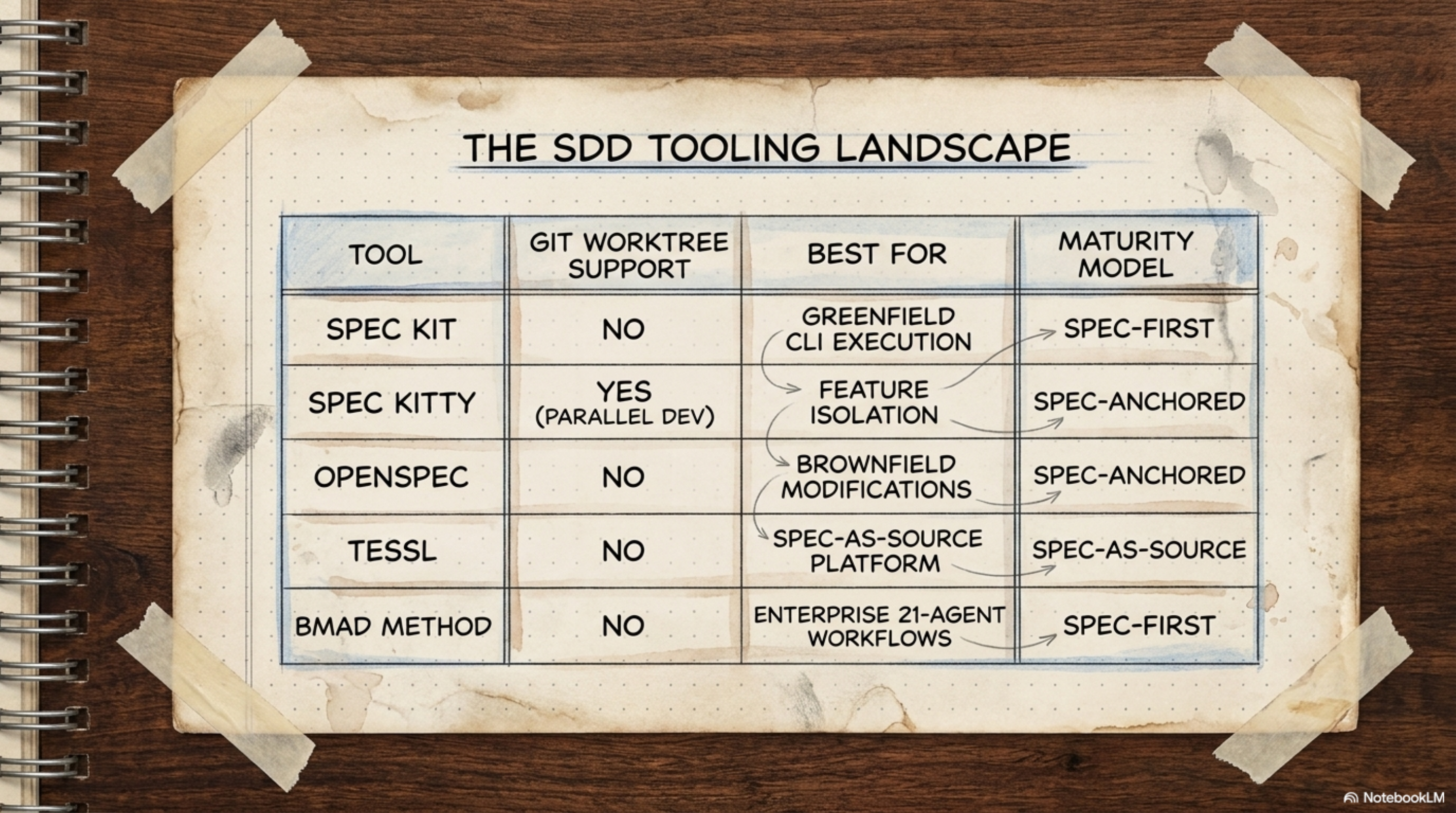
/speckit-worktree | ✅ | worktree | Parallel feature development | isolated git worktrees |
/speckit-worktrees | ✅ | worktrees | Multiple parallel agents | sibling/nested worktrees |
/speckit-conduct | ✅ | conduct | Large context window | delegates phases to sub-agents |
specifyextensionaddcheckpoint--fromhttps://github.com/aaronrsun/spec-kit-checkpoint/archive/refs/heads/main.zip
specifyextensionaddworktree--fromhttps://github.com/Quratulain-bilal/spec-kit-worktree/archive/refs/heads/main.zip
specifyextensionaddworktrees--fromhttps://github.com/dango85/spec-kit-worktree-parallel/archive/refs/heads/main.zip
specifyextensionaddconduct--fromhttps://github.com/twbrandon7/spec-kit-conduct-ext/archive/refs/heads/main.zip
SectionPhase 6 — QA & Review 🧪
The agent said "done"? Don't take its word for it. This phase is what separates code that actually works from code that just looks like it works.
Two are required, the rest are optional:
| Command | ❌/✅ | Extension | Priority | What it does |
|---|---|---|---|---|
/speckit-verify | ✅ | verify | ✅ Required | Does the code match every spec requirement? |
/speckit-verify-tasks | ✅ | verify-tasks | ✅ Required | Detects "phantom completions" — agent said done but didn't do it |
/speckit-review | ✅ | review | 🔶 Important | 6 agents: code quality, comments, tests, errors, types, simplification |
/speckit-staff-review | ✅ | staff-review | 🔶 Important | Senior engineer level review |
/speckit-security-review | ✅ | security-review | 🔶 Important | OWASP top 10, injection, auth, data exposure |
/speckit-qa | ✅ | qa | 🔶 Optional | browser/CLI acceptance testing against spec criteria |
/speckit-spectest | ✅ | spectest | 🔶 Optional | Maps tests to requirements — detects untested areas |
/speckit-ripple | ✅ | ripple | 🔶 Important after any change | Side effects analysis across 9 domains |
/speckit-cleanup | ✅ | cleanup | 🔶 Optional | Scout rule: fix small, track big issues |
/speckit-fix-findings | ✅ | fix-findings | 🔶 Optional | Auto-fix review findings |
/speckit-reconcile | ✅ | reconcile | 🔶 Optional | If code drifted from spec, updates the spec |
specifyextensionaddverify--fromhttps://github.com/ismaelJimenez/spec-kit-verify/archive/refs/heads/main.zip
specifyextensionaddverify-tasks--fromhttps://github.com/datastone-inc/spec-kit-verify-tasks/archive/refs/heads/main.zip
specifyextensionaddreview--fromhttps://github.com/ismaelJimenez/spec-kit-review/archive/refs/heads/main.zip
specifyextensionaddstaff-review--fromhttps://github.com/arunt14/spec-kit-staff-review/archive/refs/heads/main.zip
specifyextensionaddsecurity-review--fromhttps://github.com/DyanGalih/spec-kit-security-review/archive/refs/heads/main.zip
specifyextensionaddqa--fromhttps://github.com/ismaelJimenez/spec-kit-qa/archive/refs/heads/main.zip
specifyextensionaddspectest--fromhttps://github.com/Quratulain-bilal/spec-kit-spectest/archive/refs/heads/main.zip
specifyextensionaddripple--fromhttps://github.com/chordpli/spec-kit-ripple/archive/refs/heads/main.zip
specifyextensionaddcleanup--fromhttps://github.com/dsrednicki/spec-kit-cleanup/archive/refs/heads/main.zip
specifyextensionaddreconcile--fromhttps://github.com/stn1slv/spec-kit-reconcile/archive/refs/heads/main.zip
SectionPhase 7 — Ship 🚢
Everything green? Then it's shipping time. This phase turns "the code is done" into "the release is out" — with zero manual busywork:
| Command | ❌/✅ | Extension | When | Output |
|---|---|---|---|---|
/speckit-status | ✅ | status | Before ship — verify everything is green | console dashboard |
/speckit-ci-guard | ✅ | ci-guard | In CI pipeline automatically | blocks merge if specs are missing |
/speckit-pr-bridge | ✅ | pr-bridge | After implement, when creating PR | automatic PR description |
/speckit-confluence | ✅ | confluence | After finalize specs | Confluence page |
/speckit-ship | ✅ | ship | When everything is ready | CHANGELOG + release PR + git tags |
/speckit-retrospective | ✅ | retrospective | After each feature | retrospective.md + adherence score |
/speckit-memory-hub | ✅ | memory-md | After ship — save lessons | .specify/memory/ |
specifyextensionaddstatus--fromhttps://github.com/KhawarHabibKhan/spec-kit-status/archive/refs/heads/main.zip
specifyextensionaddci-guard--fromhttps://github.com/Quratulain-bilal/spec-kit-ci-guard/archive/refs/heads/main.zip
specifyextensionaddpr-bridge--fromhttps://github.com/Quratulain-bilal/spec-kit-pr-bridge-/archive/refs/heads/main.zip
specifyextensionaddship--fromhttps://github.com/arunt14/spec-kit-ship/archive/refs/heads/main.zip
specifyextensionaddretrospective--fromhttps://github.com/emi-dm/spec-kit-retrospective/archive/refs/heads/main.zip
specifyextensionaddmemory-md--fromhttps://github.com/DyanGalih/spec-kit-memory-hub/archive/refs/heads/main.zip
SectionPhase 8 — Maintenance 🔧
Shipped. Are we done? Of course not — software lives and changes, and this phase is what keeps your specs alive with it instead of rotting in a drawer:
| Command | ❌/✅ | Extension | When |
|---|---|---|---|
/speckit-doctor | ✅ | doctor | Periodic health check |
/speckit-status | ✅ | status | Daily check |
/speckit-sync | ✅ | sync | Detect spec-code drift |
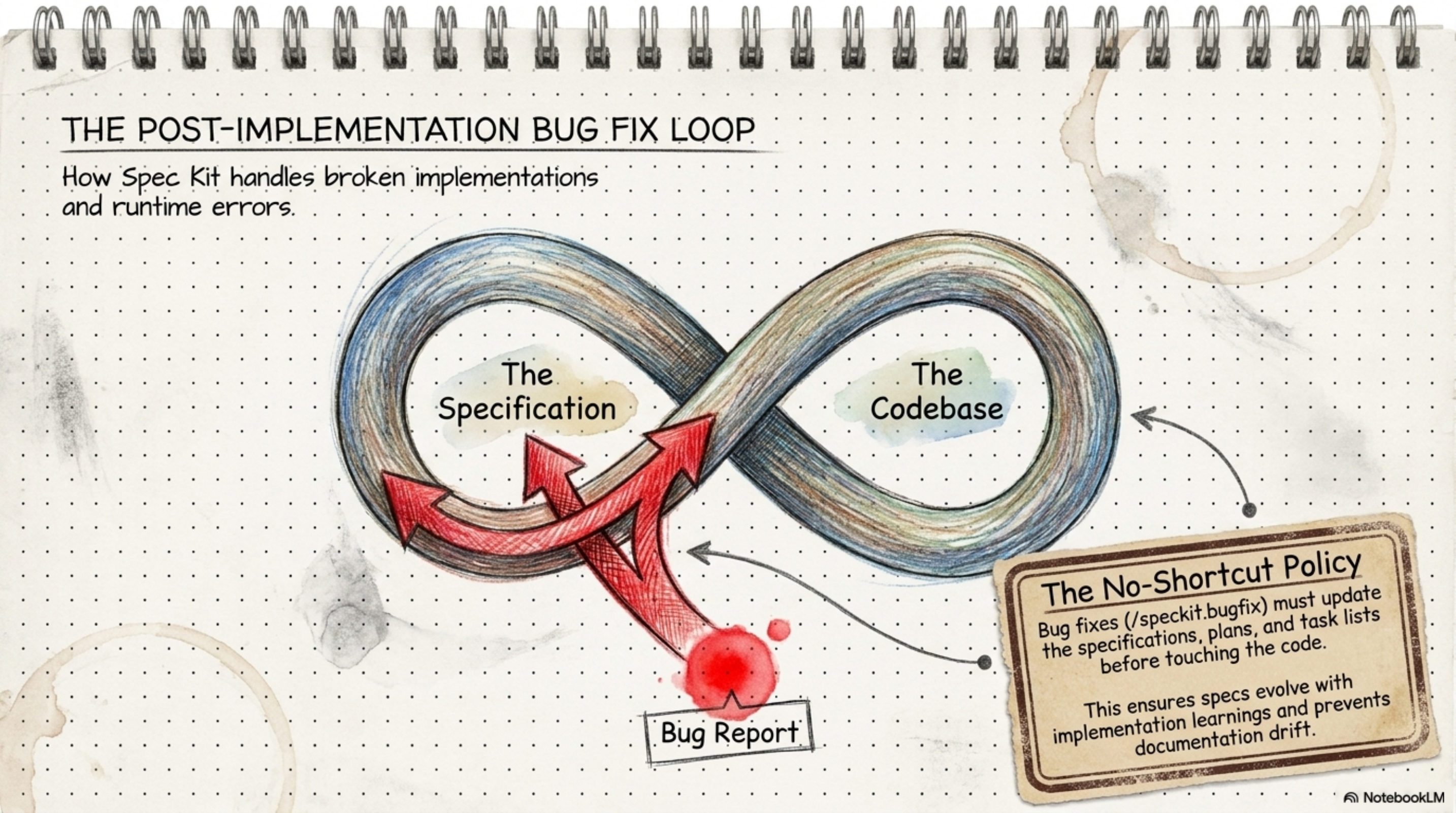
/speckit-bugfix | ✅ | bugfix | Any new bug |
/speckit-fixit | ✅ | fixit | Quick targeted fix |
/speckit-iterate | ✅ | iterate | Mid-implementation spec update |
/speckit-refine | ✅ | refine | Requirements change + cascade |
/speckit-memory-hub audit | ✅ | memory-md | Clean old memory |
specifyextensionadddoctor--fromhttps://github.com/KhawarHabibKhan/spec-kit-doctor/archive/refs/heads/main.zip
specifyextensionaddsync--fromhttps://github.com/bgervin/spec-kit-sync/archive/refs/heads/main.zip
specifyextensionaddbugfix--fromhttps://github.com/Quratulain-bilal/spec-kit-bugfix/archive/refs/heads/main.zip
specifyextensionadditerate--fromhttps://github.com/imviancagrace/spec-kit-iterate/archive/refs/heads/main.zip
specifyextensionaddrefine--fromhttps://github.com/Quratulain-bilal/spec-kit-refine/archive/refs/heads/main.zip
Section📊 All 66 Commands at Once
And now, the one you actually pin next to your monitor. Every command in the ecosystem, in one table — built-in or extension, terminal or agent, greenfield or brownfield:
| # | Command | ❌/✅ | Extension | 🖥️/🤖 | Project | Category |
|---|---|---|---|---|---|---|
| 1 | specify init | ❌ | — | 🖥️ | Both | Setup |
| 2 | specify check | ❌ | — | 🖥️ | Both | Setup |
| 3 | specify --version | ❌ | — | 🖥️ | Both | Setup |
| 4 | specify self | ❌ | — | 🖥️ | Both | Setup |
| 5 | specify extension add | ❌ | — | 🖥️ | Both | Setup |
| 6 | specify extension search | ❌ | — | 🖥️ | Both | Setup |
| 7 | specify preset add | ❌ | — | 🖥️ | Both | Setup |
| 8 | specify preset search | ❌ | — | 🖥️ | Both | Setup |
| 9 | specify integration list | ❌ | — | 🖥️ | Both | Setup |
| 10 | specify workflow | ❌ | — | 🖥️ | Both | Setup |
| 11 | /speckit.constitution | ❌ | — | 🤖 | Both | Core SDD |
| 12 | /speckit.specify | ❌ | — | 🤖 | Both | Core SDD |
| 13 | /speckit.plan | ❌ | — | 🤖 | Both | Core SDD |
| 14 | /speckit.tasks | ❌ | — | 🤖 | Both | Core SDD |
| 15 | /speckit.taskstoissues | ❌ | — | 🤖 | Both | Core SDD |
| 16 | /speckit.implement | ❌ | — | 🤖 | Both | Core SDD |
| 17 | /speckit.clarify | ❌ | — | 🤖 | Both | Quality |
| 18 | /speckit.analyze | ❌ | — | 🤖 | Both | Quality |
| 19 | /speckit.checklist | ❌ | — | 🤖 | Both | Quality |
| 20 | /speckit-brownfield | ✅ | brownfield | 🤖 | 🟤 Existing | Code Discovery |
| 21 | /speckit-repoindex | ✅ | repoindex | 🤖 | 🟤 Existing | Code Discovery |
| 22 | /speckit-review | ✅ | review | 🤖 | Both | QA & Review |
| 23 | /speckit-staff-review | ✅ | staff-review | 🤖 | Both | QA & Review |
| 24 | /speckit-security-review | ✅ | security-review | 🤖 | Both | Security |
| 25 | /speckit-qa | ✅ | qa | 🤖 | Both | QA & Testing |
| 26 | /speckit-spectest | ✅ | spectest | 🤖 | Both | QA & Testing |
| 27 | /speckit-verify | ✅ | verify | 🤖 | Both | QA & Testing |
| 28 | /speckit-verify-tasks | ✅ | verify-tasks | 🤖 | Both | QA & Testing |
| 29 | /speckit-cleanup | ✅ | cleanup | 🤖 | Both | QA & Review |
| 30 | /speckit-ripple | ✅ | ripple | 🤖 | Both | QA & Testing |
| 31 | /speckit-critique | ✅ | critique | 🤖 | Both | Quality |
| 32 | /speckit-red-team | ✅ | red-team | 🤖 | Both | Security |
| 33 | /speckit-spec-validate | ✅ | spec-validate | 🤖 | Both | Quality |
| 34 | /speckit-blueprint | ✅ | blueprint | 🤖 | 🟢 New | Planning |
| 35 | /speckit-bugfix | ✅ | bugfix | 🤖 | Both | Bug Fixing |
| 36 | /speckit-fixit | ✅ | fixit | 🤖 | Both | Bug Fixing |
| 37 | /speckit-iterate | ✅ | iterate | 🤖 | Both | Spec Management |
| 38 | /speckit-reconcile | ✅ | reconcile | 🤖 | Both | Spec Management |
| 39 | /speckit-sync | ✅ | sync | 🤖 | Both | Spec Management |
| 40 | /speckit-refine | ✅ | refine | 🤖 | Both | Spec Management |
| 41 | /speckit-jira | ✅ | jira | 🤖 | Both | Integrations |
| 42 | /speckit-github-issues | ✅ | github-issues | 🤖 | Both | Integrations |
| 43 | /speckit-confluence | ✅ | confluence | 🤖 | Both | Integrations |
| 44 | /speckit-pr-bridge | ✅ | pr-bridge | 🤖 | Both | GitHub & CI/CD |
| 45 | /speckit-ci-guard | ✅ | ci-guard | CI | Both | GitHub & CI/CD |
| 46 | /speckit-checkpoint | ✅ | checkpoint | 🤖 | Both | GitHub & CI/CD |
| 47 | /speckit-ship | ✅ | ship | 🤖 | Both | GitHub & CI/CD |
| 48 | /speckit-doctor | ✅ | doctor | 🤖 | Both | Health |
| 49 | /speckit-status | ✅ | status | 🤖 | Both | Health |
| 50 | /speckit-diagram | ✅ | diagram | 🤖 | Both | Health |
| 51 | /speckit-scope | ✅ | scope | 🤖 | Both | Health |
| 52 | /speckit-whatif | ✅ | whatif | 🤖 | Both | Health |
| 53 | /speckit-orchestrator | ✅ | orchestrator | 🤖 | Both | Orchestration |
| 54 | /speckit-fleet | ✅ | fleet | 🤖 | 🟢 New | Orchestration |
| 55 | /speckit-conduct | ✅ | conduct | 🤖 | Both | Orchestration |
| 56 | /speckit-retrospective | ✅ | retrospective | 🤖 | Both | Process |
| 57 | /speckit-retro | ✅ | retro | 🤖 | Both | Process |
| 58 | /speckit-onboard | ✅ | onboard | 🤖 | Both | Process |
| 59 | /speckit-memory-hub | ✅ | memory-md | 🤖 | Both | Memory |
| 60 | /speckit-memory-loader | ✅ | memory-loader | 🤖 | Both | Memory |
| 61 | /speckit-version-guard | ✅ | version-guard | 🤖 | 🟢 New | Dependency |
| 62 | /speckit-worktree | ✅ | worktree | 🤖 | Both | Git & Parallel |
| 63 | /speckit-worktrees | ✅ | worktrees | 🤖 | Both | Git & Parallel |
| 64 | /speckit-tinyspec | ✅ | tinyspec | 🤖 | Both | Process |
| 65 | /speckit-optimize | ✅ | optimize | 🤖 | Both | Process |
| 66 | /speckit-learn | ✅ | learn | 🤖 | Both | Process |
Section🎯 Quick Decision Guide
Lost and not sure where to start? Find your situation in the left column, and go:
| Scenario | Start Here |
|---|---|
| Brand new project from scratch | Phase 0 → Phase 1 → Phase 2 → ... |
| Existing codebase, adopting SDD | Phase 0 (brownfield + repoindex) → Phase 1 |
| Constitution done, new feature | Phase 2 (specify) |
| Spec written | Phase 3 (plan) |
| Plan ready | Phase 4 (tasks + analyze) |
| Tasks defined | Phase 5 (implement) |
| Code done | Phase 6 (QA) |
| All checks pass | Phase 7 (ship) |
| Bug reported | bugfix → verify → ripple |
| Requirements changed mid-work | iterate → refine → tasks → implement |
| No idea where things stand | /speckit-status |
Section🏗️ Project Structure After specify init
Want to know exactly what landed in your project after init? Here's the full map — read it once and you'll know where every file comes from:
my-project/
├── .specify/
│   ├── memory/constitution.md      ← Project rules
│   ├── templates/
│   │   ├── spec-template.md
│   │   ├── plan-template.md
│   │   └── tasks-template.md
│   ├── templates/overrides/        ← Highest priority
│   ├── presets/                    ← Preset templates
│   ├── extensions/                 ← Installed extensions
│   └── features/
│       └── 001-feature-name/
│           ├── spec.md             ← From /speckit.specify
│           ├── plan.md             ← From /speckit.plan
│           ├── tasks.md            ← From /speckit.tasks
│           ├── data-model.md
│           ├── contracts/
│           │   ├── api-spec.json
│           │   └── signalr-spec.md
│           ├── research.md
│           ├── checklist.md
│           ├── blueprint.md
│           └── analysis.md
├── CLAUDE.md     ← Or KIMI.md / COPILOT.md depending on integration
├── .gitignore
└── src/          ← Code (generated from /speckit.implement)
And if you customize a template and wonder "which copy wins?" — here's your answer:
Template Resolution Order (highest wins):
1. .specify/templates/overrides/    ← project-local (highest priority)
2. .specify/presets/templates/      ← presets
3. .specify/extensions/templates/   ← extensions
4. .specify/templates/              ← spec kit core (lowest priority)
Section🤖 Supported Integrations (30+)
Which agent do you use? Doesn't matter — Spec Kit talks to pretty much all of them. Pick your line:
specifyinit.--integrationclaude# Claude Code → CLAUDE.md
specifyinit.--integrationcopilot# GitHub Copilot → .github/copilot/
specifyinit.--integrationgemini# Gemini CLI → GEMINI.md
specifyinit.--integrationcodex# Codex CLI → CODEX.md
specifyinit.--integrationcursor-agent# Cursor → .cursor/rules/
specifyinit.--integrationcline# Cline → .clinerules
specifyinit.--integrationroo# Roo Code → .roorules
specifyinit.--integrationwindsurf# Windsurf → .windsurf/rules/
specifyinit.--integrationhermes# Hermes → HERMES.md
specifyinit.--integrationkimi# Kimi Code → KIMI.md
specifyinit.--integrationkiro-cli# Kiro → KIRO.md
specifyinit.--integrationforge# Forge → FORGE.md
specifyinit.--integrationopencode# opencode → OPENCODE.md
specifyinit.--integrationqwen# Qwen Code → QWEN.md

# If your agent isn't on the list:
specifyinit.--integrationgeneric--integration-options="--commands-dir .myagent/cmds"

# Skills mode (for agents that support it):
specifyinit.--integrationcodex--integration-options="--skills"

# List all integrations:
specifyintegrationlist
Section🛡️ Key Rules
If you only remember one table from this sheet, make it this one. Break these rules and you pay in hours of debugging:
| Rule | Details |
|---|---|
No tech stack in /speckit.specify | Only what + why — tech goes in plan |
/speckit.analyze before implement — always | Consistency check saves hours of debugging |
| Constitution is not optional | Follows every command automatically |
[P] markers in tasks.md | Flags tasks safe to run in parallel |
Community extensions need --from | specify extension add review alone fails |
/speckit-verify-tasks is required | AI says "done" without doing it — catch it here |
| Each feature = new branch | Optional but best practice |
Section⚙️ Brownfield Golden Rule
One last thing before I let you go — if you work on existing code, these are the 7 steps around every change. Memorize them like your own name:
BeforeeditingANYexistingcode:
  1. /speckit-status          ← Know where things stand
  2. Read the module spec.md  ← Understand the contract
  3. Make your change
  4. /speckit-verify          ← Did you break the contract?
  5. /speckit-ripple          ← Any cascading impact?
  6. /speckit-spectest        ← Are tests still aligned?
  7. /speckit-reconcile       ← Full consistency check
Section🖼️ Images from Source Materials
Prefer looking at a picture instead of reading a table? These are the visual companions to everything above:
| Image | Source |
|---|---|
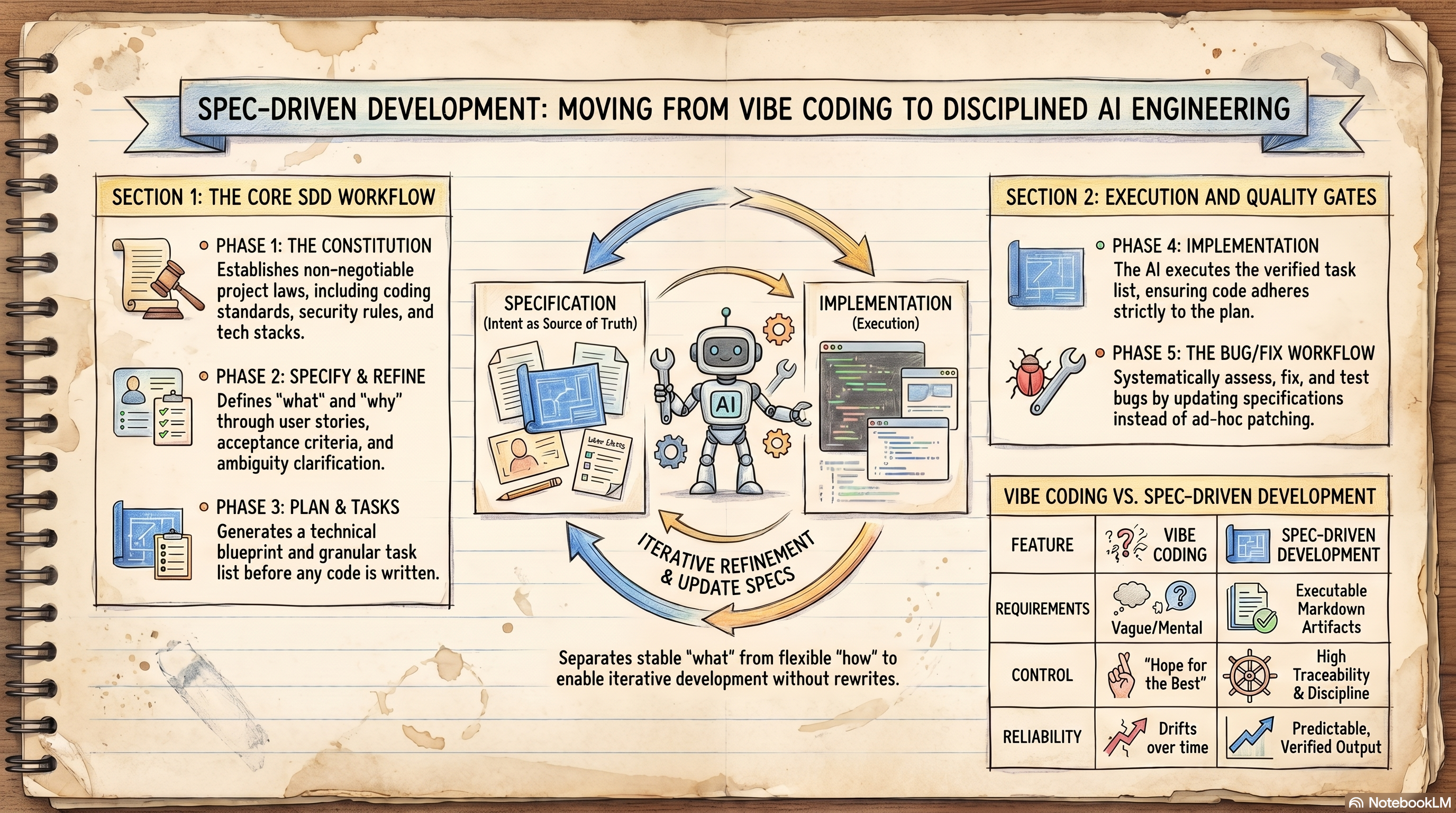 | Full Infographic |
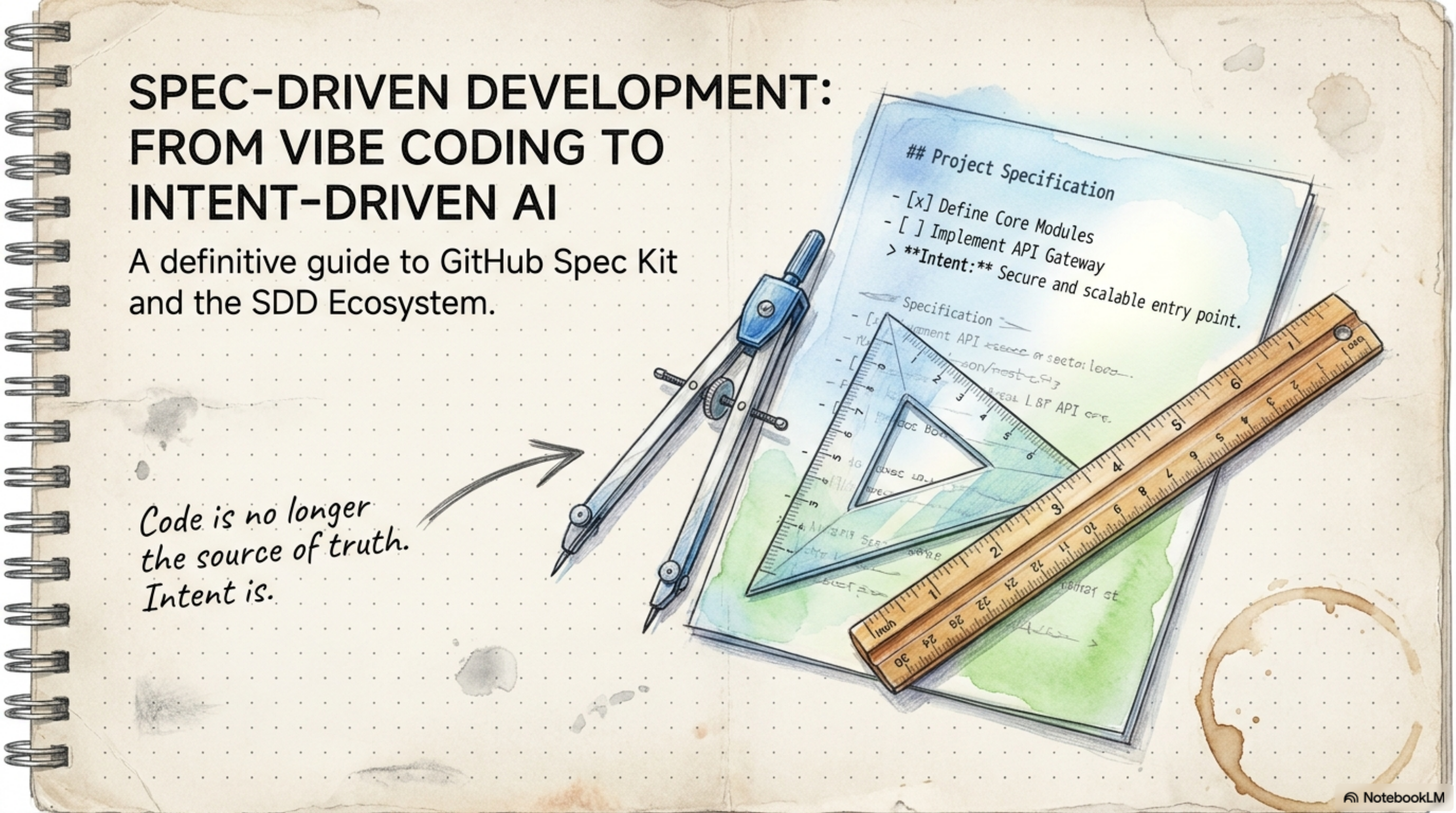 | Spec-Driven Development — Overview |
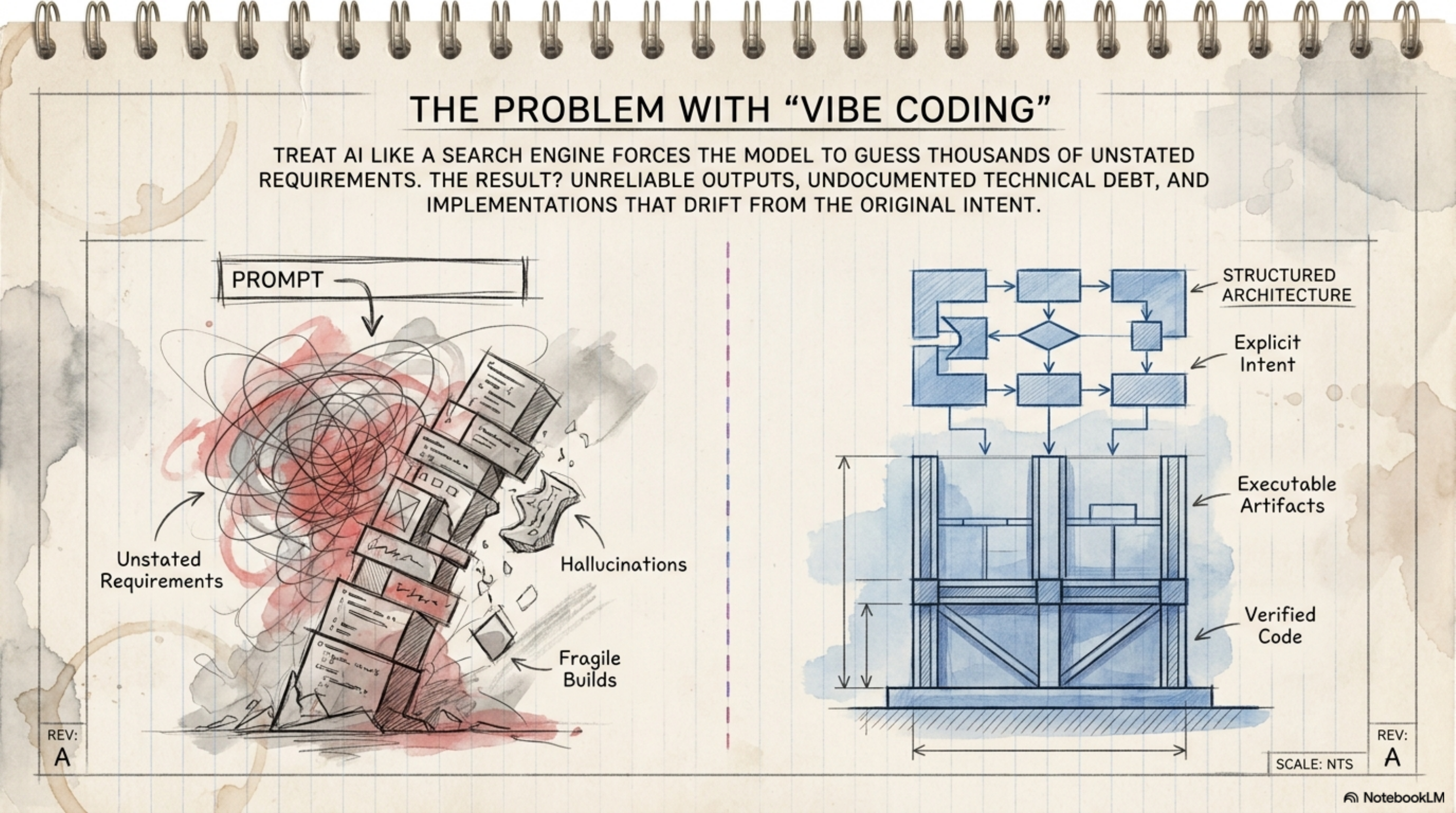 | Vibe Coding vs SDD |
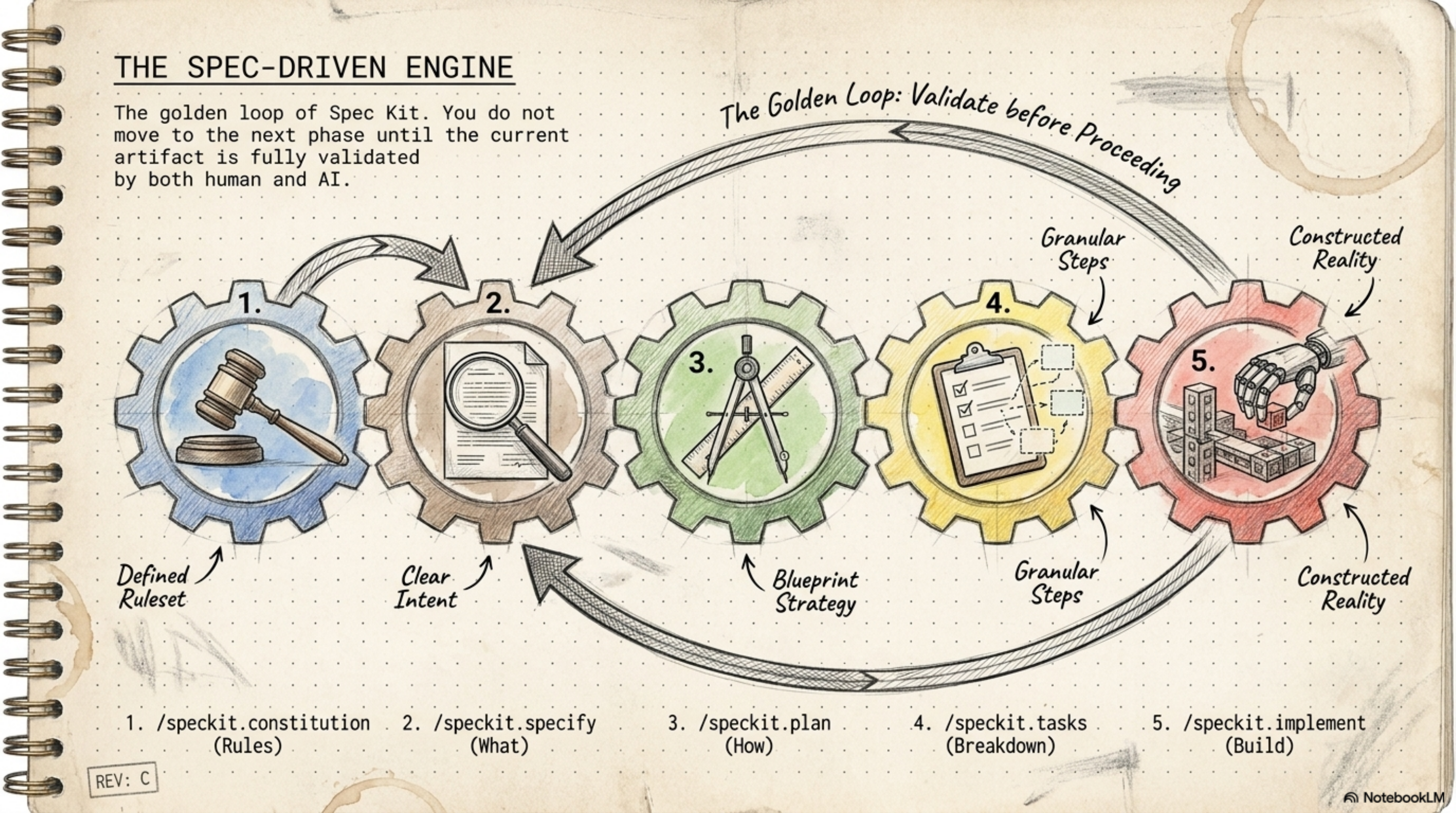 | SDD Phases Overview |
 | Extension Ecosystem |
 | Spec Kit vs alternatives |
 | Bug Workflow |
 | Intent-Based Development |
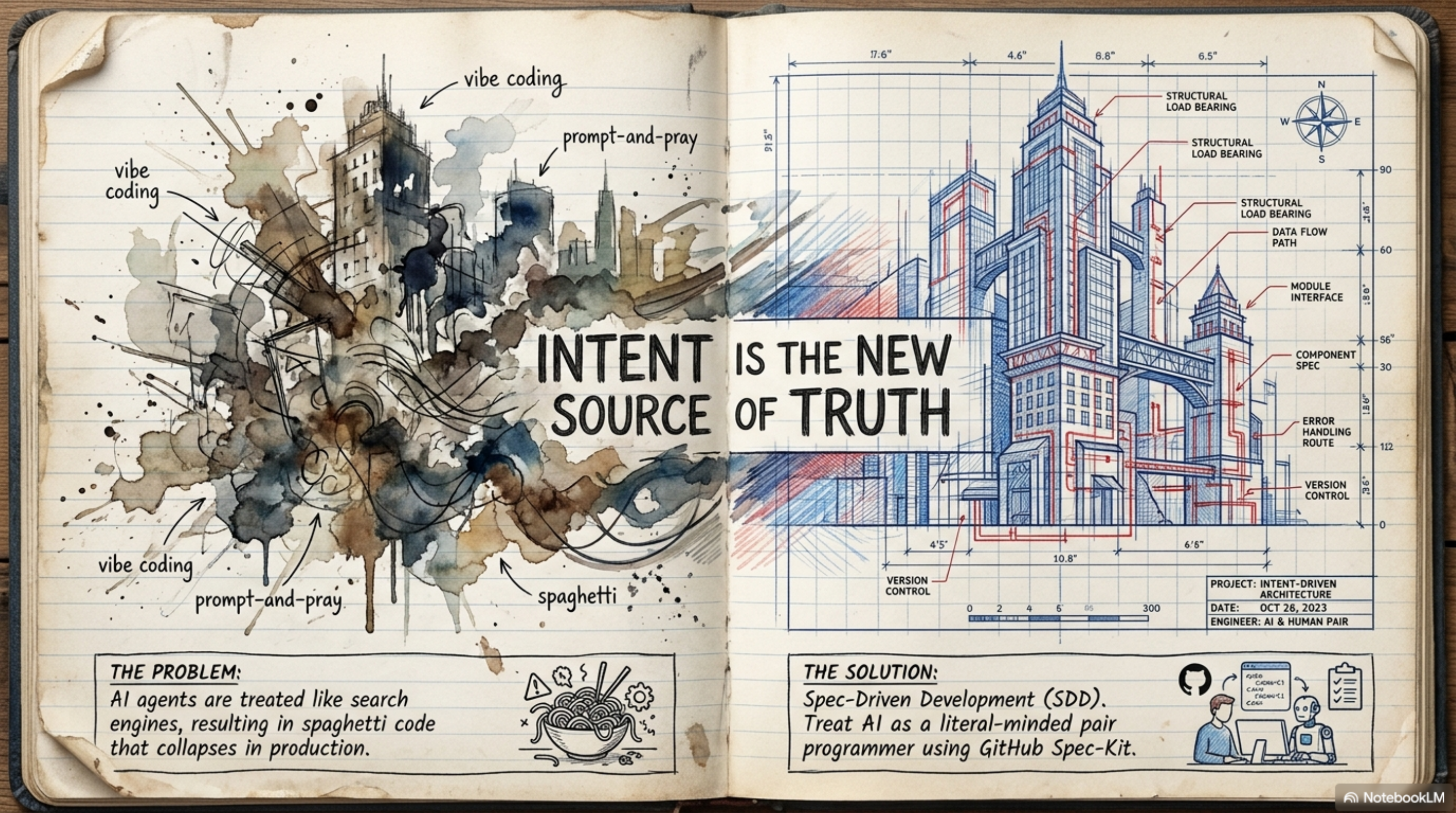 | Engineering Intent — Title |
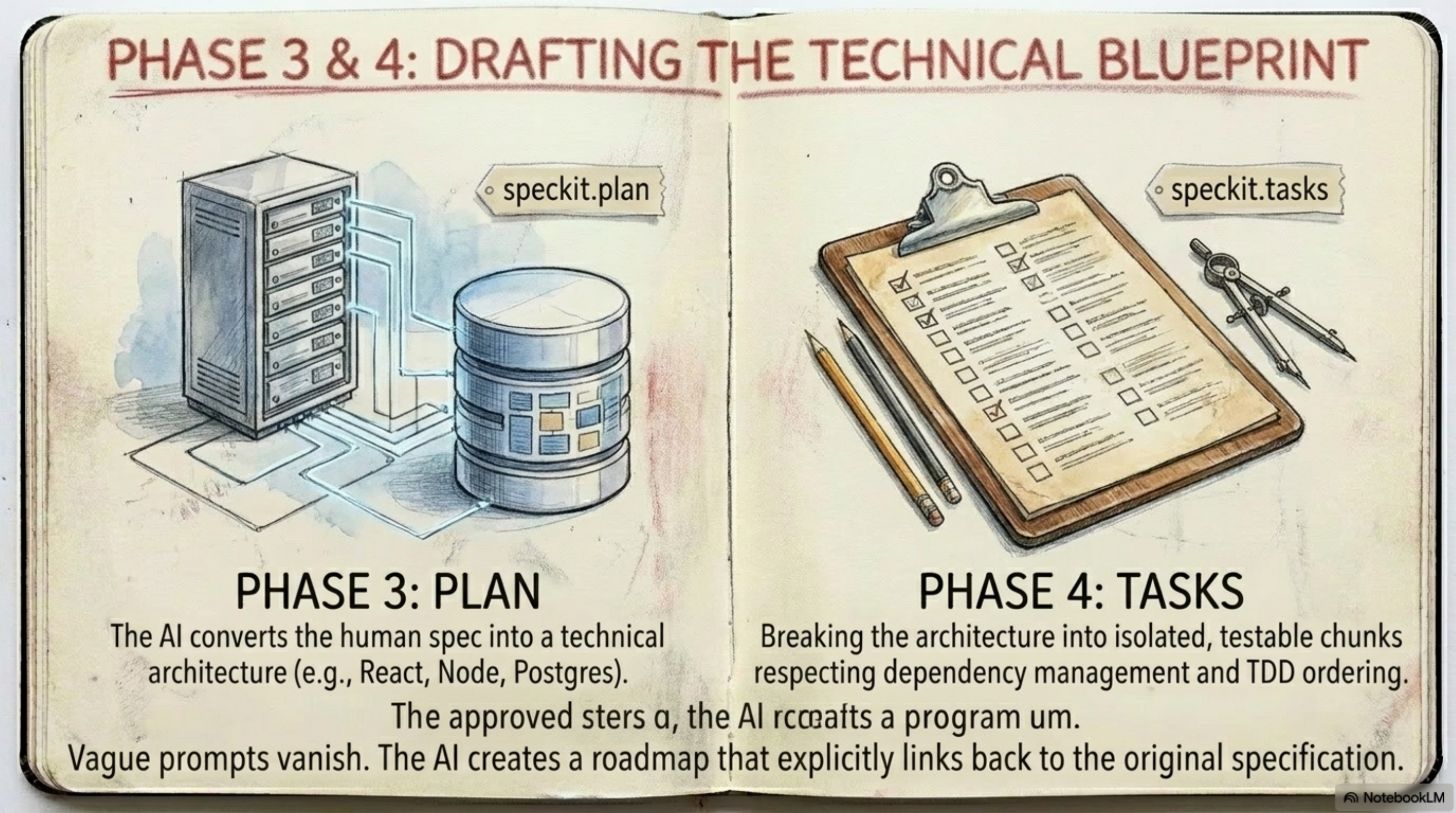 | Architecture Diagram |
Section📊 Excalidraw Diagrams
And if you want to remix the diagrams yourself, they're all editable:
| # | Diagram | File | Elements |
|---|---|---|---|
| 1 | SDD Complete Workflow (9 Phases) | sdd-workflow-flowchart.excalidraw | 49 elements |
| 2 | Vibe Coding vs SDD | vibe-coding-vs-sdd.excalidraw | 20 elements |
| 3 | .specify/ Directory Structure | specify-directory-structure.excalidraw | 19 elements |
| 4 | Extension Ecosystem Mind Map | extension-ecosystem-mindmap.excalidraw | 26 elements |
| 5 | Greenfield vs Brownfield Workflow | greenfield-vs-brownfield.excalidraw | 61 elements |
| 6 | SDD Maturity Hierarchy | sdd-maturity-hierarchy.excalidraw | 15 elements |
All diagrams are open source — edit them on excalidraw.com or with the VS Code extension.
Section📎 References
- GitHub Spec Kit Repository
- Spec Kit Documentation
- Integrations Reference
- In-Depth Article — The complete guide to GitHub Spec Kit
This cheat sheet is part of the Agentic AI series on Learn-in-Depth Journal.
Comments