OpenCode: إزاي الـ Terminal AI Agent الوحيد اللي بيشتغل زي Department كامل
"الـterminal اللي قدامك ده مش بس بيكتب كود — ده بيشتغل زي department كامل فيه builders و planners و scouts، وكل واحد بيلعب دوره من غير ما يعدي على حدود التاني."
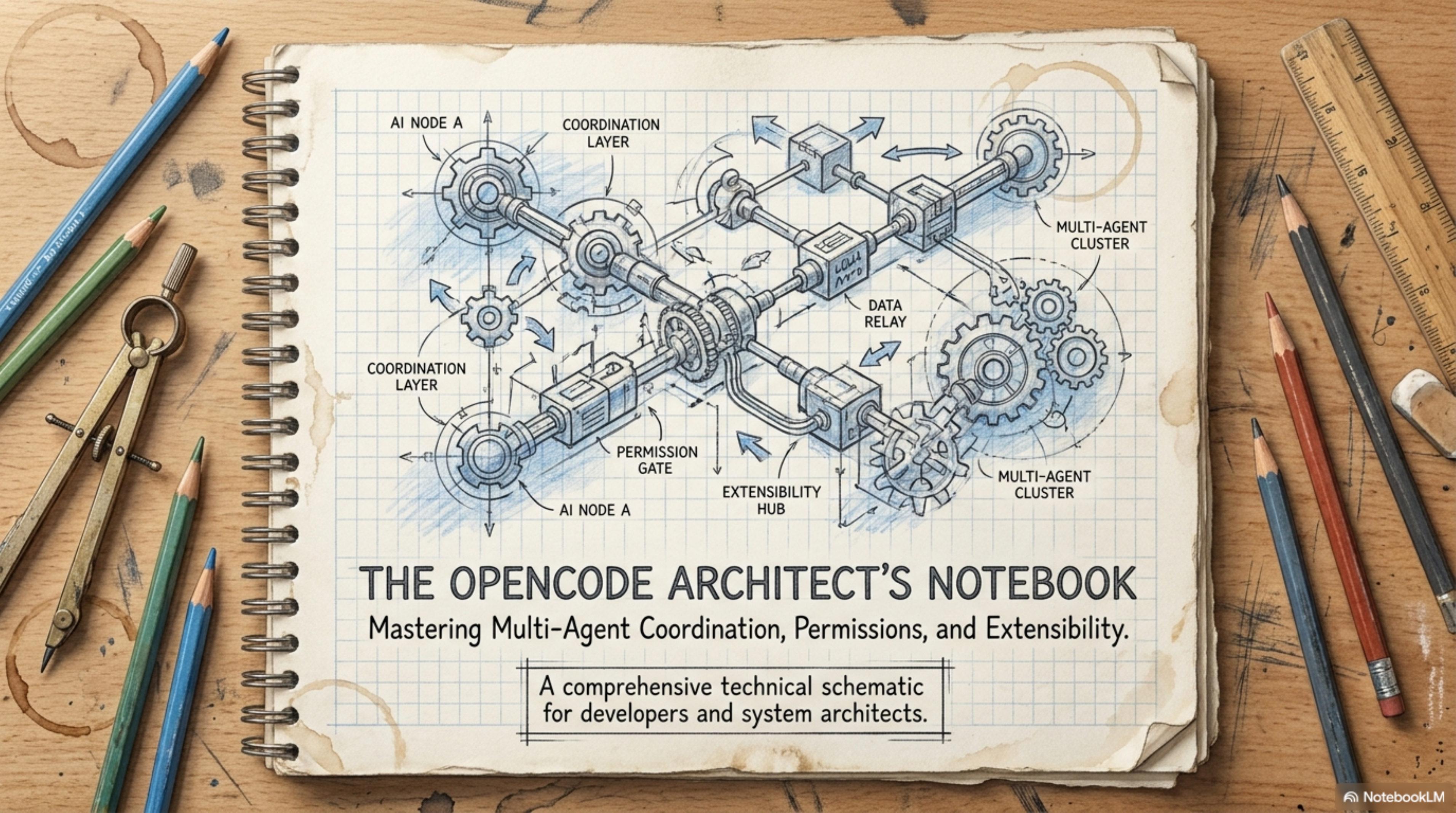
Section1. المشكلة: ليه الـ AI Coding Agent العادي مش كفاية؟
تعال بقى نشوف المشهد ده: أنت قاعد الساعة 2 الفجر، والـfeature اللي المفروض تتسلم بكرة الصبح لسه فيها 3 bugs، والـAI assistant بتاعك — اللي هو الـchatbot في الـVS Code — بيسألك كل 30 ثانية "هل عايزني أعمل كذا؟" وكل ما تعملو "allow" بيتقدم شوية وبيقف تاني يسأل. النتيجة؟ أنت كتبت حاجة كان ممكن تخلص في 20 دقيقة، أخدت منك ساعتين.
أو السيناريو التاني: أنت شغال على repository كبيرة — يعني الـcodebase فيها 50,000 ملف — والـAI agent بتاعك بيعمل grep على الكل، وبدل ما يرجعلك بالنتيجة المهمة، بيعمل flood لـchat window بحاجات مش مهمة. تالت ساعة وأنت بـscroll عشان تلاقي الـfunction اللي محتاجها.
وهنا انت هتقول لي: "طب ده طبيعي، الـAI agents شكلها كده!" — أقولك لأ، مش لازم تبقى كده.
الـمشكلة الحقيقية إن الـAI coding tools اللي موجودة شغالة بنموذج واحد: agent واحد، chat واحد، permission واحدة. يعني الـagent بيعمل كل حاجة بنفسه — يبحث، يكتب، ينفذ — ومفيش حد بيتدخل يقوله "هذه خطر، لا تعملها" غير لما يسألك. ومفيش partitioning — الـsubagent اللي بيعمل search بيعمل flood للـchat الرئيسي بكل اللي لقاه.
تقوللي ده architecture حلو ونضيف؟ قولك لأ — ده بالظبط اللي هيخليك تضيع ساعتين على حاجة كانت تتسلم في 20 دقيقة.
Section2. إيه هو OpenCode؟
OpenCode هو Go-based terminal AI coding agent — يعني بيتعامل مع الـ AI models مباشرة من جوه الـ terminal عبر TUI (Terminal User Interface). بس اللي بيميزه مش إنه بيشتغل في الـ terminal — ده بنشاط كتير بيعملوا كده. اللي بيميزه هو إنه بيشتغل كـ multi-agent system متكامل:
- Primary Agents بيتحكموا في الـsession وبيمثلوا المستخدم
- Subagents متخصصين في مهام معينة (search, research, multi-step tasks)
- Hooks تسمحلك تتحكم في كل tool call قبل ما يتنفذ
- Permissions triad (Allow/Ask/Deny) بتحميك من الأخطاء
- Skills بنظام SKILL.md بتوسع قدراته من غير ما تعدل الكود
OpenCode هو مشروع مفتوح المصدر (open source) اتعمل بالـ Go وبيشتغل كـ terminal AI coding agent. المشروع بيتطور باستمرار وبيدعم multi-agent architecture متكاملة.
ملحوظة: في المقال ده هنتكلم عن OpenCode كمشروع واحد. الـconfig file هو
.opencode.jsonوالـCLI command هوopencode.
Section3. الـOperator Topology: Primary Agents و Subagents
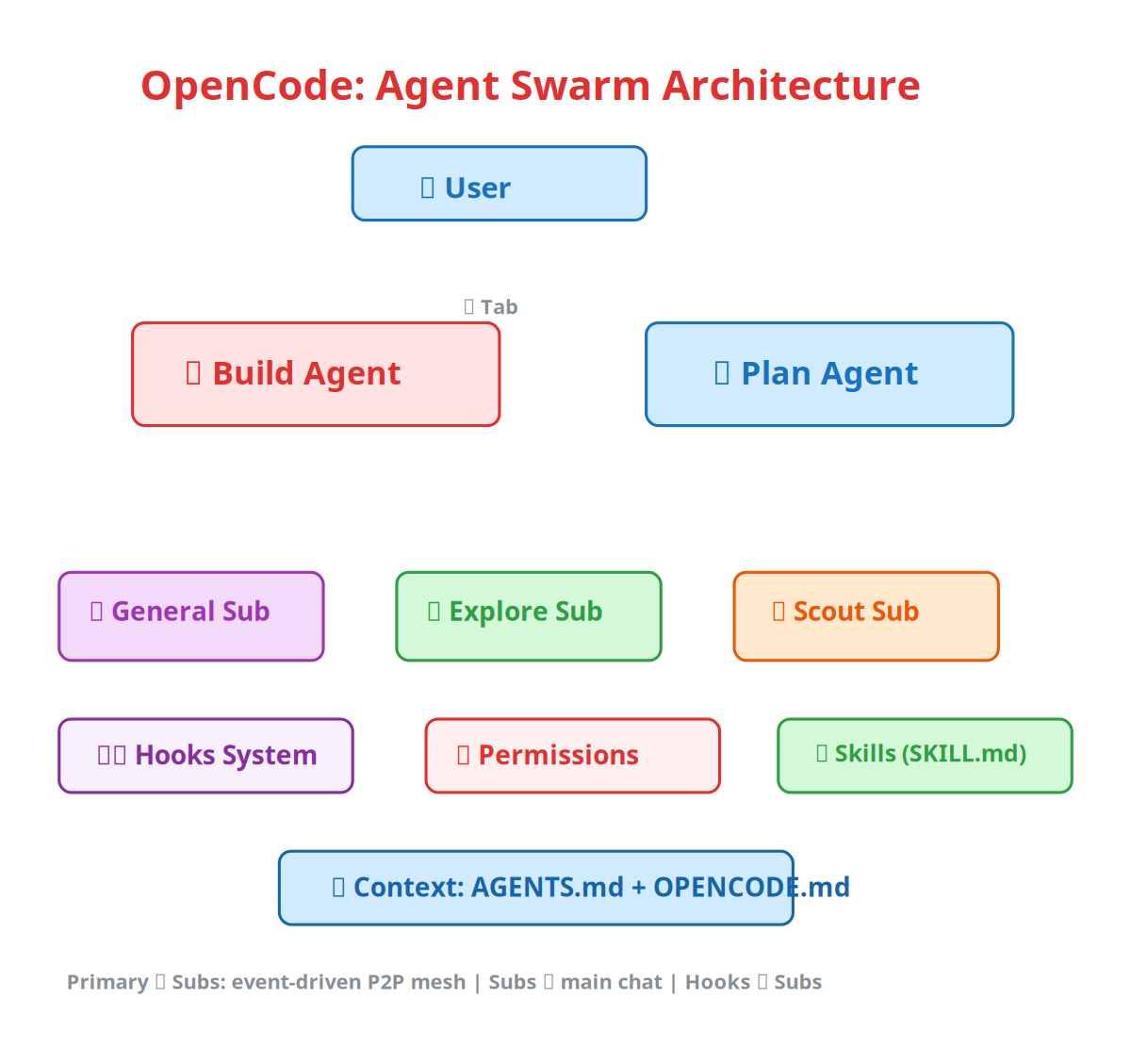
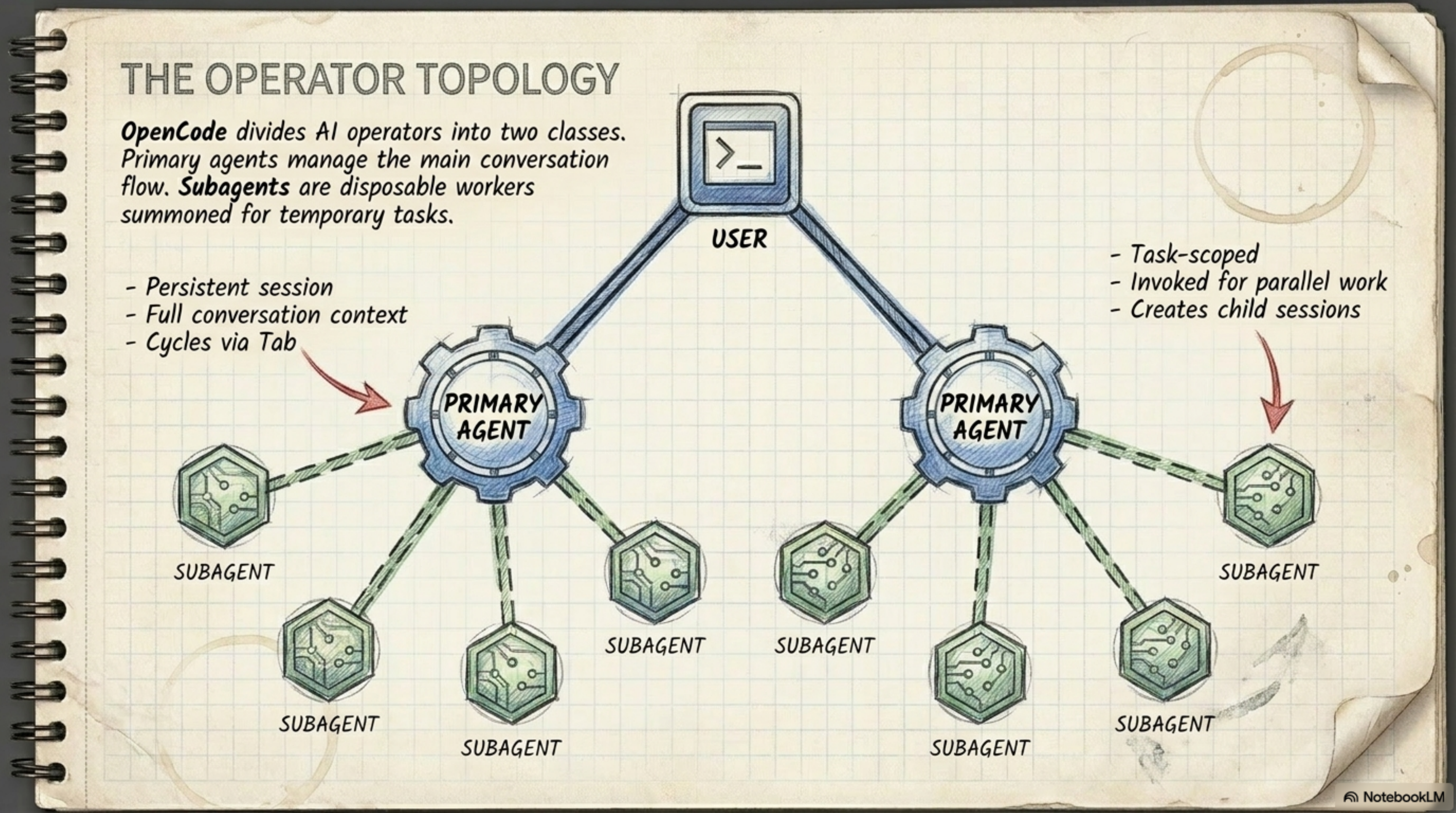
تخيّل معايا إنك مدير department — عندك ناس بتشتغل full-time (دول الـPrimary Agents)، وناس بتتنادي بس لما محتاجها (دول الـSubagents).
Primary Agents: Build و Plan
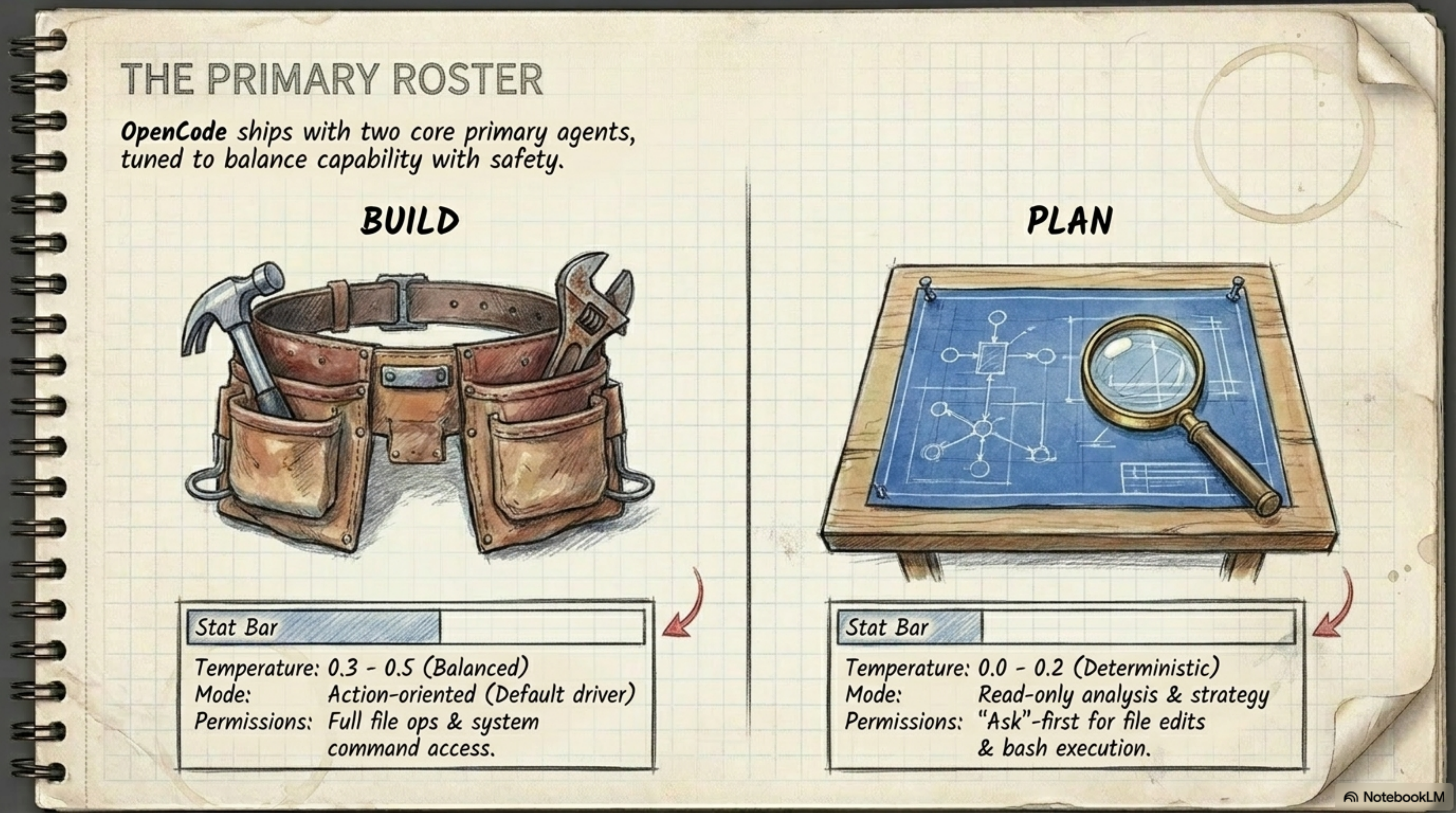
الـsystem دي شغالة بـ agentين أساسيين بيتحكموا في الـconversation معاك:
| Agent | الدور | الـTemperature | الـPermissions |
|---|---|---|---|
| Build | الـdefault driver — بيعمل كل حاجة (يكتب كود، يشغل tests، يعدل ملفات) | 0.3–0.5 (Balanced) | Full file ops + system command access |
| Plan | الـanalyst — بيقرأ ويفهم بس، وما يعدلش حاجة من غير ما يسألك | 0.0–0.2 (Deterministic) | Ask-first لـ file edits + bash |
الـBuild agent ده اللي انت بيتكلم معاه في الـأغلب — ده اللي بينفذ. الـPlan agent ده اللي بيفكر وبيحلل وبيقولك "الطريقة الفلانية أحسن عشان كذا وكذا" — بس ما يعملش حاجة من غير ما تسمحو.
وبالنسبة للـtab switching — انت ممكن تبدل بين الـagentين في أي وقت بـ Tab في الـTUI. يعني ممكن تبدأ الـsession مع Build وتطلب منو يكتب feature، وبعدين تبدل على Plan وتقولو "حلللي الـarchitecture بتاعة اللي كتبناه ده وشوفلو فيه حاجة غلط."
Subagents: General و Explore و Scout
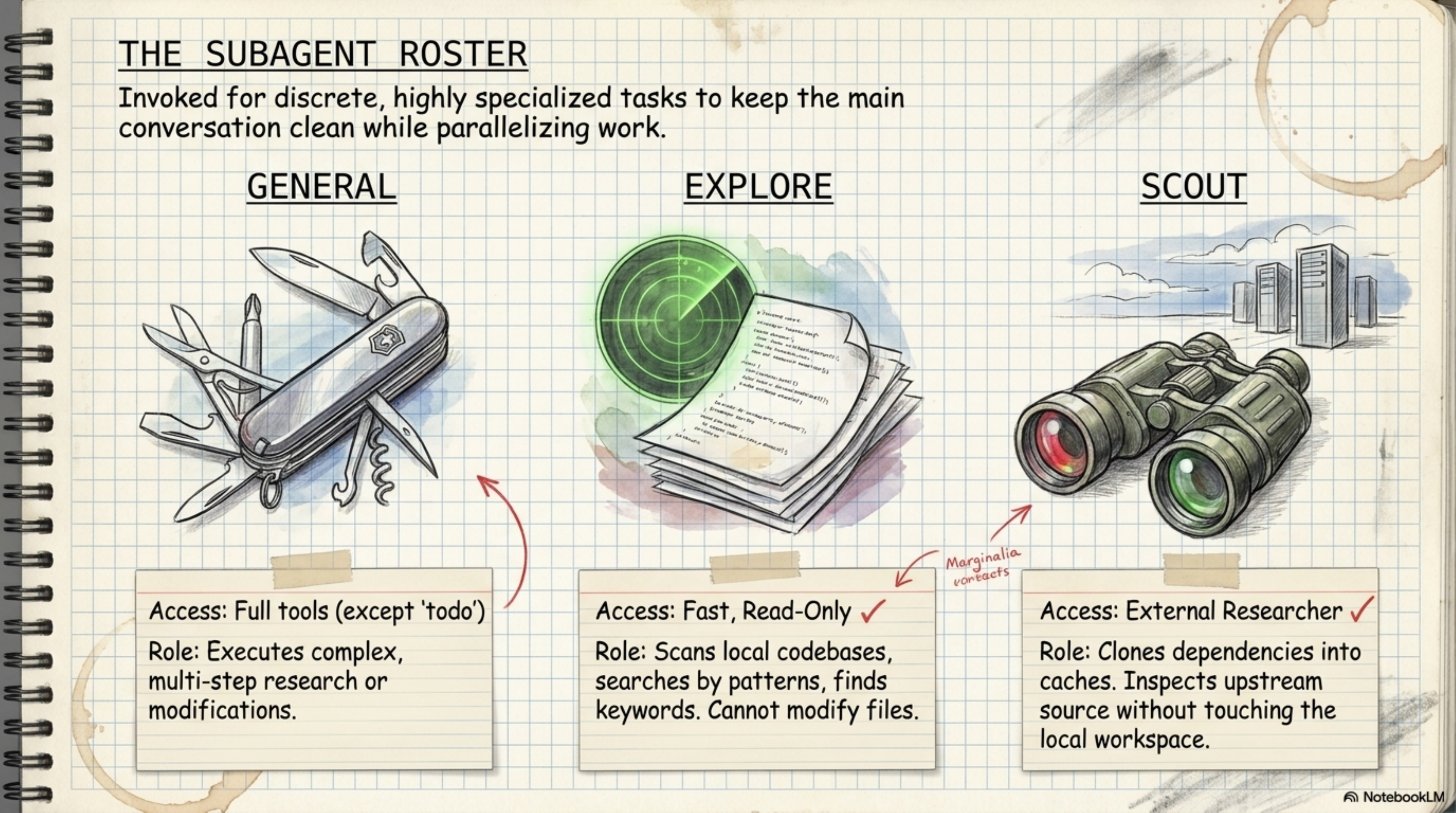
دول الـspecialists اللي بيتندوا بس لما الـPrimary Agent محتاجهم:
General — ده زي الـSwiss Army knife:
- Access: Full tools (except
todo) - Role: بينفذ multi-step tasks معقدة — يعني لو الـBuild agent محتاج حد يعمل research كبير، بينادي General وبيقولو "اذهب واعمل كذا وارجعلي بالنتيجة"
Explore — ده الـradar:
- Access: Fast, Read-only — يعني
globوgrepوlsوviewبس - Role: بيمسح الـcodebase محلّياً (locally)، يبحث بـpatterns وkeywords، بس ما يعدلش أي ملف
Scout — ده الـbinoculars اللي بتشوف بعيد:
- Access: External researcher — بيعمل clone للـdependencies في managed cache ويتفحصها من بره
- Role: بيعمل research على external documentation وupstream source من غير ما يلمس الـlocal workspace بتاعك
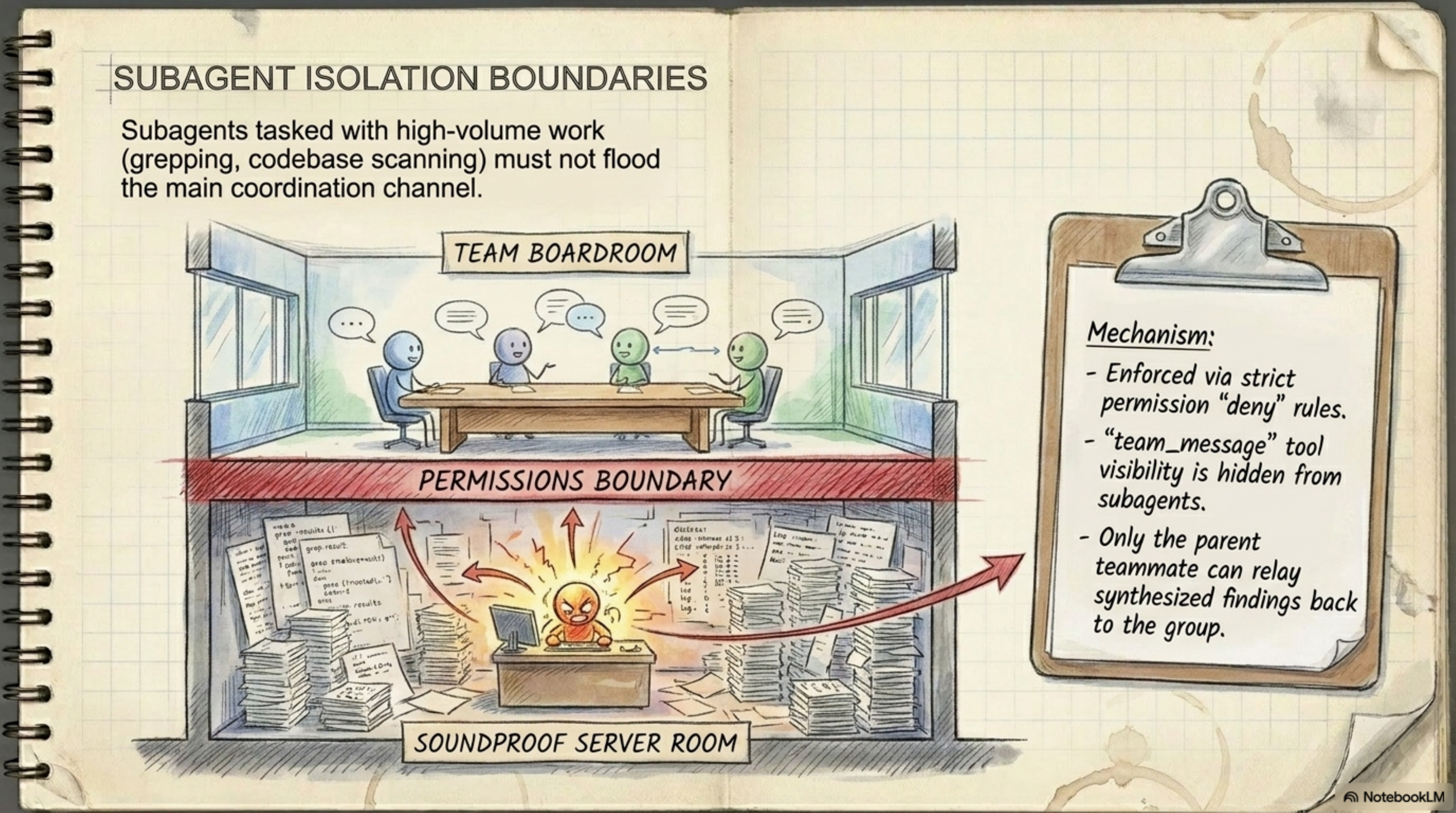
والنقطة المهمة هنا — الـSubagents ما بيتكلموش في الـmain channel. يعني الـExplore agent لما بيعمل grep على 10,000 ملف، مش بيعمل flood لـchat window بتاعتك — لأن الـ"team_message" tool مش available ليهم. الـPrimary Agent بس اللي يقدر يوصل الـsynthesized findings ليك.
Section4. الـMessaging Architecture: ليه Event-Driven أحسن بـمراحل
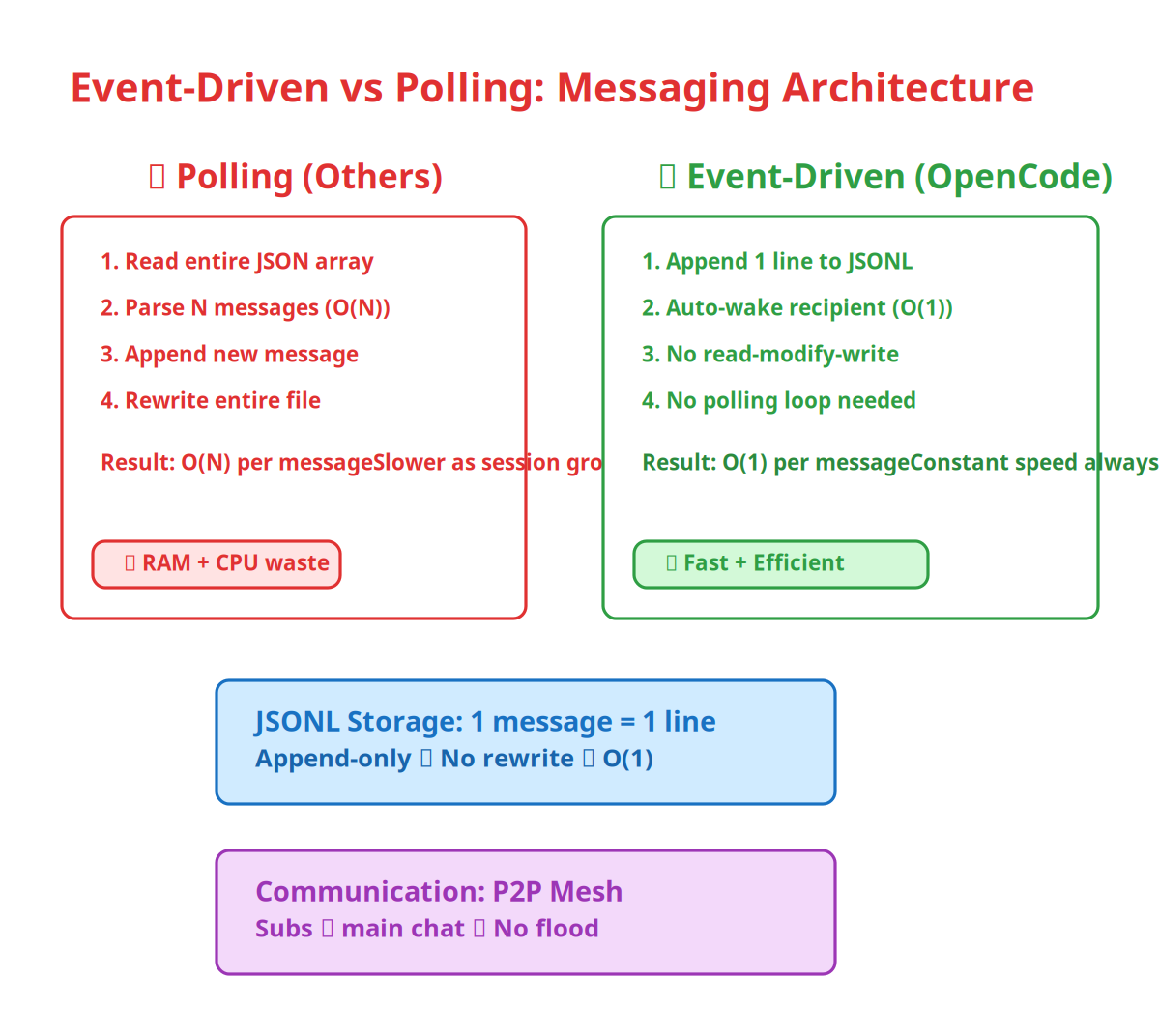
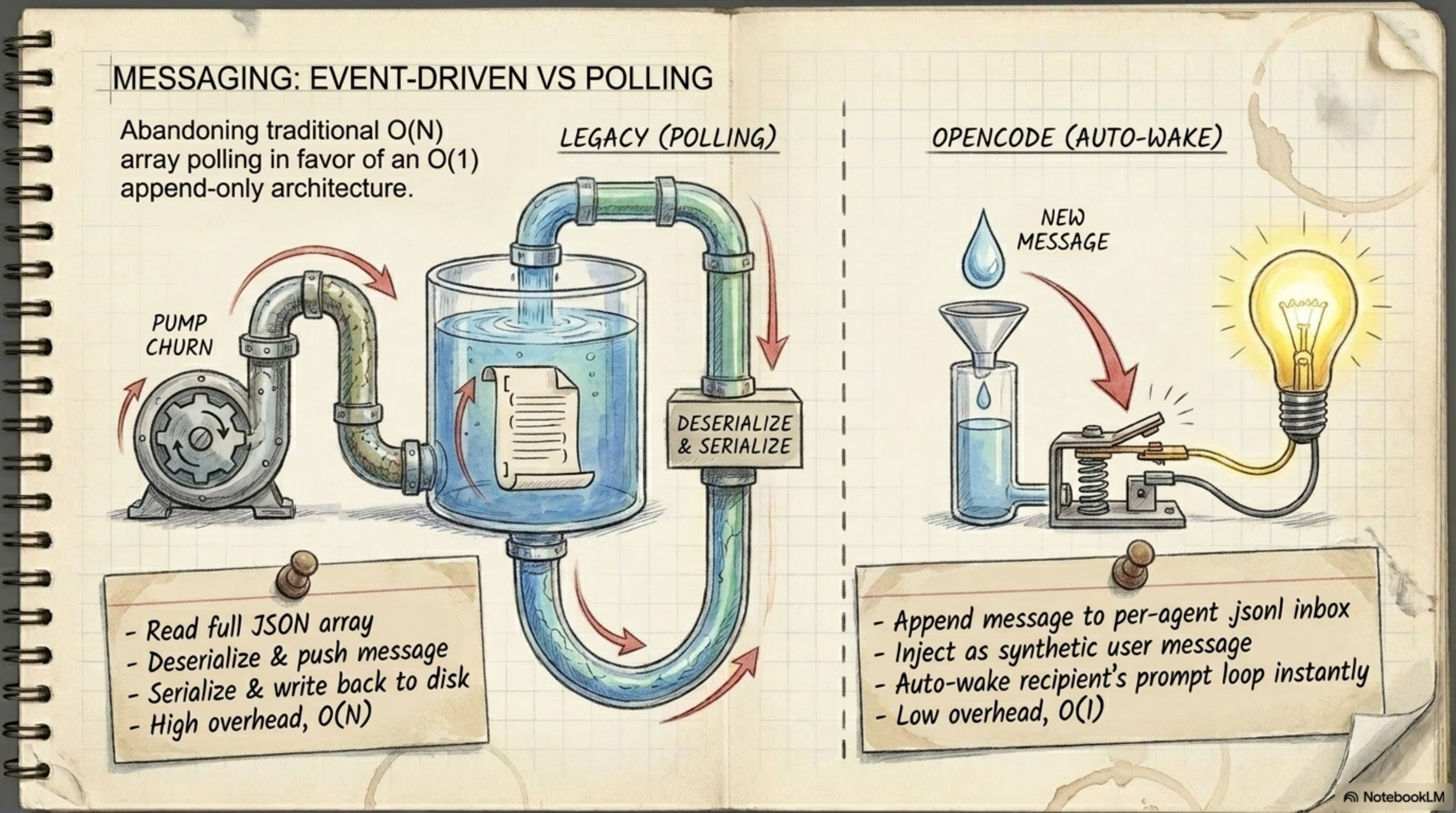
تعال بقى نتكلم عن حاجة محدش بيتكلم عنها بس هي اللي بتفرق بين OpenCode وكل الـagents التانيين: طريقة الـmessaging.
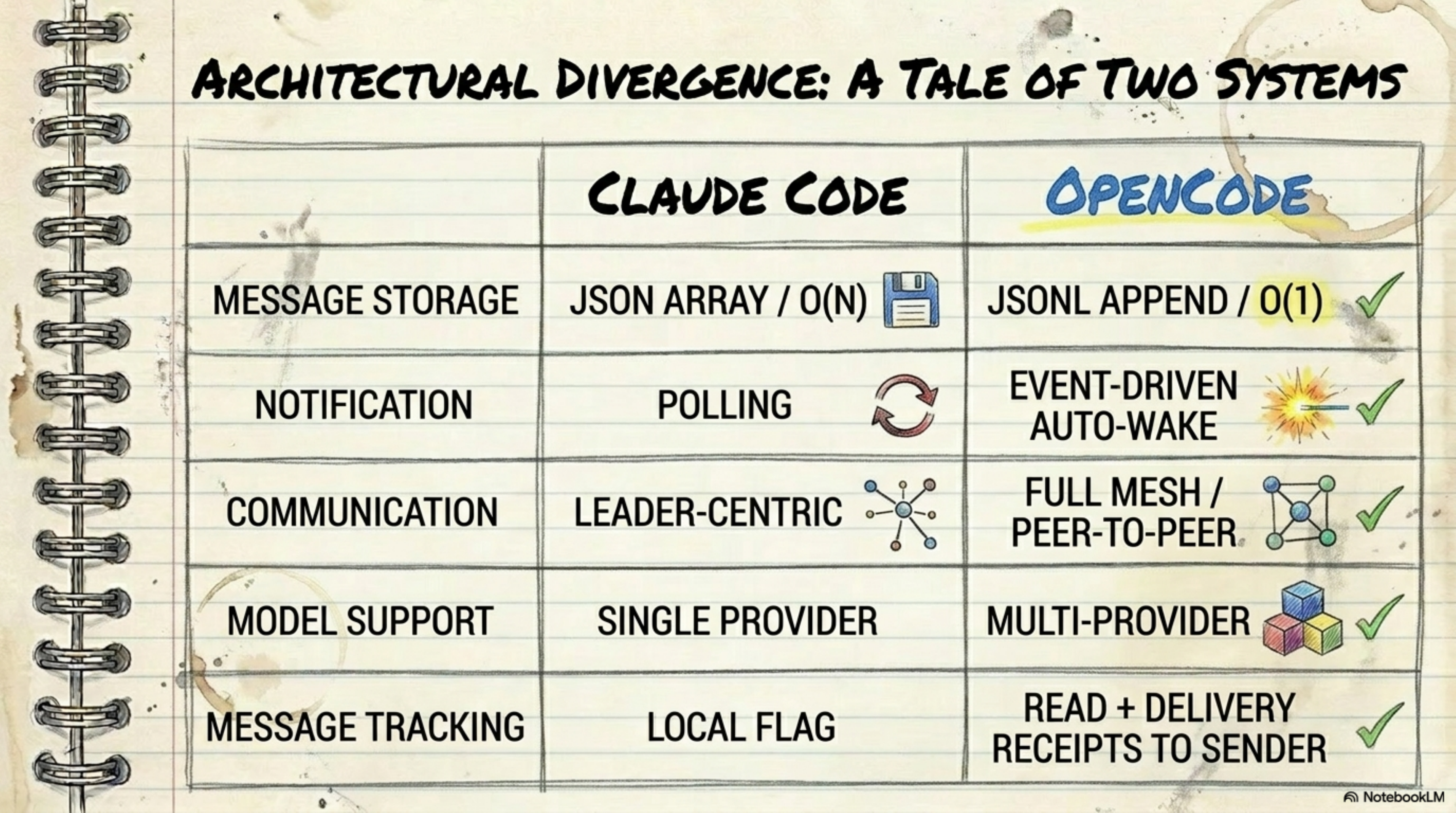
الـagents التانيين (زي Claude Code مثلاً) شغالين بـ polling — يعني كل شوية بيقروا الـJSON array كله من الأول، يضيفوا message جديدة، ويعيدوا كتابته كلو. ده O(N) — يعني كل ما الـconversation تطول، كل ما العملية تبقى أبطأ.
OpenCode شغال بـ event-driven auto-wake:
- كل message بتتـappend كـline في JSONL file — يعني O(1)
- الـrecipient بيتـauto-wake فوراً لما message جديدة تتنكتب
- مفيش polling، مفيش read-modify-write cycle
الفرق ده مش بس theoretical — في الـlong sessions (اللي هي الوضع الطبيعي في coding)، الـpolling approach بيأكل RAM وCPU وبيبقى بطيء تدريجياً. الـappend-only approach بيفضل سريع من الأول لآخر.
Section5. الـPermission Triad: Allow و Ask و Deny
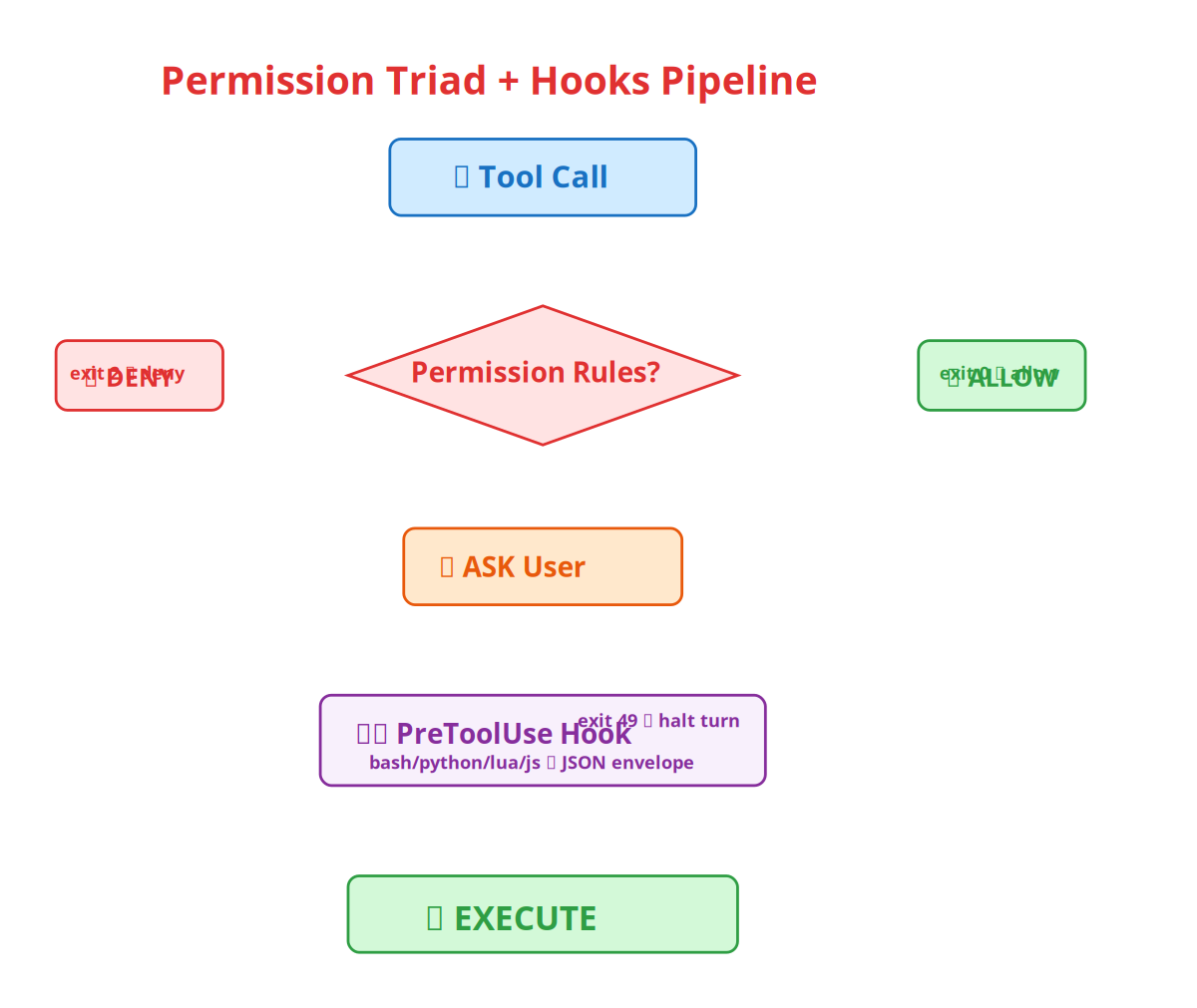
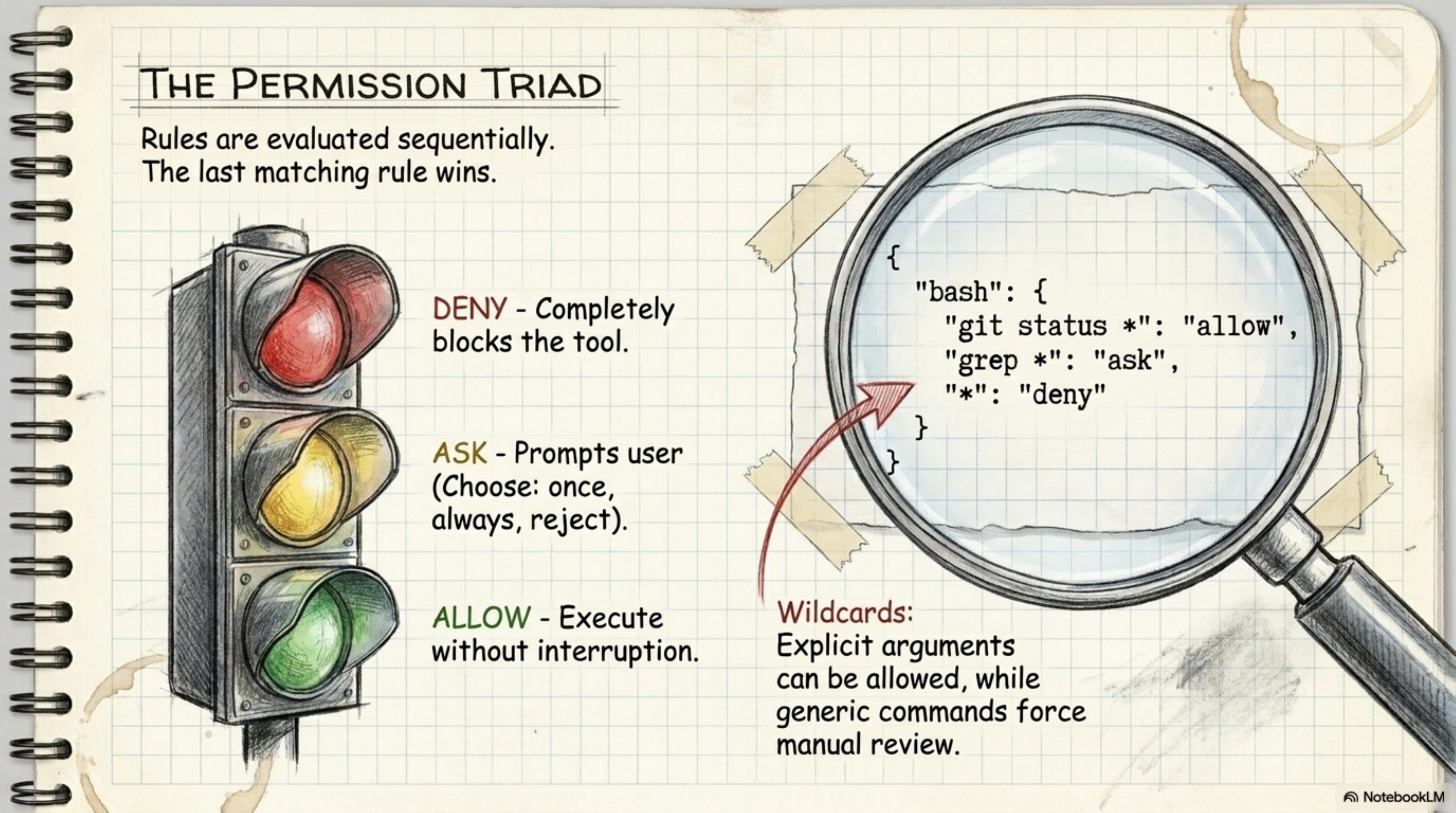
هنا انت هتقول لي: "طب الـAI agent ده هيعمل حاجات لوحده من غير ما يسألني؟" — وأقولك: لأ، النظام مبني على triad من الـpermissions:
| الحالة | معناها | مثال |
|---|---|---|
| ALLOW | ينفذ من غير ما يسألك | git status * — أمر آمن |
| ASK | يسألك الأول وتختار | grep * — أمر محتمل يكون خطر |
| DENY | ممنوع نهائياً | rm -rf / — أمر خطير |
والقاعدة: آخر rule بتاع الـmatching هي اللي بتتنفذ. يعني ممكن تعمل:
{
  "permissions": {
    "bash": {
      "rules": [
        { "pattern": "git status *", "decision": "allow" },
        { "pattern": "grep *", "decision": "ask" },
        { "pattern": "*", "decision": "deny" }
      ]
    }
  }
}
ده معناه: الـgit status سمح بيه، الـgrep اسألني فيه، وكل حاجة تانية ارفضها. وبعدين تقدر تعمل --yolo mode لو حابب كل حاجة تنفذ من غير ما تسأل:
opencode--yolo# ⚠️ كل حاجة تنفذ من غير permission prompt
وبعدين في الـhooks اللي بتسمحلك تعمل dynamic permissions — يعني بدل ما تكتب rule لكل أمر، تكتب script بيتنفذ قبل كل tool call ويقرر هو:
{
  "hooks": {
    "PreToolUse": [
      {
        "matcher": "^(view|ls|grep|glob)$",
        "command": "echo '{\"decision\":\"allow\"}'"
      }
    ]
  }
}
Section6. الـHooks System: التحكم اللي مكانش موجود في أي tool تاني
الـhooks ده النظام اللي بيخليك تتحكم في الـAI agent بطريقة deterministic — يعني مش محتاج تعتمد على الـmodel إنه "يفهم" إنه مش لازم يعمل حاجة، انت بتكتب rule وبتنفذ.
إزاي بيشتغل؟
- كل مرة الـagent بيعمل tool call، الـsystem بيشيك هل في hook مسجل ولا لأ
- لو في hook، بيشغل الـscript بتاعك (bash, python, lua, js — أي لغة)
- الـscript بياخد JSON input على الـstdin ويطلع JSON output على الـstdout
- بناءً على الـoutput، الـsystem بيقرر: allow (نفذ)، deny (ارفض)، أو halt (وقف الـturn بالكامل)
الـenvironment variables المتاحة
| المتغير | وصفه |
|---|---|
OPENCODE | دايماً 1 لو شغال تحت OpenCode |
OPENCODE_TOOL_NAME | اسم الـtool (مثلاً bash) |
OPENCODE_TOOL_INPUT_COMMAND | الـcommand في حالة الـbash tool |
OPENCODE_TOOL_INPUT_FILE_PATH | الـfile path في حالة الـfile tools |
OPENCODE_SESSION_ID | رقم الـsession الحالي |
OPENCODE_CWD | الـworking directory |
أمثلة عملية
1. امنع الـrm -rf على الـroot:
#![Agent Swarm Architecture — OpenCode]usr/bin/env bash
ifecho"$OPENCODE_TOOL_INPUT_COMMAND"|grep-qE'rm\s+-(rf|fr)\s+/';then
echo"Refusing to run rm -rf against root">&2
exit2# Block tool
fi
2. ا inject context لما الـagent بيعدل Go files:
#![Agent Swarm Architecture — OpenCode]usr/bin/env bash
if[["$OPENCODE_TOOL_INPUT_FILE_PATH"==*.go]];then
echo'{"context": "Remember: run gofumpt after editing Go files."}'
else
echo'{}'
fi
3. اوقف الـturn لو حد حاول يعمل drop database:
#![Agent Swarm Architecture — OpenCode]usr/bin/env bash
ifecho"$OPENCODE_TOOL_INPUT_COMMAND"|grep-qE'drop\s+database';then
echo"Database drop detected — halting turn">&2
exit49# Halt entire turn
fi
Section7. الـSkills System: إزاي تدي الـagent قدرات جديدة من غير ما تعدل الكود
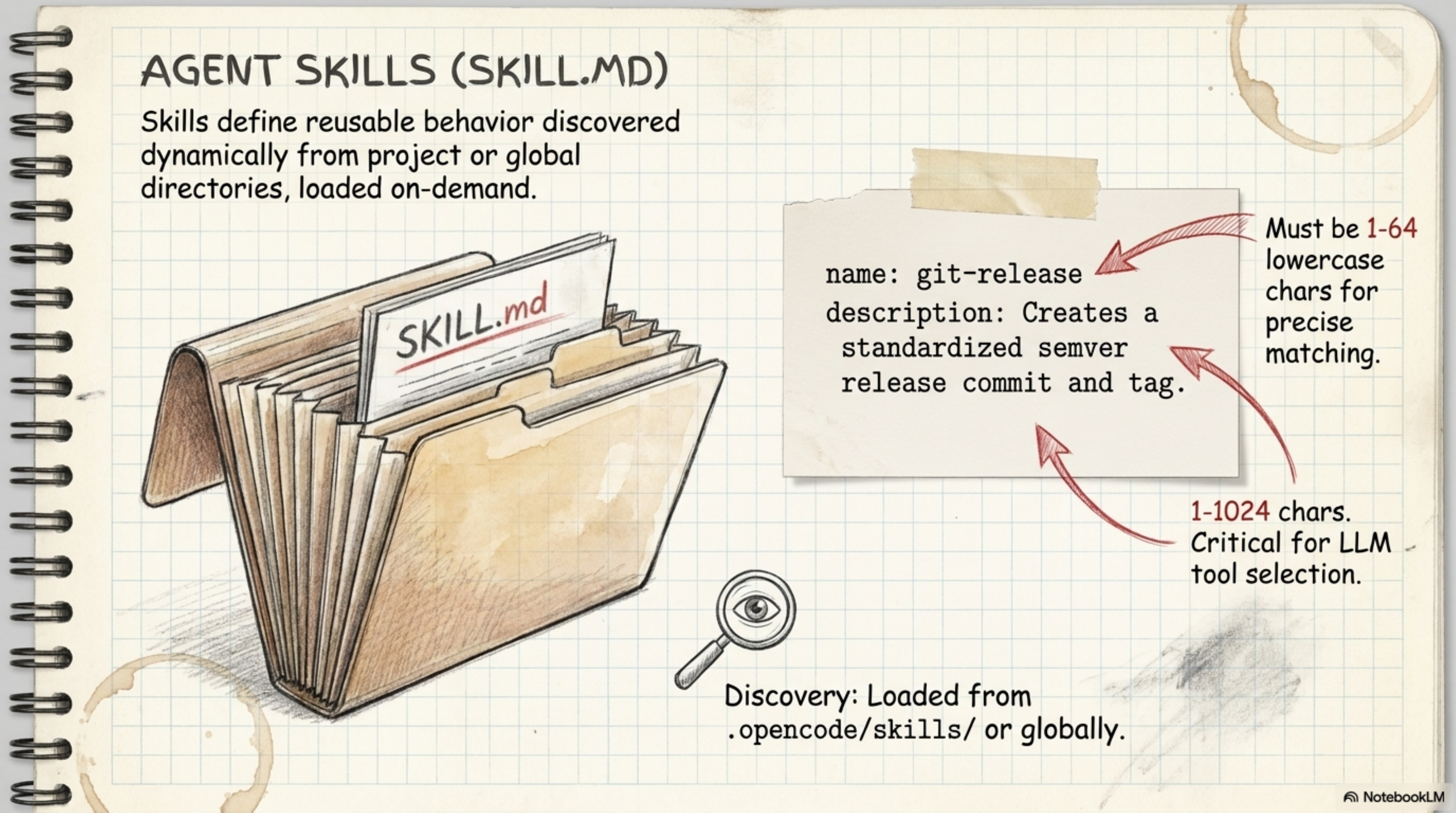
الـskills هي طريقة OpenCode إنه يوسع قدراته عن طريق ملفات Markdown — مش عن طريق programming. كل skill عبارة عن folder فيه SKILL.md وبيحتوي على YAML frontmatter + instructions:
name: git-release
description: Creates a standardized semver release commit and tag.
user-invocable: true          # يظهر في Ctrl+P command palette
disable-model-invocation: true # بس المستخدم بس اللي يقدر يناديها

# Git Release Skill

Instructions for creating a semver release...
إزاي الـagent بيلاقي الـskills؟
الـsystem بـscan الـpaths دي بالترتيب:
Global (user-level):
$XDG_CONFIG_HOME/opencode/skills/أو~/.config/opencode/skills/~/.agents/skills/~/.claude/skills/
Project-level:
.agents/skills.opencode/skills.claude/skills.cursor/skills
والقاعدة: آخر skill بالاسم ده هي اللي بتتنفذ — يعني لو عندك skill اسمها git-release في الـglobal path وتانية بنفس الاسم في الـproject path، الـproject version هي اللي بتشتغل.
الـBuilt-in Skills
| Skill | وصفه |
|---|---|
opencode-config | بيعلم الـagent إزاي يـconfigure نفسه |
opencode-hooks | بيعلم الـagent إزاي يكتب ويـdebug hooks |
jq | built-in JSON processor (gojq) — مش محتاج تـinstall حاجة |
Section8. الـContext Files: إزاي الـagent بيفهم مشروعك
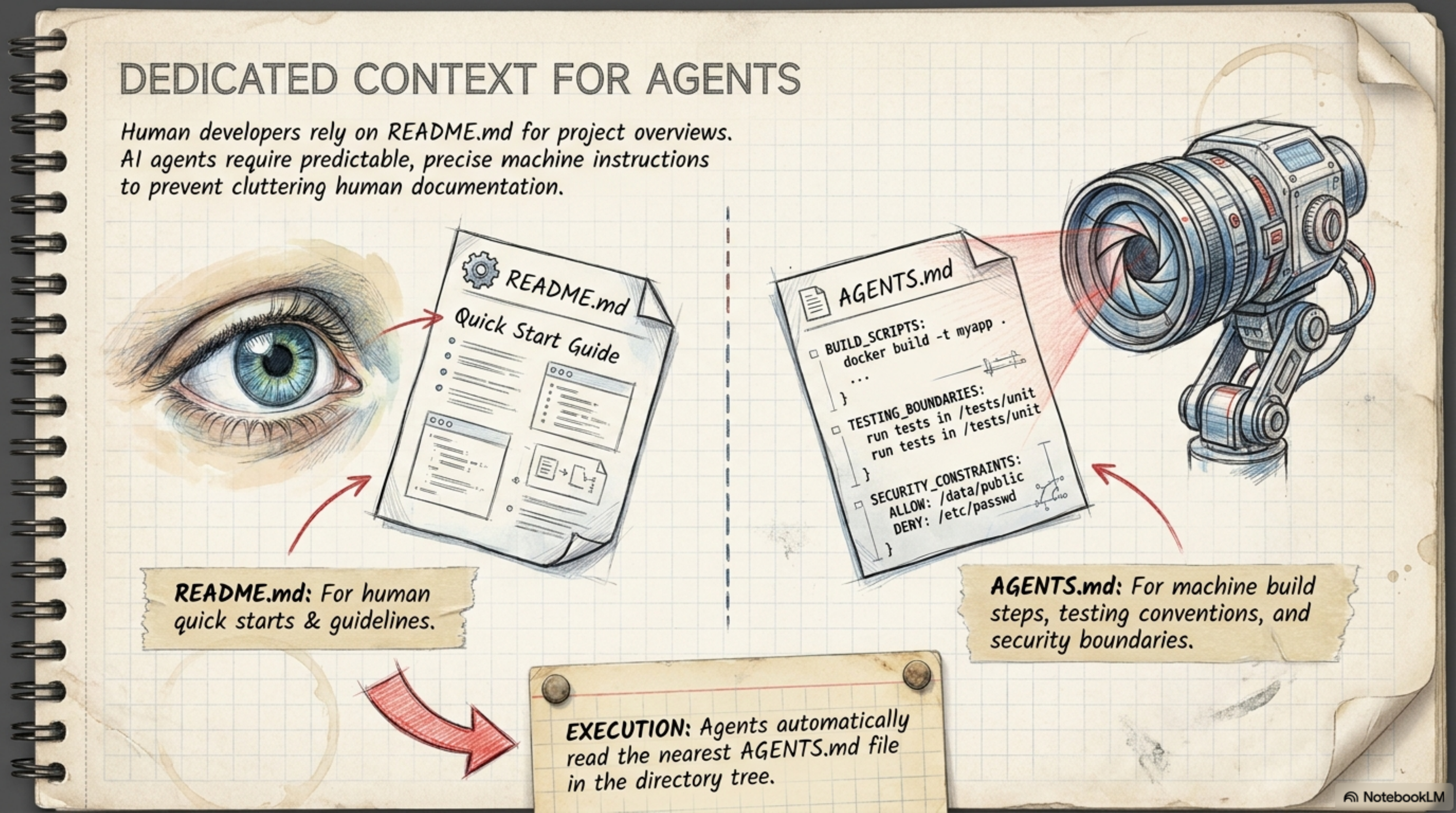
الـcontext files دي المكان اللي بتحط فيه التعليمات اللي الـagent بيتبعها. في OpenCode الـconfig file هو .opencode.json — بس كمان في context files منفصلة:
الـpaths اللي الـagent بيقرأها
| الـPath | النوع |
|---|---|
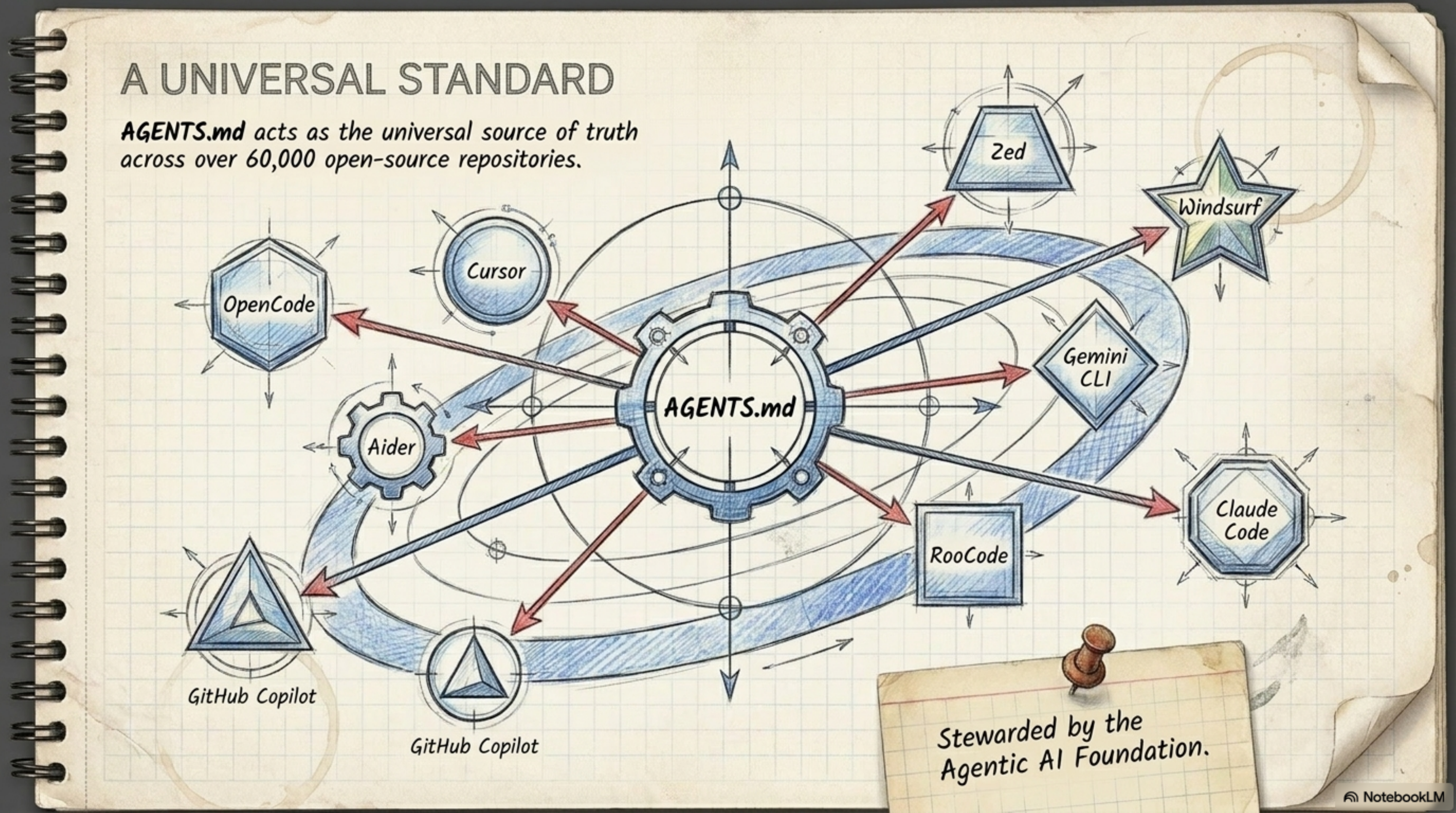
AGENTS.md | الـuniversal standard — كل الـAI agents بيفهموه |
OPENCODE.md / opencode.md | OpenCode-specific |
CLAUDE.md | Claude Code-specific |
.cursorrules | Cursor-specific |
GEMINI.md | Gemini-specific |
.github/copilot-instructions.md | GitHub Copilot |
والحلو إن AGENTS.md بقى universal standard بيتقرأ من أكتر من 60,000 open-source repository — يعني لو كاتب الـinstructions مرة واحدة في AGENTS.md، كل الـagents (Cursor, Claude Code, Copilot, Windsurf, Zed, إلخ) هيفهموها.
Section9. الـCrash Recovery: لما السيرفر يقع، إيه اللي بيحصل؟
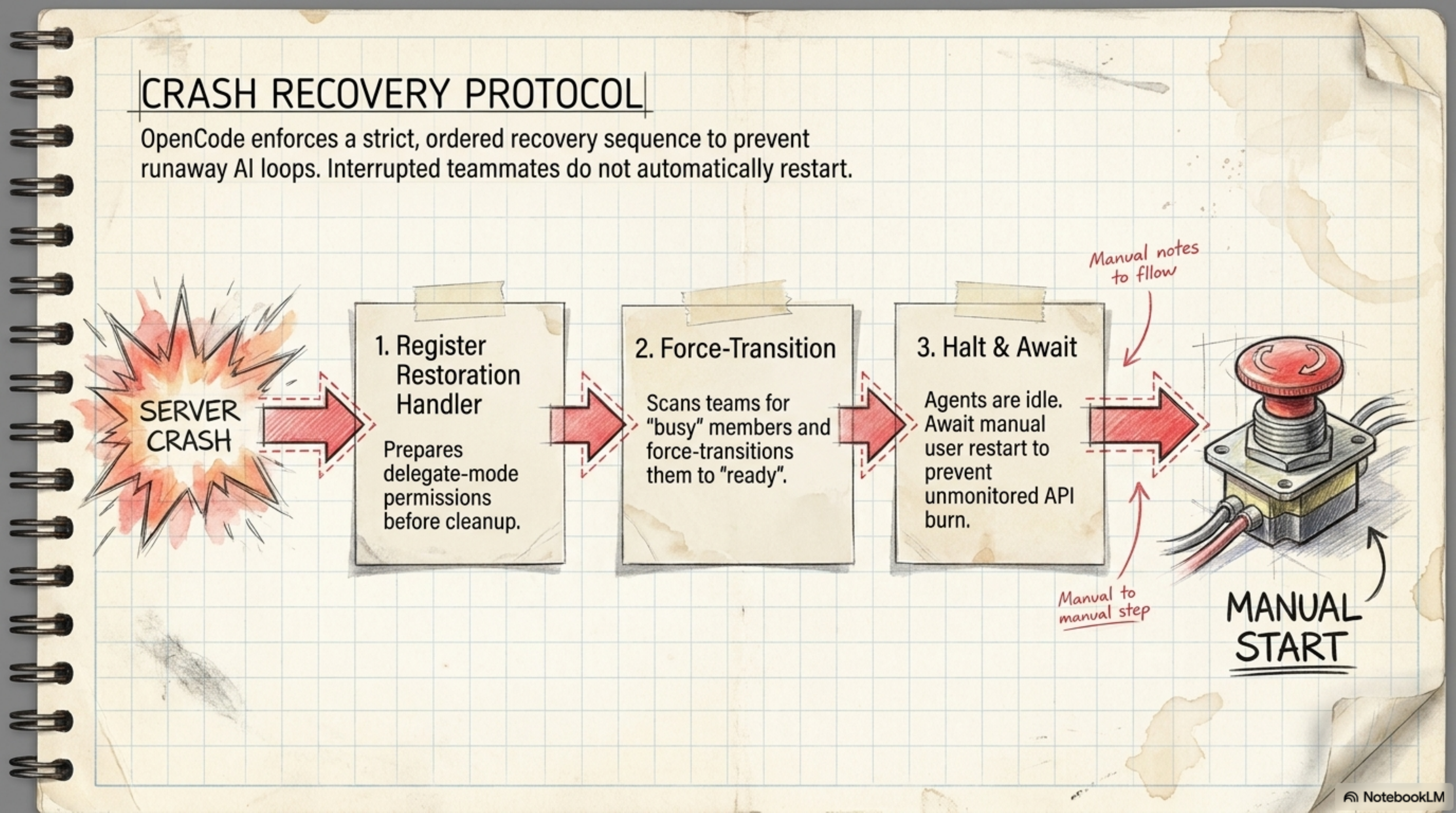
تفتكر إن لما السيرفر يقع والـagents كانت شغالة، هتقوم تاني لوحدها وتكمل شغلها؟ … لأ، ده بالظبط اللي هيخليك تصحى تلاقي 4 autonomous agents بيحرقوا API credits طول الليل على task عتيقة.
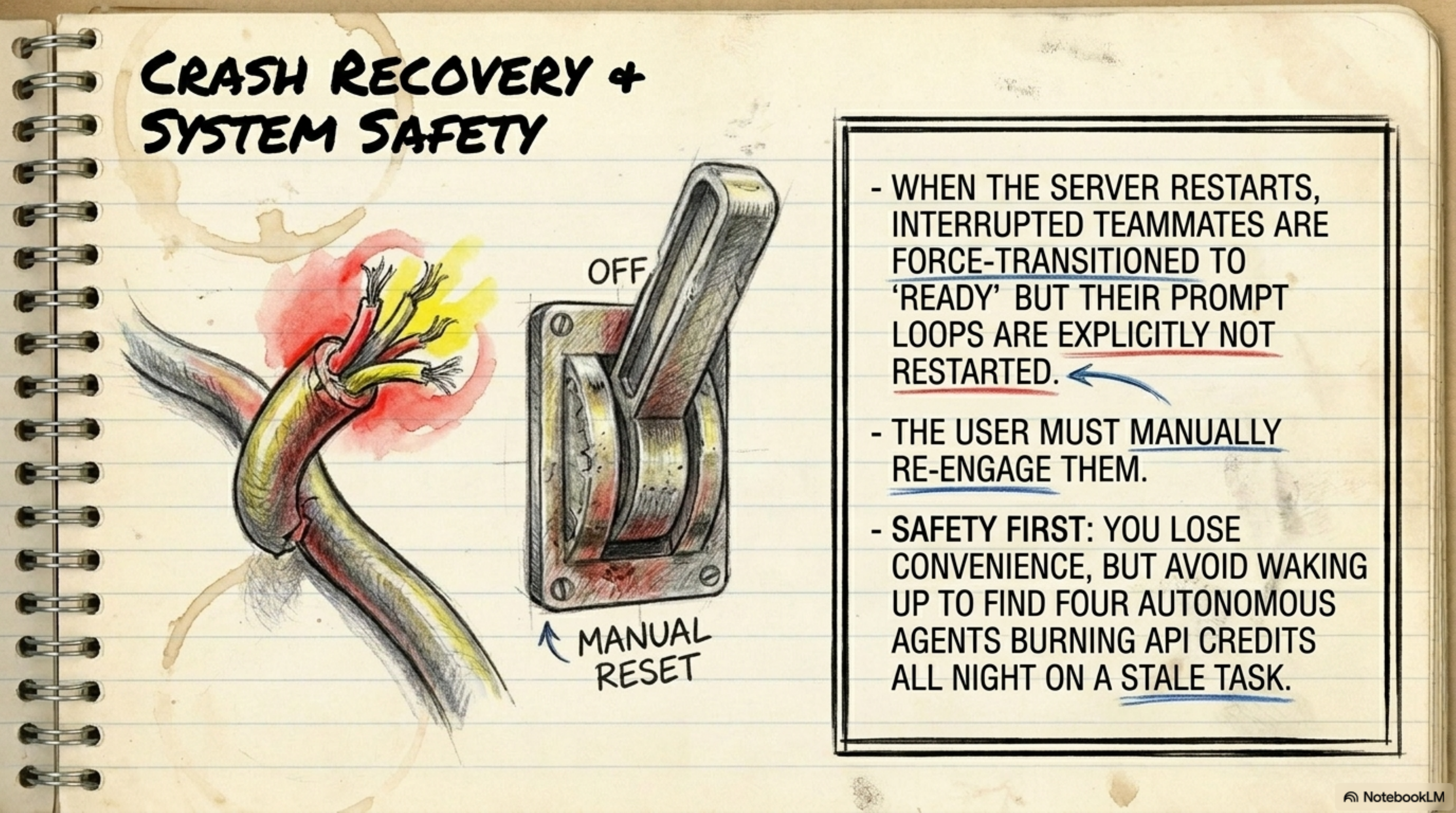
الـsystem لما بيقوم من crash بيعمل 3 حاجات بالترتيب:
- Register Restoration Handler — بـتهيء الـpermissions قبل ما يعمل أي cleanup
- Force-Transition — بيمسح الـagents اللي كانت "busy" ويحولهم لـ"ready"
- Halt & Await — واقف. ما بيـrestartش الـagents لوحده. لازم انت تعمل manual start.
يعني الـsystem بيعمل cleanup اتوماتيك، بس لازم الإنسان هو اللي يضغط على الـbutton عشان يكمل. ده بيسلمك من API burn غير مقصود.
Section10. الـHidden Orchestrators: اللي بيشغل في الـbackground
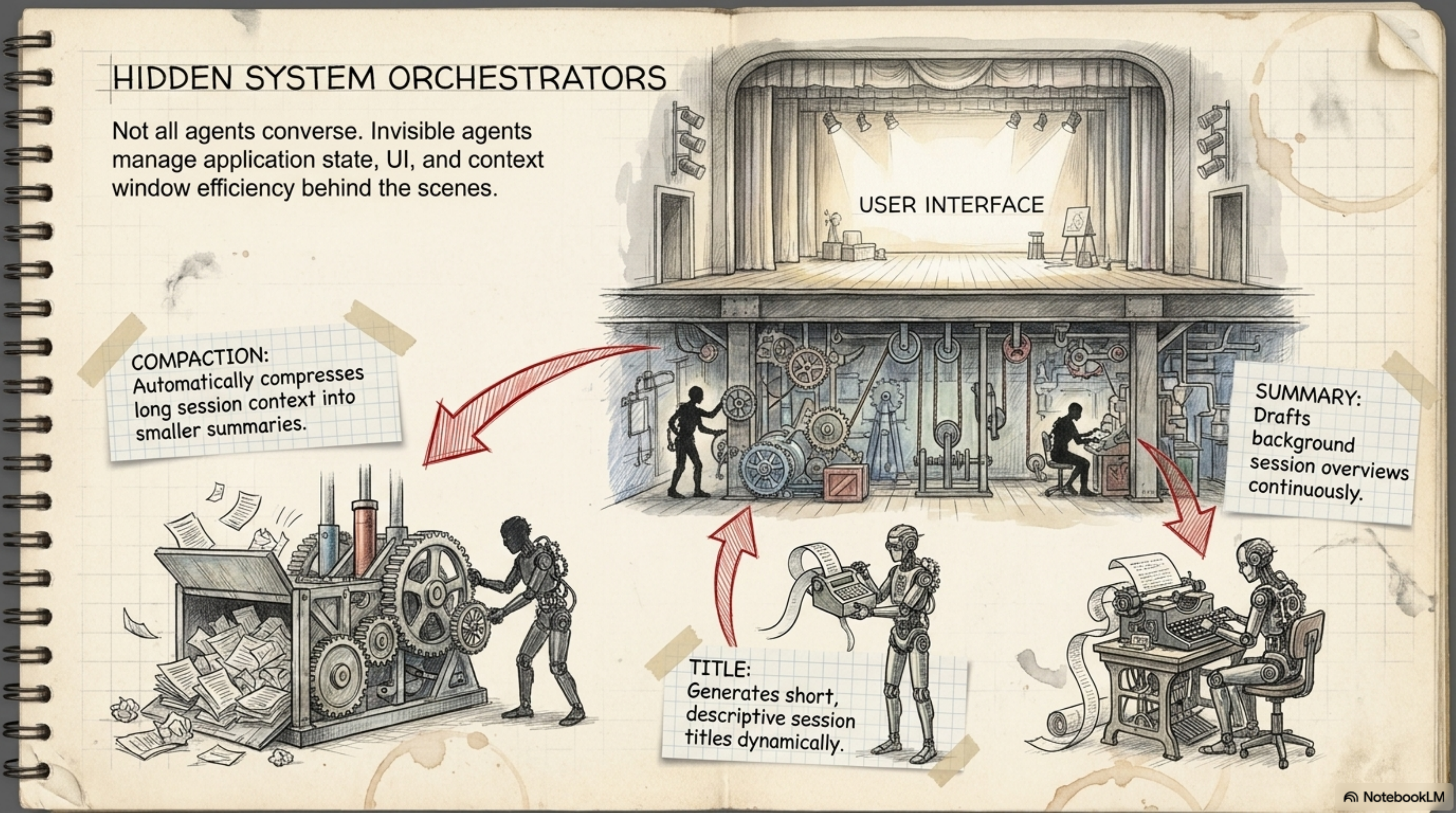
فيه تلاتة agents بتشتغل في الـbackground وأنت مش حاسس بيهم:
Compaction — لما الـcontext window بتقرب من الـlimit (95%)، ده بيعمل auto-summarize للـconversation ويعمل session جديدة بالـsummary. يعني مش لازم تخاف إن الـsession تقطع فجأة.
Title — بيعمل أسماء تلقائية لكل session عشان تلاقيها بسرعة. بدل ما تلاقي "session 3a7f" تلاقي "Fix auth middleware CORS issue".
Summary — بيعمل background overviews مستمرة عشان لو رجعت لـsession قديم تلاقي الـcontext مكتوب.
Section11. الـConfiguration: إزاي تضبط كل حاجة
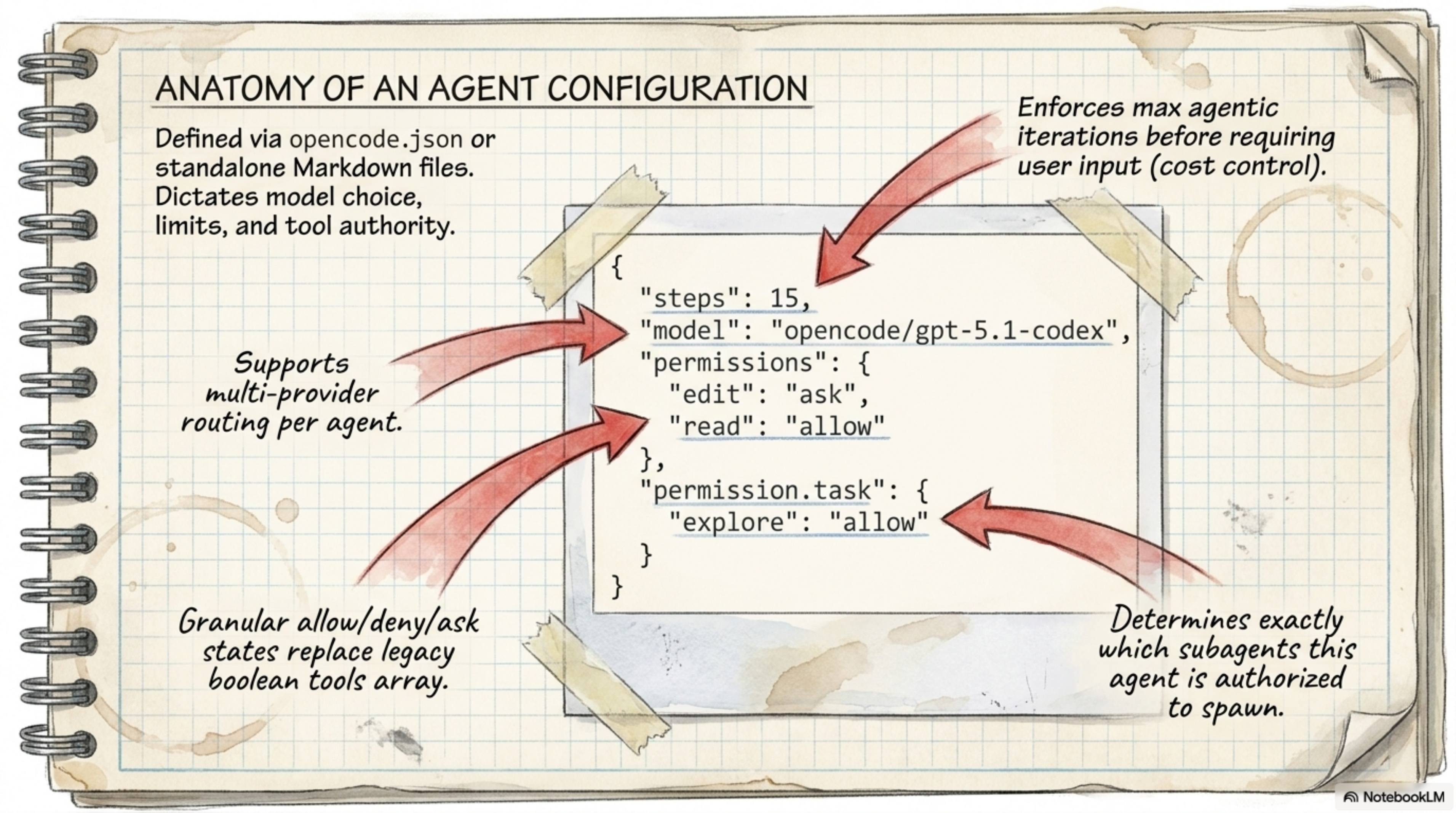
الـconfig file هو .opencode.json. المهم فيه إنك تقدر تضبط كل حاجة:
{
  "agents": {
    "coder": {
      "model": "anthropic.claude-sonnet-4",
      "maxTokens": 5000,
      "reasoningEffort": "medium"
    },
    "task": {
      "model": "anthropic.claude-sonnet-4",
      "maxTokens": 5000
    },
    "title": {
      "model": "anthropic.claude-sonnet-4",
      "maxTokens": 80
    }
  },
  "providers": {
    "anthropic": {
      "apiKey": "$ANTHROPIC_API_KEY"
    },
    "openai": {
      "apiKey": "$OPENAI_API_KEY"
    }
  },
  "mcp": {
    "github": {
      "type": "http",
      "url": "https://api.githubcopilot.com/mcp/",
      "headers": { "Authorization": "Bearer $GH_PAT" }
    }
  },
  "permissions": {
    "allowed_tools": ["view", "ls", "grep", "glob", "edit"]
  },
  "options": {
    "context_paths": ["AGENTS.md", ".cursorrules"],
    "global_context_paths": ["~/.config/opencode/OPENCODE.md"]
  }
}
الـproviders المتاحة
| Provider | الـEnvironment Variable | ملاحظات |
|---|---|---|
| Anthropic | ANTHROPIC_API_KEY | Claude models |
| OpenAI | OPENAI_API_KEY | GPT models |
| Google Gemini | GEMINI_API_KEY | Gemini models |
| AWS Bedrock | AWS_ACCESS_KEY_ID | Claude via AWS |
| Azure OpenAI | AZURE_OPENAI_ENDPOINT | GPT via Azure |
| OpenRouter | OPENROUTER_API_KEY | Multi-model access |
| GitHub Copilot | GITHUB_TOKEN | Free tier available |
| Groq | GROQ_API_KEY | Fast inference |
| Ollama | Local endpoint | Self-hosted models |
| LM Studio | Local endpoint | Self-hosted models |
وبعدين تقدر تضيف custom providers عن طريق type: "openai-compat" أو type: "anthropic-compat" — يعني لو عندك model شغال على endpoint بتاعك، تقدر تربطه بسهولة.
Section12. الـMCP Integration: Model Context Protocol
الـMCP ده نظام بيخلي الـAI agent يقدر يتكلم مع أدوات خارجية. يعني بدل ما الـagent محصور في الـterminal، يقدر يفتح GitHub issues، يبعت Slack messages، يقرأ من databases — كل ده عن طريق MCP servers.
{
  "mcp": {
    "github": {
      "type": "http",
      "url": "https://api.githubcopilot.com/mcp/",
      "headers": { "Authorization": "Bearer $GH_PAT" }
    },
    "filesystem": {
      "type": "stdio",
      "command": "npx",
      "args": ["-y", "@modelcontextprotocol/server-filesystem", "/path/to/dir"],
      "disabled_tools": ["write_file"]
    }
  }
}
الـtypes المتاحة:
stdio— بيشغل process محلي (زي npx)http— بيتصل بـHTTP endpointsse— Server-Sent Events
Section13. الـLSP Integration: Code Intelligence
الـLSP (Language Server Protocol) ده اللي بيخلي الـagent يفهم الـcode بشكل أعمق — يعني مش بس بـgrep على نص، ده بيقدر يعمل go to definition و find references و diagnostics.
الـsupported LSPs:
- gopls — Go
- typescript-language-server — TypeScript/JavaScript
- nixd — Nix
وتقدر تضيف LSPs كمان:
{
  "lsp": {
    "rust-analyzer": {
      "command": "rust-analyzer",
      "filetypes": ["rs"],
      "root_markers": ["Cargo.toml"]
    }
  }
}
Section14. الـTUI: Keyboard Shortcuts
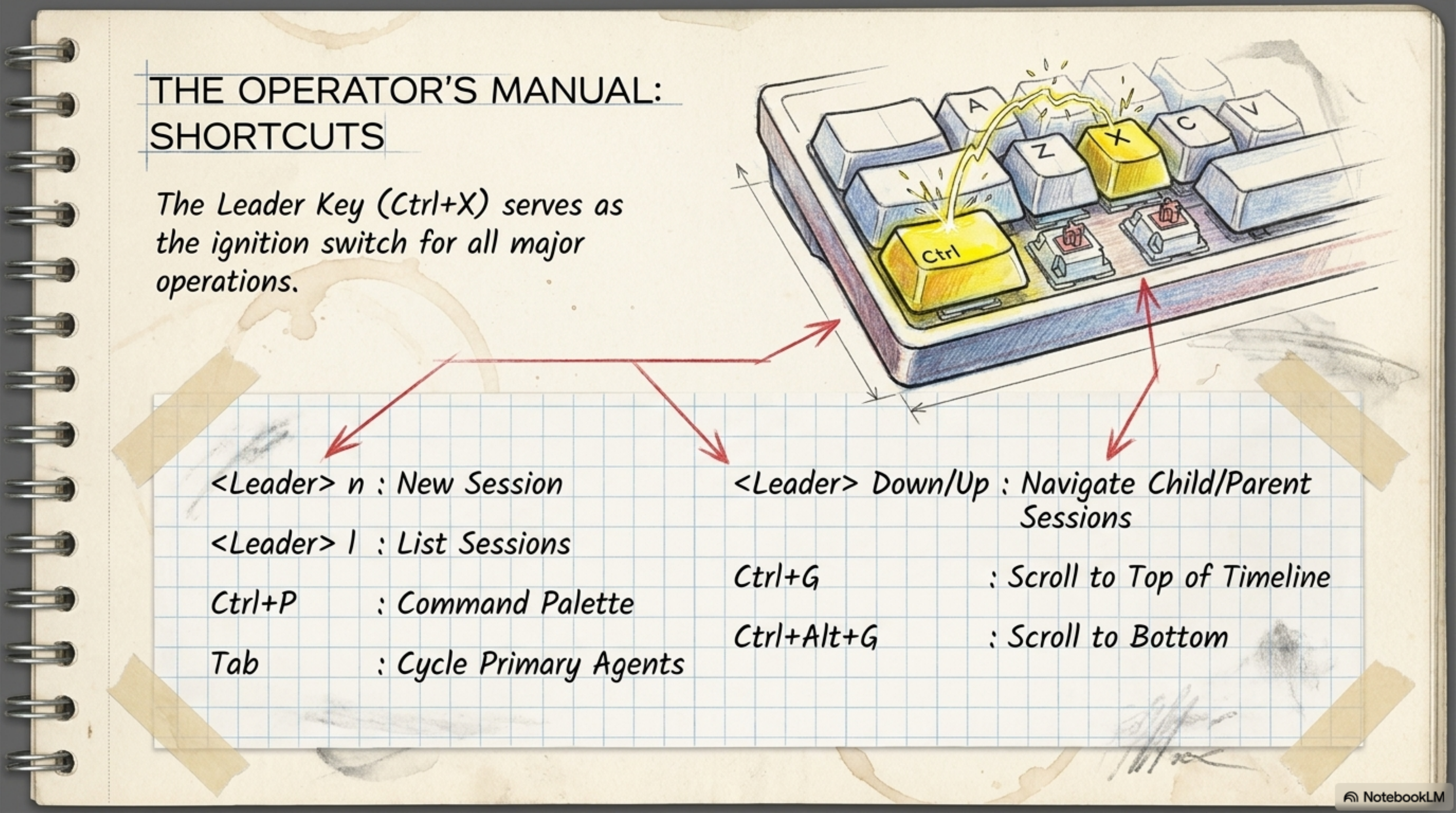
| الـShortcut | الـAction |
|---|---|
Ctrl+X | Leader key (بداية كل الـshortcuts) |
Leader n | New session |
Leader l | List sessions |
Ctrl+P | Command palette |
Tab | Cycle Primary Agents |
Leader ↓/↑ | Navigate child/parent sessions |
Ctrl+G | Scroll to top |
Ctrl+Alt+G | Scroll to bottom |
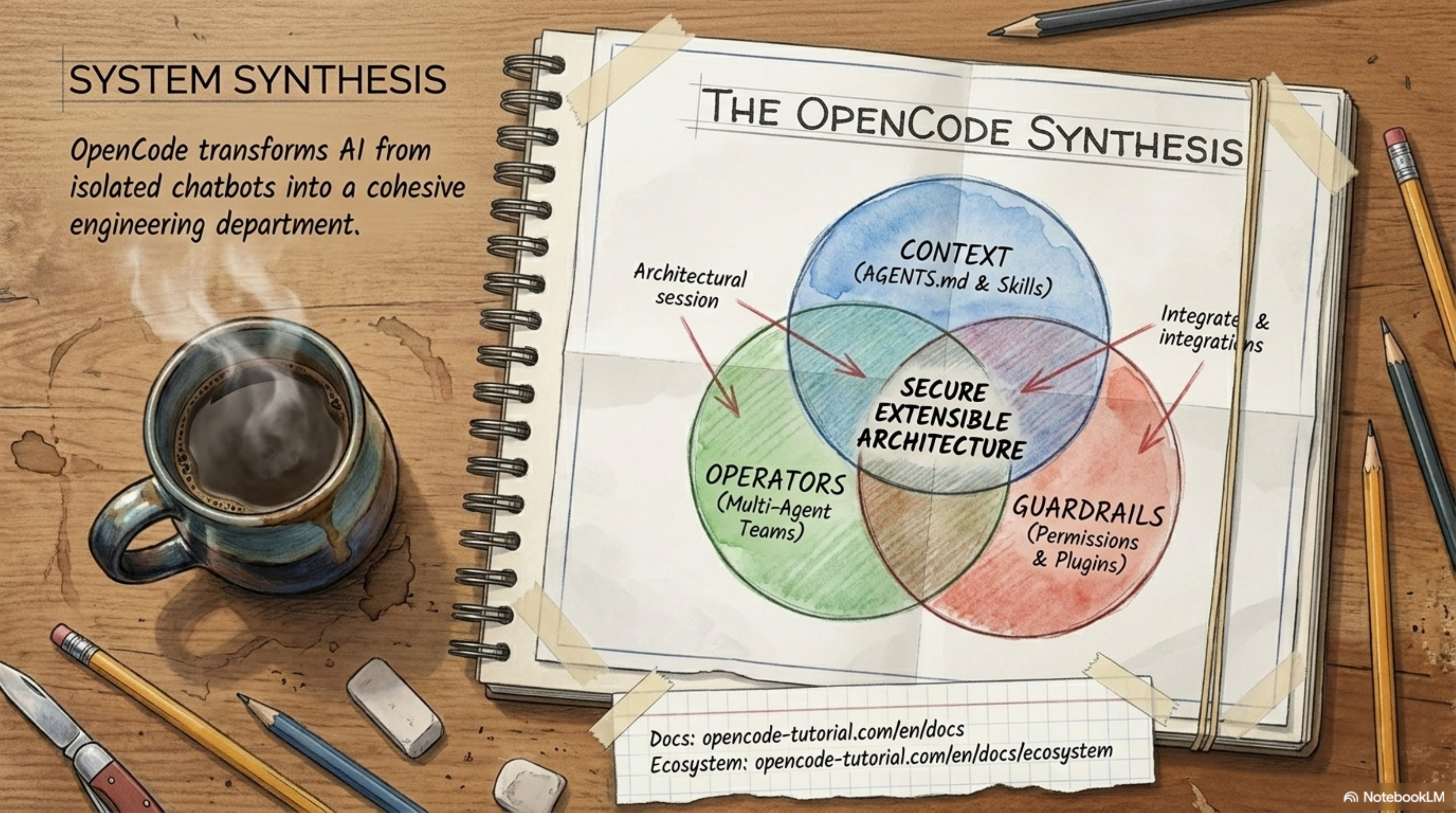
Section15. الـContext-to-Collaboration Pipeline
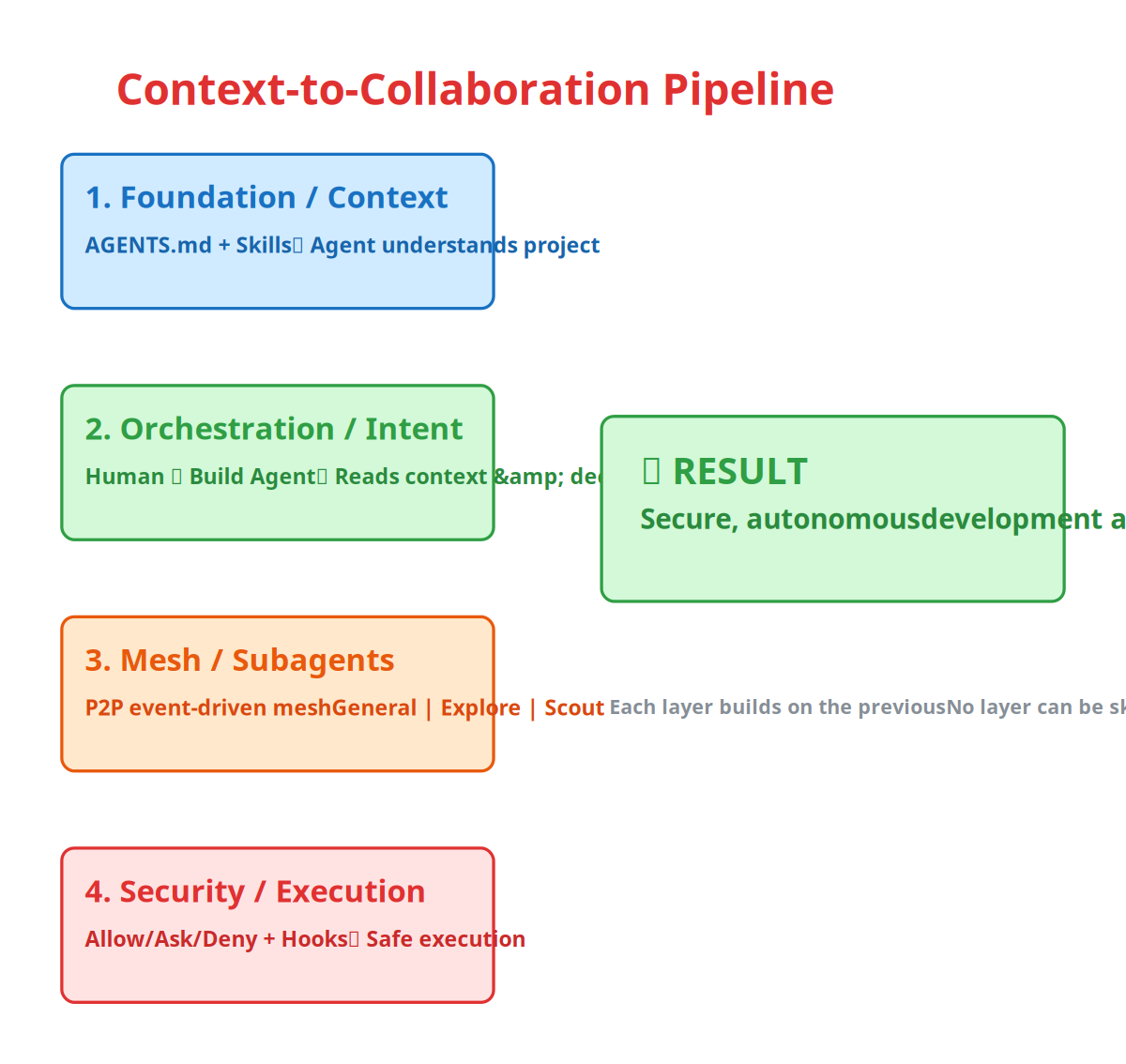
تعال بقى نشوف الـpipeline الكامل من الأول لآخر:
-
Foundation / Context — الـAGENTS.md و الـskills بيـbuildوا الأساس. ده اللي بيخلي الـagent يفهم إزاي المشروع شغال.
-
Orchestration / Human Intent — انت كـuser بتقول للـBuild agent "اعمل كذا"، والـagent بيقرأ الـcontext ويقرر إزاي ينفذ.
-
Mesh / Subagent Deployment — الـBuild agent بينادي الـSubagents (General, Explore, Scout) عن طريق peer-to-peer event-driven mesh — مش عن طريق central coordinator.
-
Security / Safe Execution — كل الـtool calls بتمر على الـpermission system (Allow/Ask/Deny) والـhooks قبل ما تتنفذ.
النتيجة؟ Secure, highly autonomous development at scale.
Section16. الـComparison: OpenCode vs. Claude Code
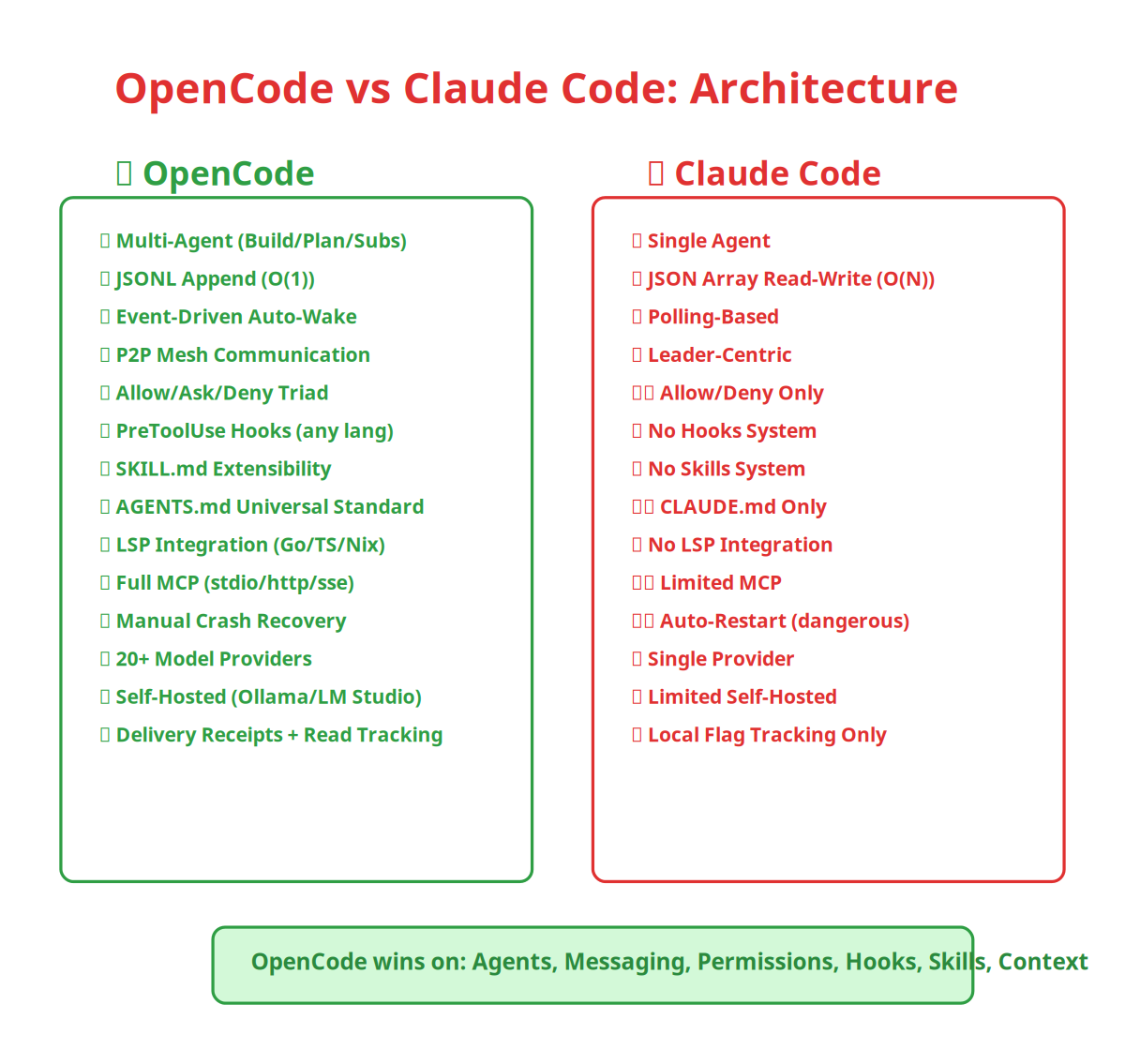
| الـFeature | Claude Code | OpenCode |
|---|---|---|
| Message Storage | JSON Array / O(N) | JSONL Append / O(1) |
| Notification | Polling | Event-Driven Auto-Wake |
| Communication | Leader-Centric | Full Mesh / P2P |
| Model Support | Single Provider | Multi-Provider (20+) |
| Message Tracking | Local Flag | Read + Delivery Receipts |
| Agent System | Single Agent | Multi-Agent (Build/Plan + Subs) |
| Permissions | Allow/Deny | Allow/Ask/Deny Triad |
| Hooks | لا | PreToolUse (any language) |
| Skills | لا | SKILL.md system |
| Context Files | CLAUDE.md فقط | AGENTS.md + OPENCODE.md + CLAUDE.md + GEMINI.md + .cursorrules |
| LSP | لا | Go, TS, Nix + custom |
| MCP | محدود | Full (stdio, http, sse) |
| Crash Recovery | Auto-restart (خطر) | Manual start (آمن) |
| Self-hosted Models | محدود | Ollama, LM Studio, LiteLLM |
Section17. الـKey Rules و الـGotchas
| القاعدة | التفاصيل | ليه مهمة |
|---|---|---|
| الـBuild agent مش بيعمل commit لوحدو | لازم تقول "commit" بوضوح | عشان ميعملش push لحاجة مش شايفها |
| الـSubagents ما بيتكلموش في الـmain channel | team_message tool مش available ليهم | عشان ميعملوش flood لـchat window |
| الـCrash recovery لازم manual start | الـagents بتتحول لـ"ready" بس مش بتـrestart | عشان مياكلش API credits ليلًا |
| الـSkills بتتـscan كل مرة | من 6+ paths (global + project) | عشان لو حذفت skill من الـproject تختفي فورًا |
| الـcontext window بتـcompact تلقائي | على 95% بيعمل summarize | عشان الـsession ماتقطعش فجأة |
| الـhooks بتشتغل على الـtop-level agent بس | مش على الـSubagents | عشان الـSubagents trusted (read-only أو scoped) |
| آخر permission rule هي اللي بتتنفذ | git status *: allow بعد كده *: deny | عشان تقدر تعمل allow لأوامر معينة وdeny لكل حاجة تانية |
Section18. الخلاصة
طيب كل اللي فات ده معناه إيه؟
أولاً — OpenCode مش مجرد chatbot في الـterminal، ده multi-agent system متكامل فيه Build و Plan agents، و Subagents متخصصة (General و Explore و Scout)، وكل واحد بيلعب دوره من غير ما يعدي على حدود التاني.
ثانياً — الـpermission triad (Allow/Ask/Deny) + الـhooks system بيوصلوا لك درجة من التحكم deterministic مش موجودة في أي tool تاني — تقدر تكتب script يمنع rm -rf أو يـrewrite commands أو يضيف context تلقائي.
ثالثاً — الـevent-driven messaging architecture و JSONL append-only storage بيخلو الـsystem سريع من الأول لآخر — مش زي الـpolling approach اللي بيكون أبطأ كل ما الـsession تطول.
رابعاً — الـAGENTS.md standard خلى الـcontext files مش بس لـOpenCode بس، لكن لكل الـAI agents — يعني اكتب مرة واحدة وخلي 60,000+ repository يقرأها.
خامساً — الـcrash recovery بـmanual start مش auto-restart — ده بيحميك من API burn غير مقصود.
وهنا يفضل السؤال لحضرتك: لو الـAI agent اللي شغال معاه كل يوم فعلاً بيشتغل زي department كامل — Build و Plan و Explore و Scout — إنت محتاج تبقى المدير ولا محتاج تبقى المراقب؟
- Crush GitHub Repository — الـrepo الحالي
- OpenCode (archived) — الـrepo الأصلي
- Agent Skills Standard — الـstandard بتاع SKILL.md
- Catwalk Model DB — الـmodel database
Comments